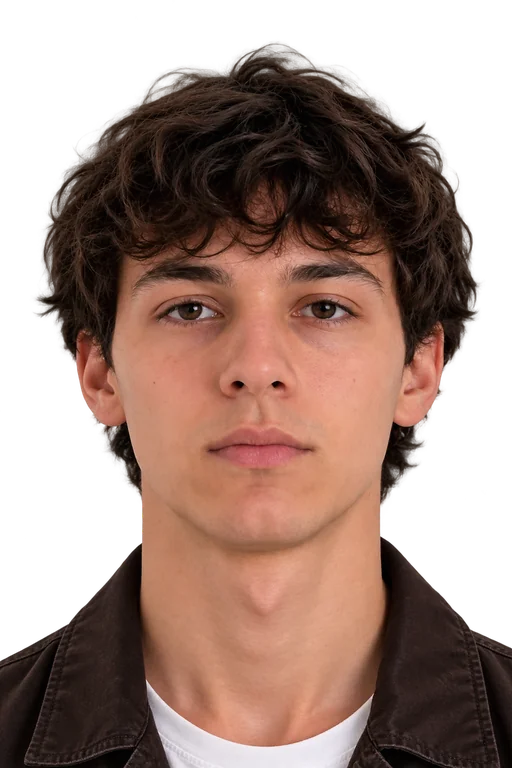
CANADA PASSPORT PHOTO REQUIREMENTS AT A GLANCE
Follow these key rules to make sure your photo is accepted.
DIMENSIONS
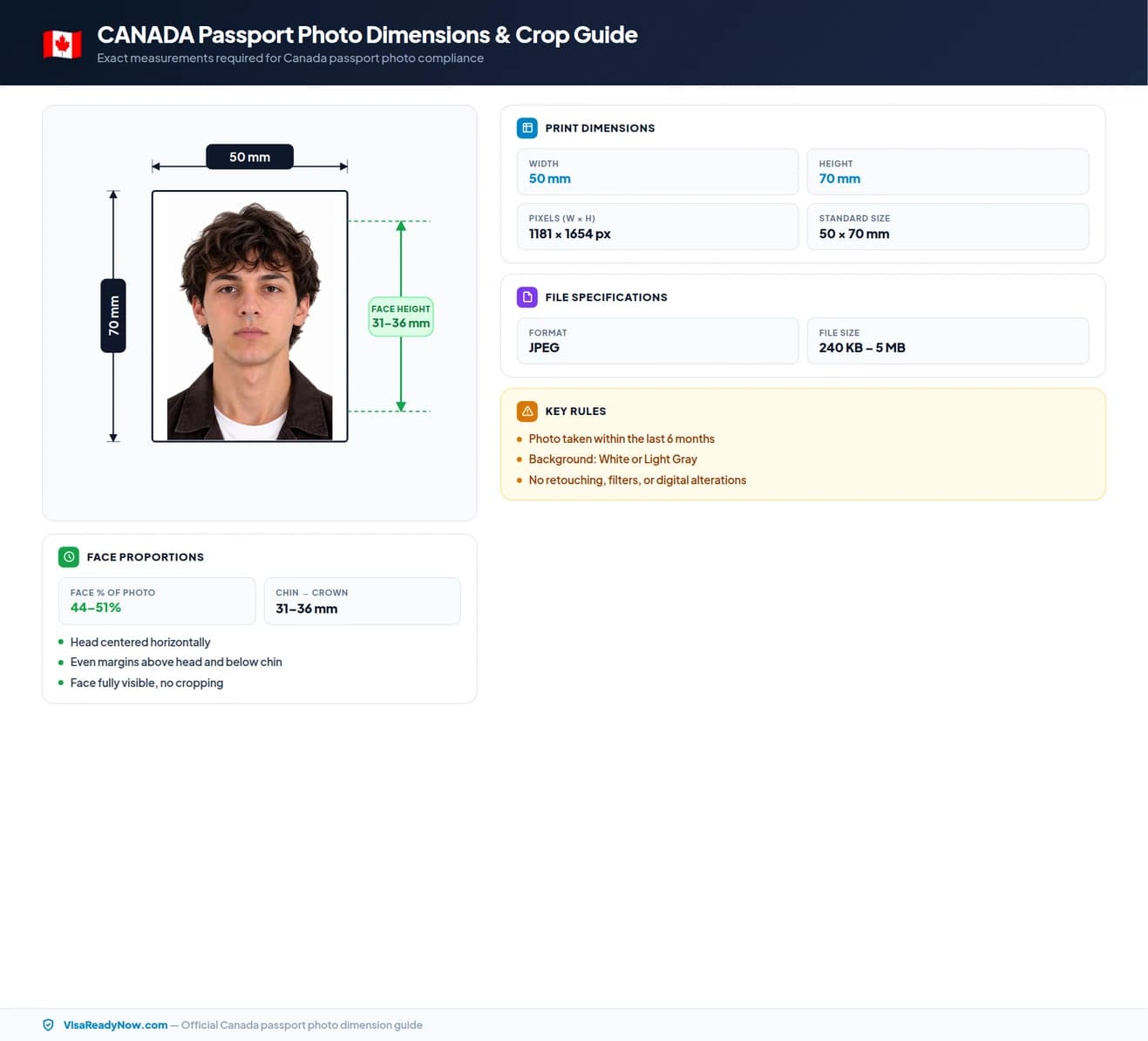
Photo size: 50 × 70 mm
Head size: 31 – 36 mm
FACE POSITION & SIZE
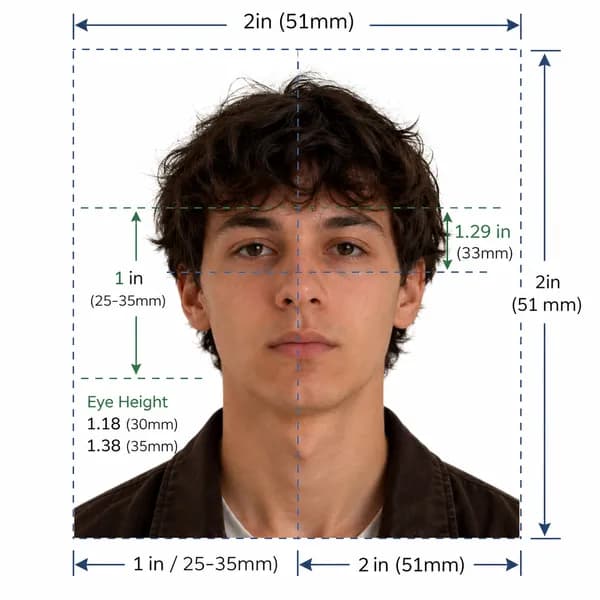
Keep your head centred with even space around it. Neutral expression, mouth closed. Glasses are allowed only if the lenses are not tinted and your eyes are clearly visible.
BACKGROUND
Important Note
IRCC's visitor passport photo rules cover the photo itself: a frame of at least 35 × 45 mm, a 31–36 mm head and a plain white or light-coloured background. They set no pixel or file-size rule for digital photos. The 420 × 540 px, 60–240 kB rule applies to International Experience Canada (IEC) work permits. Non-tinted prescription glasses are allowed if your eyes are clearly visible.
Official Compliance Guarantee
Our AI system validates your photo against official Canadian passport photo requirements. Get 100% compliant photos or we'll help you fix it.
Canada Official Photo Specifications
Canadian Passport Order (SI/81-86) & IRCC Photo Specification Standards
Official government rule for application approvalImmigration, Refugees and Citizenship Canada (IRCC)
Application context: Canada Passport Applications
Quick reference: Canada passport photo specifications
Review all official photo specifications required by Canada embassies, consulates, and visa application centres worldwide.
| Specification | Requirement |
|---|---|
| Photo size (Paper) | 50 × 70 mm (1.97 × 2.76 in) |
| Digital resolution | 1181 × 1654 px @ 600 DPI |
| Face height | 31 – 36 mm (44–51% of total height) |
| File format & size | JPEG, 200 KB – 5 MB |
| Background colour | White or Light Gray |
| Expression | Neutral expression, mouth closed, eyes open |
| Glasses policy | Permitted with thin, non-reflective frames |
| Recency | Taken within the last 6 months |
Official Canada passport photo dimensions
IRCC's visitor passport (TRV) photo specifications set a frame of at least 35 mm wide by 45 mm high, with the head measuring 31 mm to 36 mm from the bottom of the chin to the top of the head (the crown). Cropping to exactly 35 × 45 mm meets this minimum. Canadian passports use a different, larger format: 50 × 70 mm.
Many applicants assume Canada uses the same 2 × 2 inch (51 × 51 mm) square format as the United States. This is incorrect. Canadian passport photos are a portrait rectangle — 35 mm wide by 45 mm high — and submitting a square photo will result in rejection.
Canada passport photo size in mm, cm, and inches
| Unit | Width | Height | Face height |
|---|---|---|---|
| Millimetres (mm) | 50 mm | 70 mm | 31 – 36 mm |
| Centimetres (cm) | 5.0 cm | 7.0 cm | 3.1–3.6 cm |
| Inches (in) | 1.97 in | 2.76 in | 1.21–1.41 in |
| Pixels (px @ 300 DPI) | 1181 px | 1654 px | 728–844 px |
Too complicated? Let our AI handle it.
Upload a selfie and our AI will automatically crop, size, and replace the background to validate against official government requirements.
Need a Canada Visa Photo instead?
View official biometric specs, size rules, and digital upload requirements for Canada visa applications.
Print vs. digital: what changes between paper and online applications?
Paper applications need two identical printed photos, taken within the last six months and printed on quality photographic paper. For online applications, IRCC's visitor passport photo page gives no separate pixel or file-size rule, so follow the instructions on your application's upload page. Some programmes do set one: IEC work permits need at least 420 × 540 px and a file of about 240 kB (not less than 60 kB), and PR card uploads need 715 × 1000 to 2000 × 2800 px, 4 MB or less. The face, expression and background rules are the same either way.
| Aspect | Print (Paper form) | Digital (Online) |
|---|---|---|
| Dimensions | 50 × 70 mm | 1181 × 1654 px |
| Format | Colour print on photo paper | JPEG (200 KB – 5 MB) |
| Background | White or Light Gray | White or Light Gray |
| Resolution | Min 600 DPI | 1181 × 1654 px (600 DPI) |
| Expression | Neutral expression, mouth closed, eyes open | Neutral expression, mouth closed, eyes open |
Background requirements for Canada passport photos
IRCC requires a plain white or light-coloured background. It must be evenly lit, with no shadows, patterns, gradients or objects, and it should contrast clearly with your face, hair and clothing. Do not use a background removal tool to replace the background: IRCC says digital photos must not be altered in any way.
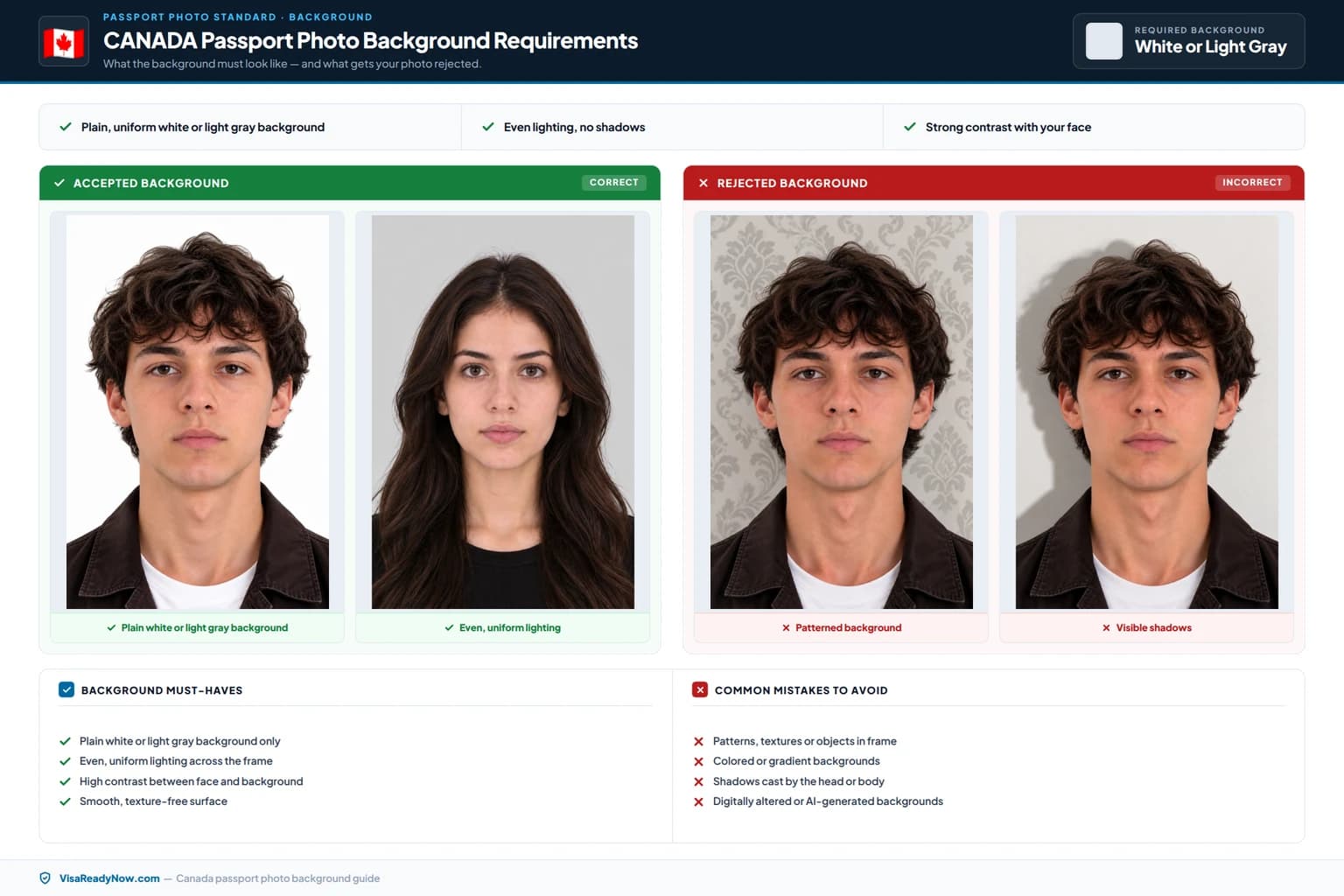
Plain white is the safest choice. A light, plain wall also fits the rule, but dark, coloured or patterned backgrounds do not. If in doubt, hold a sheet of white printer paper next to your background: it should look just as light and even.
Face position, expression, and lighting requirements
Your face must be centred in the frame, looking directly into the camera lens with your head level and upright. Both ears should be visible and unobscured. Hair must not cover the sides of your face, forehead, or eyes. Your eyes must be fully open and looking straight at the lens. Your mouth must be closed with a neutral, relaxed expression — no smiling, frowning, or raised eyebrows.
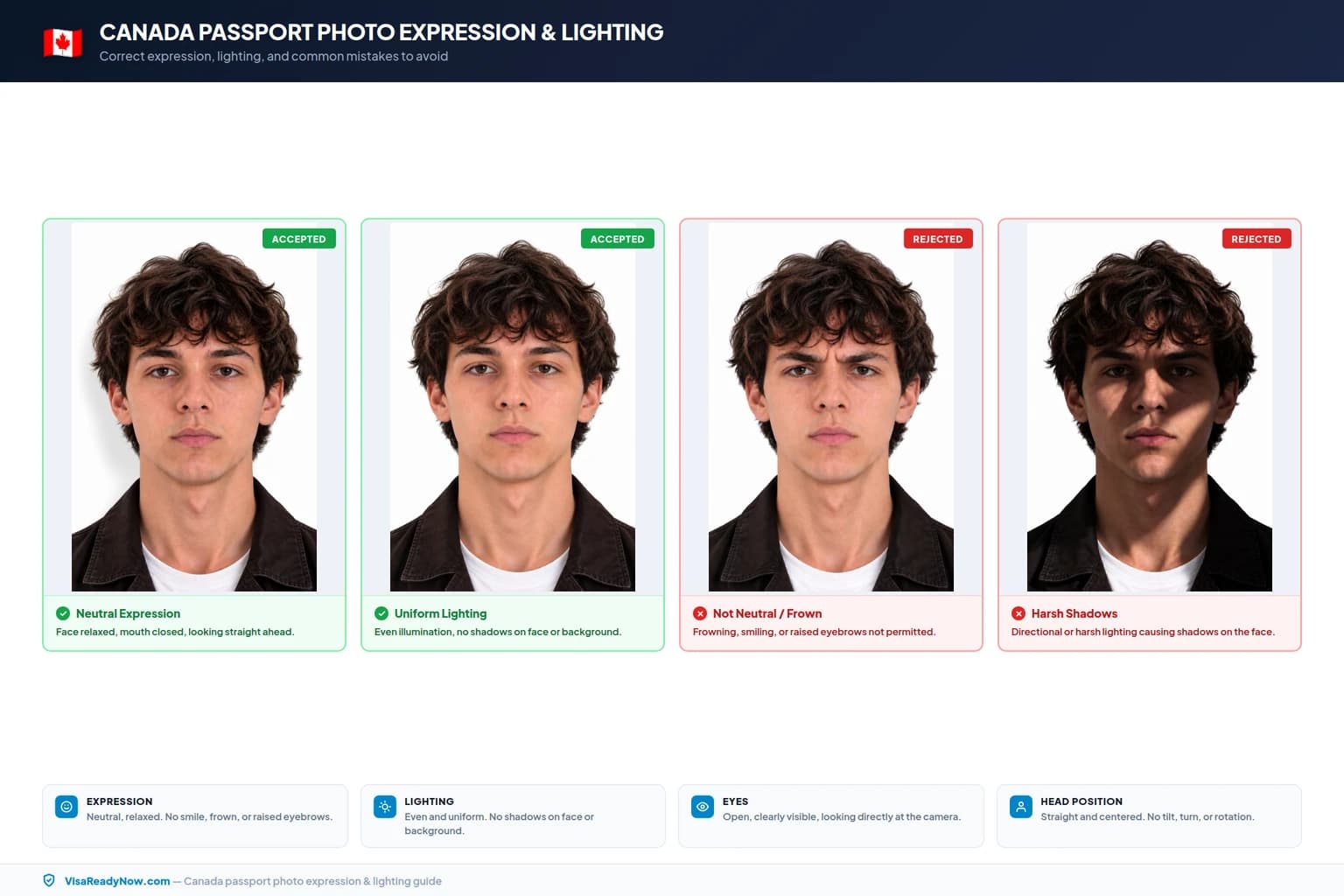
Lighting must be uniform and diffused. There should be no shadows on your face, under your chin, or on the white background. Your natural skin tone must be faithfully represented — avoid direct flash, which creates harsh highlights, red-eye, and shadows. Use diffused natural window light or two balanced artificial light sources at equal height on either side of your face.
Glasses policy for Canada passport photos
You can wear glasses in a Canadian passport photo if they are non-tinted prescription glasses and your eyes are clearly visible. The frames must not cover any part of your eyes. Sunglasses are not accepted.
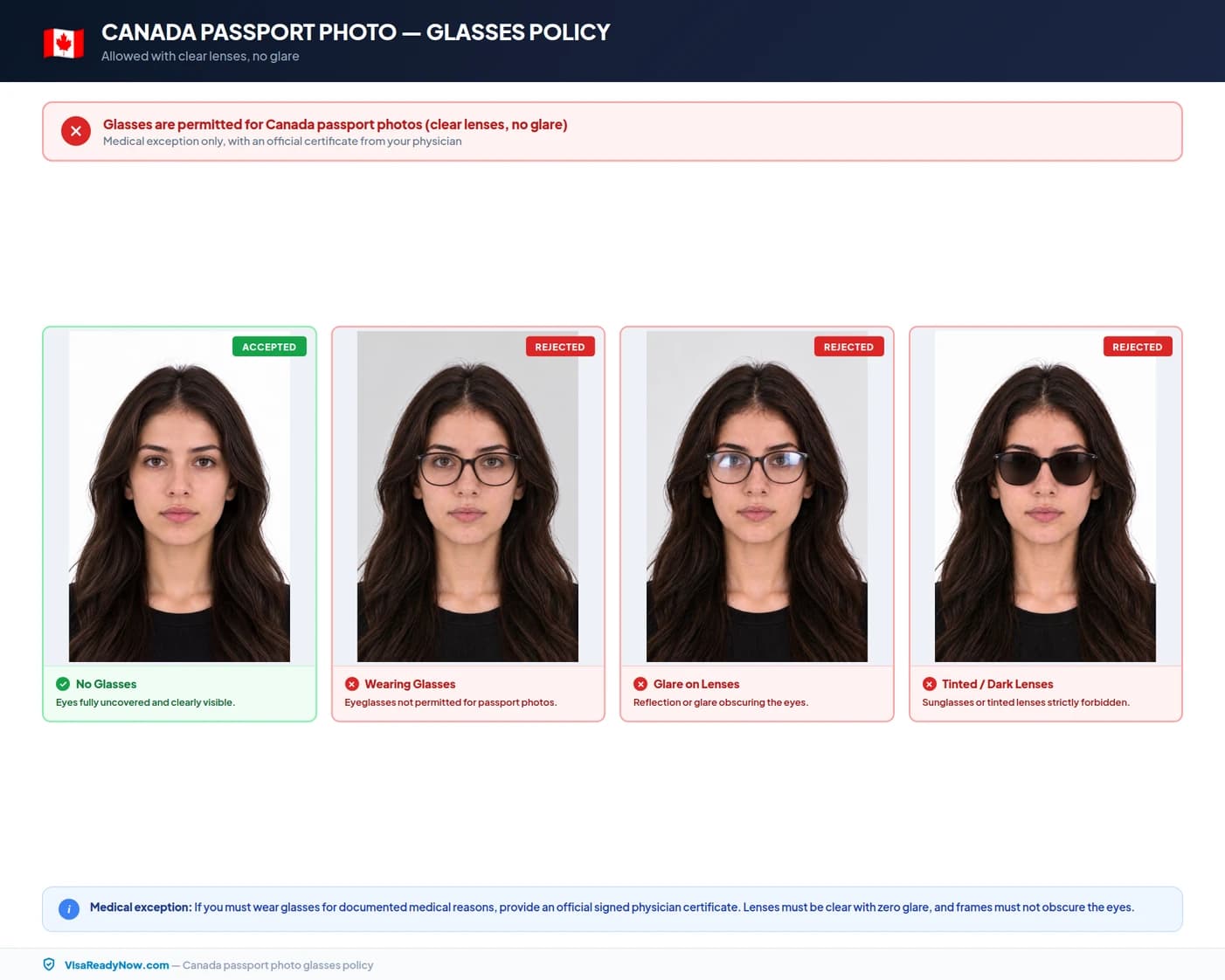
Glare on the lenses can hide your eyes, so check for reflections before you take the photo; taking your glasses off removes the risk. Canadian passport photos are stricter than passport photos: tinted lenses are refused there even when they are prescription lenses.
Canada passport photo checklist: do's and don'ts
Double check these common pitfalls to ensure your photo is not delayed or rejected at the IRCC portal or passport application centre.

DO
- Use a plain white background with no shadows, textures, or patterns
- Ensure your face is centred, forward-facing, and fully visible from chin to crown
- Keep your eyes fully open and looking directly at the camera
- Maintain a neutral expression with your mouth closed
- Use even, diffused lighting with no shadows on your face or background
- Include the tops of both shoulders and upper chest in the frame
- Ensure hair does not cover the edges of your face or obscure your eyes
- For online uploads, follow the file rules on your application's upload page (IEC: at least 420 × 540 px, 60–240 kB)
- Have the photo taken within the last 6 months to reflect your current appearance
- Wear everyday clothing appropriate to the season — nothing that blends into the white background
DON'T
- Wear sunglasses, tinted lenses, or frames that cover any part of your eyes
- Smile, tilt or turn your head, or allow your eyes to be partially closed
- Use a coloured, patterned, off-white, or cream background
- Retouch, filter, or digitally alter the photo in any way
- Take a phone photo of a printed photo (scan the print instead)
- Upload a blurry, low-resolution or heavily compressed file
- Wear hats, beanies, or fashion headwear (religious and medical coverings excepted)
- Allow hair, jewellery, or accessories to cover your eyes or the sides of your face
- Use a photo older than 6 months
- Use filters, sepia tones, or any other edit to the image
How to take a correct Canada passport photo at home (step-by-step)
Following these six steps will produce a photo that meets IRCC requirements for both paper and digital submissions without needing to visit a professional studio.
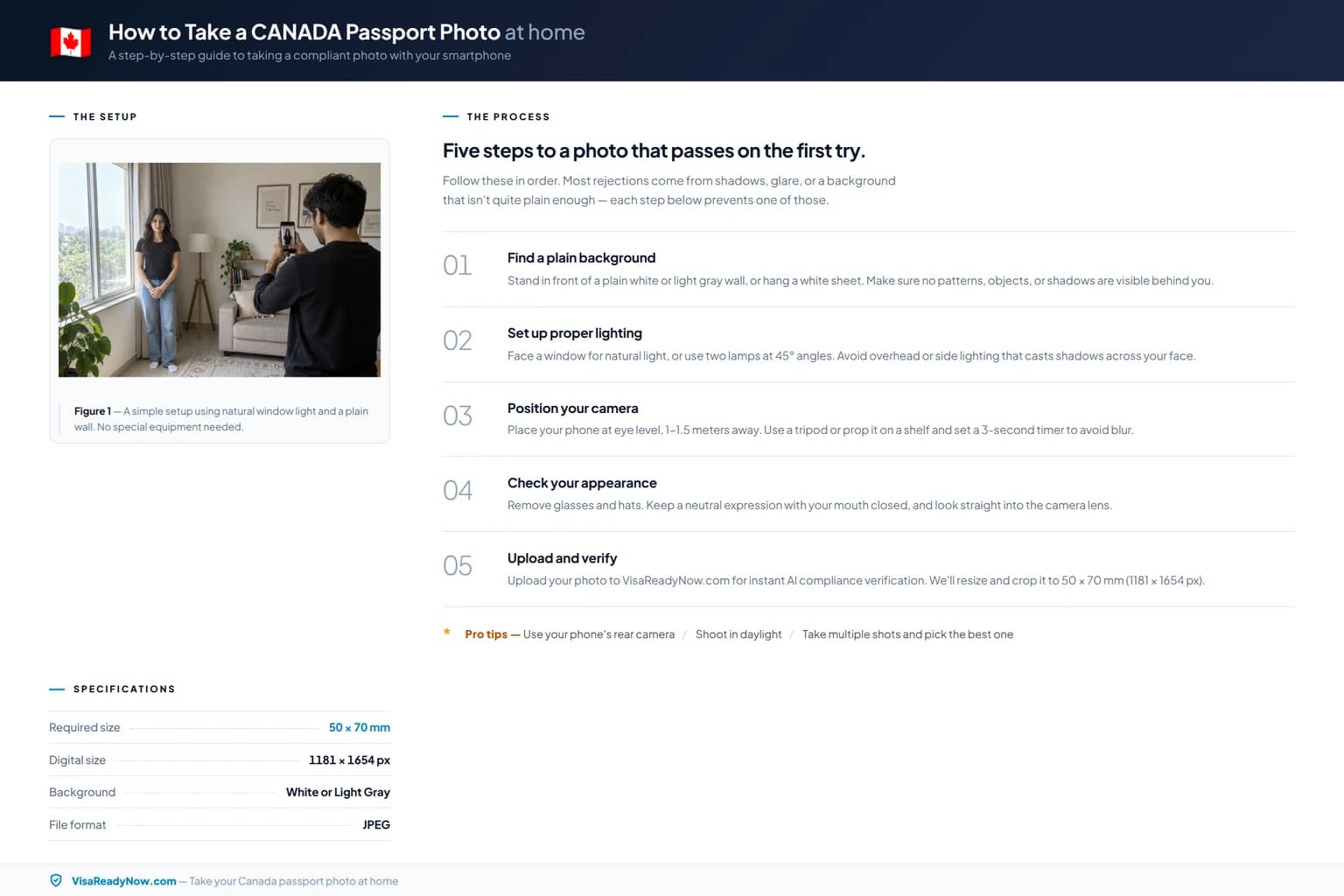
Prepare a plain white background
Hang a white sheet or stand in front of a plain white wall. Ensure it is evenly lit so there are no shadows, creases, or colour gradients visible behind you. The background must be pure white — off-white and cream shades are routinely rejected.
Set up balanced lighting
Use natural daylight from a large window or two artificial lights at equal height positioned on either side of your face. Avoid direct flash, which causes harsh highlights and red-eye. Even lighting prevents shadows forming on your face or the white background.
Position your head and body correctly
Face the camera directly with your head level and upright — no tilt, no turn. Your shoulders and upper chest should be visible at the bottom of the frame. Position yourself roughly 45–60 cm from the camera. Both ears should be visible and your face fully centred.
Take the photo
Open your eyes fully and look straight into the lens. Keep a neutral expression — mouth closed, no smile or frown. If you wear glasses, make sure the lenses are not tinted and there is no glare over your eyes. Ask someone else to take the photo for a sharper, better-composed result than a selfie.
Crop and size the image
For paper applications, print at 35 × 45 mm on quality photographic paper. For online applications, export the file your upload page asks for; IEC work permit applicants need at least 420 × 540 px and 60–240 kB. Keep the head at 31–36 mm of the 45 mm height.
Check before submitting
Verify the background is plain, light and shadow-free, any glasses are untinted and glare-free, your eyes are open and your expression is neutral, hair does not cover the edges of your face, and the file meets your upload page's requirements.
Common Canada passport photo rejection reasons in 2026
These are common reasons a Canadian passport photo is returned or has to be retaken:
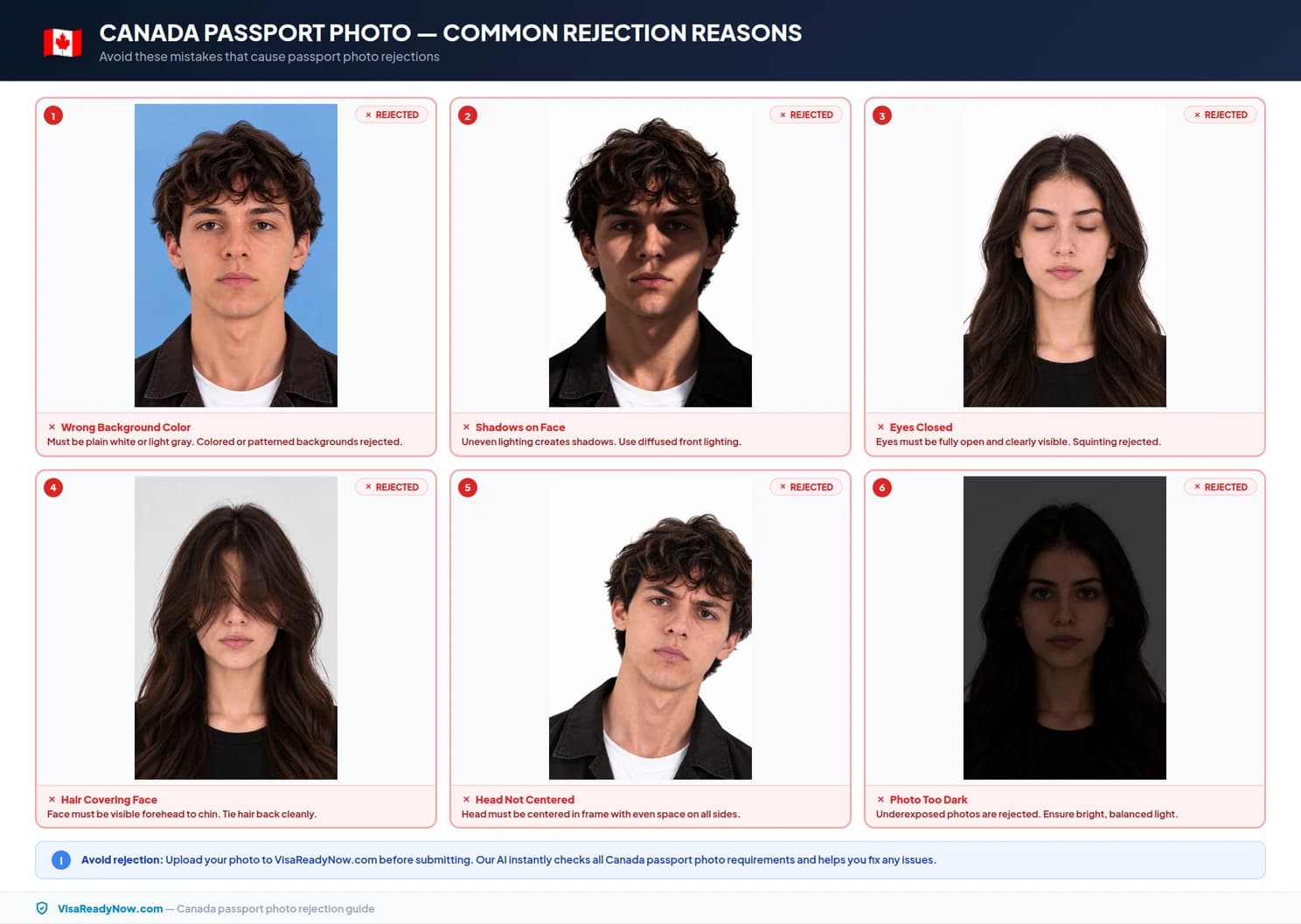
Background that is not plain and light
IRCC requires a plain white or light-coloured background. Dark, coloured, patterned or busy backgrounds are not accepted, and neither are shadows behind you.
Tinted glasses or glare
Sunglasses and tinted lenses are not accepted, and frames must not cover any part of your eyes. Glare on clear lenses can also hide your eyes, so check for reflections.
Wrong face height proportion
Your face from chin to crown must measure 31–36 mm of the 45 mm total height. A face that is too small (distant shot) or too large (close crop) will fail automated face-proportion checks.
Phone photo of a printed photo
A phone photo of a paper photo picks up glare, blur and distortion. If you only have a print, scan it instead — IEC asks for at least 600 pixels per inch.
Non-neutral expression
IRCC requires a neutral expression, neither frowning nor smiling, with your mouth closed and your face square to the camera. Raised eyebrows, squinting or a tilted head make the photo unusable.
Low-resolution or over-compressed file
Blurry, pixelated or heavily compressed files are hard to verify. For IEC work permits, the image must be at least 420 × 540 px and the file not smaller than 60 kB.
Photo older than 6 months
IRCC requires a recent likeness taken within the past 6 months. If your appearance has changed significantly — for example due to surgery, major weight change, or ageing — use a new photo.
Retouching or digital alteration
Any digital editing — including skin smoothing, blemish removal, brightness adjustment, background removal and replacement — is not permitted. The photo must be the original, unaltered capture.
Canada passport photo requirements for babies and children
Children of all ages — including newborns — must have their own separate passport photo and cannot share a photo with a parent or guardian. The child must be photographed alone, with no other person, hand, toy, pacifier, chair back, or any other object visible in the frame.
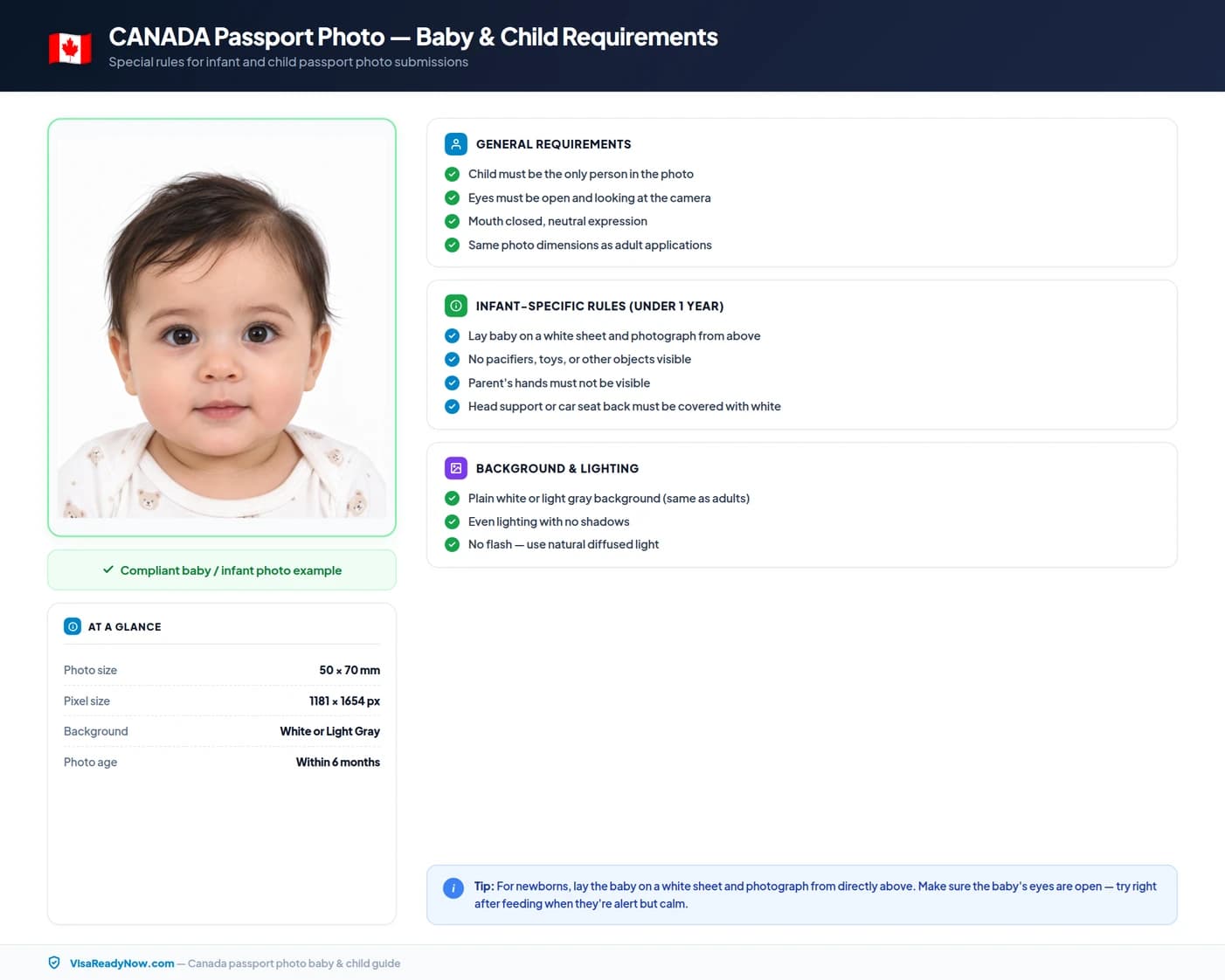
For very young infants who cannot support their own head, lay them on a white sheet on a flat surface and photograph directly from above. Ensure the white sheet fills the entire background without shadows or creases. For children aged 3 and over, the full standard requirements apply: mouth closed, eyes open, neutral expression, plain white background. For infants under 3 years of age, a slightly open mouth is generally accepted.
Religious head coverings in Canada passport photos
Religious head coverings are permitted provided they are worn daily for religious reasons and meet all of the following conditions: the covering must be plain material with no patterns; your full face must remain visible from the bottom of the chin to the top of the forehead; both side edges of the face — including the outer eye corners — must be visible; and the covering must cast no shadows on your face or on the white background.
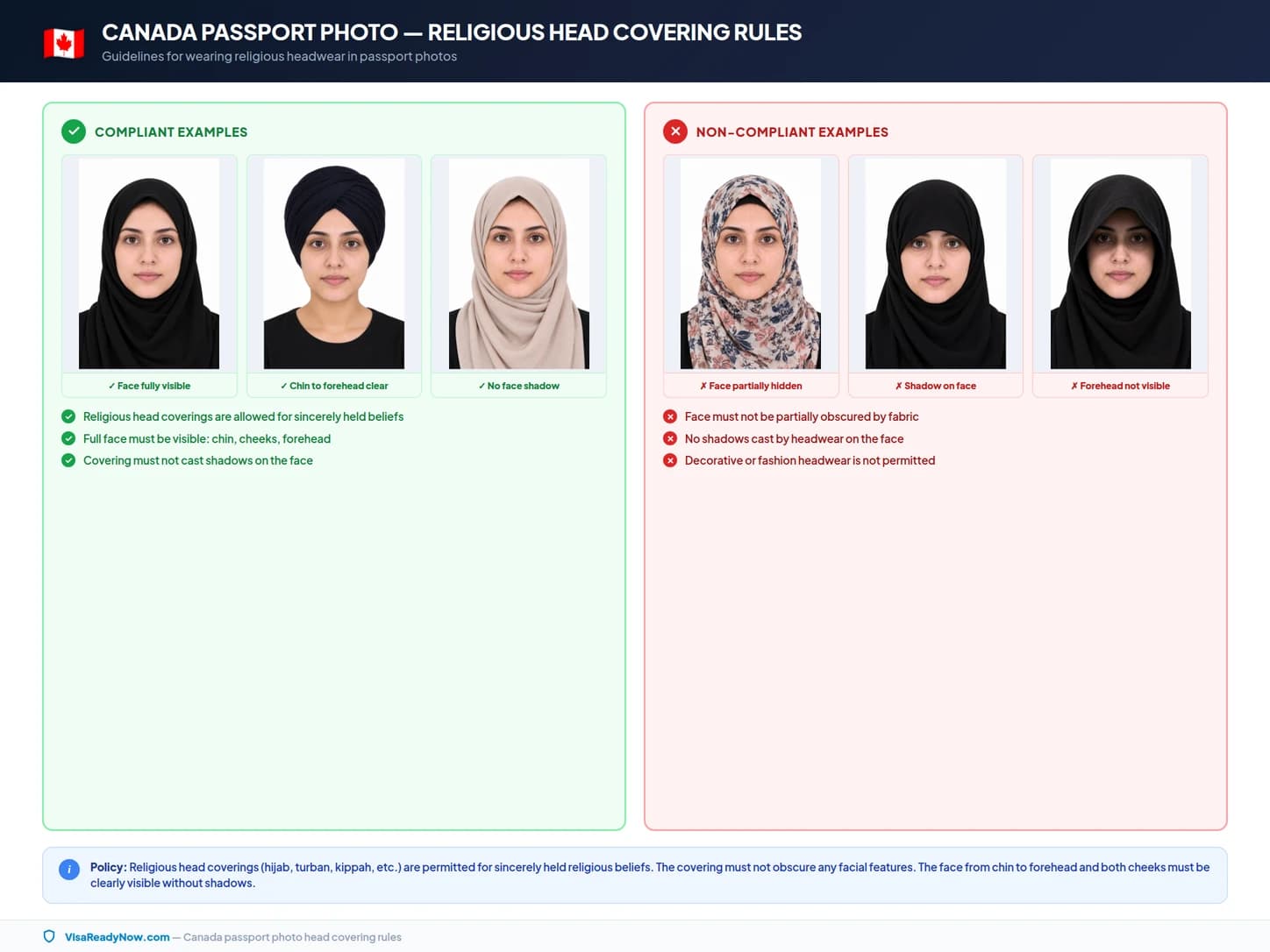
Fashion hats, beanies, caps, and headwear worn for non-religious reasons are not permitted. Medical head coverings — for example following surgery — are accepted with an accompanying signed medical certificate from a registered practitioner.
Official sources
These pages are the authoritative references.
- IRCC — Temporary resident passport photo specifications
- IRCC — International Experience Canada: digital photo for the work permit application
- IRCC — PR card photo requirements (online and paper)
- IRCC — Applying for a visitor passport (temporary resident passport)
- Canadian Passport Office — passport and travel document photo requirements
- IRCC — Visitor passport application guide (IMM 5257)
Frequently asked questions: Canada passport photo 2026
What is the Canada passport photo size requirement in 2026?
Canadian passport photos must be at least 35 mm wide by 45 mm high (crop to exactly 35 × 45 mm). Your head, from the bottom of the chin to the crown, must measure 31–36 mm, and the background must be plain white or light-coloured. IRCC's visitor passport page sets no pixel or file-size rule for digital photos; IEC work permit uploads need at least 420 × 540 px and 60–240 kB.
What is the Canada passport photo size in pixels?
IRCC's visitor passport (TRV) photo page doesn't give a pixel size. The 420 × 540 px minimum comes from the International Experience Canada (IEC) work permit rules, which also ask for a file of ideally 240 kB and not less than 60 kB. PR card uploads use a different rule: 715 × 1000 to 2000 × 2800 px, 4 MB or less.
What is the Canada passport photo size in cm and inches?
The photo must be 3.5 cm wide by 4.5 cm high. In inches, that is approximately 1.38 inches wide by 1.77 inches high. This is a portrait format — do not use the 2 × 2 inch (51 × 51 mm) square format used for US passports.
Does Canada accept a 2×2 inch photo for a passport?
No. A 2 × 2 inch (51 × 51 mm) square format is the US passport standard. Canadian passport photos must be 35 mm wide by 45 mm high, which is a portrait format and not square. Using a 2 × 2 inch photo will result in rejection.
Can the Canada passport photo background be off-white or light grey?
IRCC's rule is a plain white or light-coloured background. A plain, evenly lit off-white or light grey background fits that wording, but plain white is the safest choice. Patterns, shadows and dark colours are not accepted.
Can I wear glasses in a Canada passport photo?
Yes, if they are non-tinted prescription glasses and your eyes are clearly visible. The frames must not cover any part of your eyes, and sunglasses are not accepted. Canadian passport photos are stricter: tinted lenses are refused there even when they are prescription lenses.
Can I smile in a Canada passport photo?
No. IRCC requires a neutral expression, neither frowning nor smiling, with your mouth closed. Keep your eyes fully open and your face square to the camera.
How recent must a Canada passport photo be?
The photo must have been taken within the last 6 months and must accurately reflect your current appearance. If your appearance has changed significantly — for example due to surgery, significant weight change, or a major change in facial hair — you should use a new photo.
Are Canada tourist passport and study permit photo requirements different?
The visitor passport photo specifications (at least 35 × 45 mm, 31–36 mm head, plain white or light-coloured background, neutral expression) are the baseline, but upload rules differ by programme. IEC work permits require at least 420 × 540 px and 60–240 kB, and PR card uploads require 715 × 1000 to 2000 × 2800 px, 4 MB or less. Always check the photo instructions in your own application's checklist.
Can I use a photo taken on my phone for a Canada passport?
Yes, provided the photo meets IRCC's rules: plain white or light-coloured background, a 31–36 mm head in a 35 × 45 mm frame, a neutral expression, and no editing. Use a second person to take the photo rather than a selfie for better framing and sharpness.
Should a Canada passport photo be matte or glossy?
IRCC only says printed photos must be on quality photographic paper; it doesn't require matte or glossy. For online applications the paper finish doesn't matter, because you upload a file.
What should I wear for a Canada passport photo?
Wear everyday clothing that contrasts clearly with the white background. Avoid white or very pale tops that will blend into the background. Do not wear uniforms, camouflage, or costumes. Modest religious dress is permitted provided your full face from chin to crown remains visible.
Are religious head coverings allowed in a Canada passport photo?
Yes, provided the covering is worn for religious reasons, is plain material without patterns, casts no shadows on your face or the white background, and your full face from chin to crown — including both side edges — remains visible.
What are the Canada passport photo requirements for babies and children?
Children of all ages, including infants, need their own separate photo. No other person, hand, toy, pacifier, or object should appear in the frame. For very young infants who cannot support their head, lay them on a white sheet on a flat surface and photograph from directly above. The standard expression and background rules apply; for very young infants a slightly open mouth is generally accepted.
Can I retouch or edit my Canada passport photo?
No. Any form of digital retouching or editing is not permitted. This includes background removal and replacement, skin smoothing, blemish removal, brightness or contrast adjustments, and any filters. The photo submitted must be the original, unaltered digital file.
What is the file size limit for a Canada passport photo uploaded online?
IRCC's visitor passport photo page doesn't set a file-size limit, so follow the limit shown on your application's upload page. For IEC work permits the file should ideally be 240 kB and not less than 60 kB; for PR card uploads it must be 4 MB or less.
Ready to prepare your Canada photo?
Upload your original image and our tool will crop it to 35×45 mm, check the head size and the plain background, and export a JPEG.
Explore Official Photo Guides & Biometric Tools
Compare dimensions, background rules, and instant photo makers for top global destinations.
United States Visa Photo Requirements & Size
Schengen Area Visa Photo Requirements & Size
United Kingdom Visa Photo Requirements & Size
Canada Visa Photo Requirements & Size
Australia Visa Photo Requirements & Size
India Visa Photo Requirements & Size
China Visa Photo Requirements & Size
Japan Visa Photo Requirements & Size
United Arab Emirates Visa Photo Requirements & Size