
EMIRATES ID & UAE VISA PHOTO REQUIREMENTS AT A GLANCE
Follow these key rules so your ID photos pass ICP and GDRFA automated checks.
DIMENSIONS
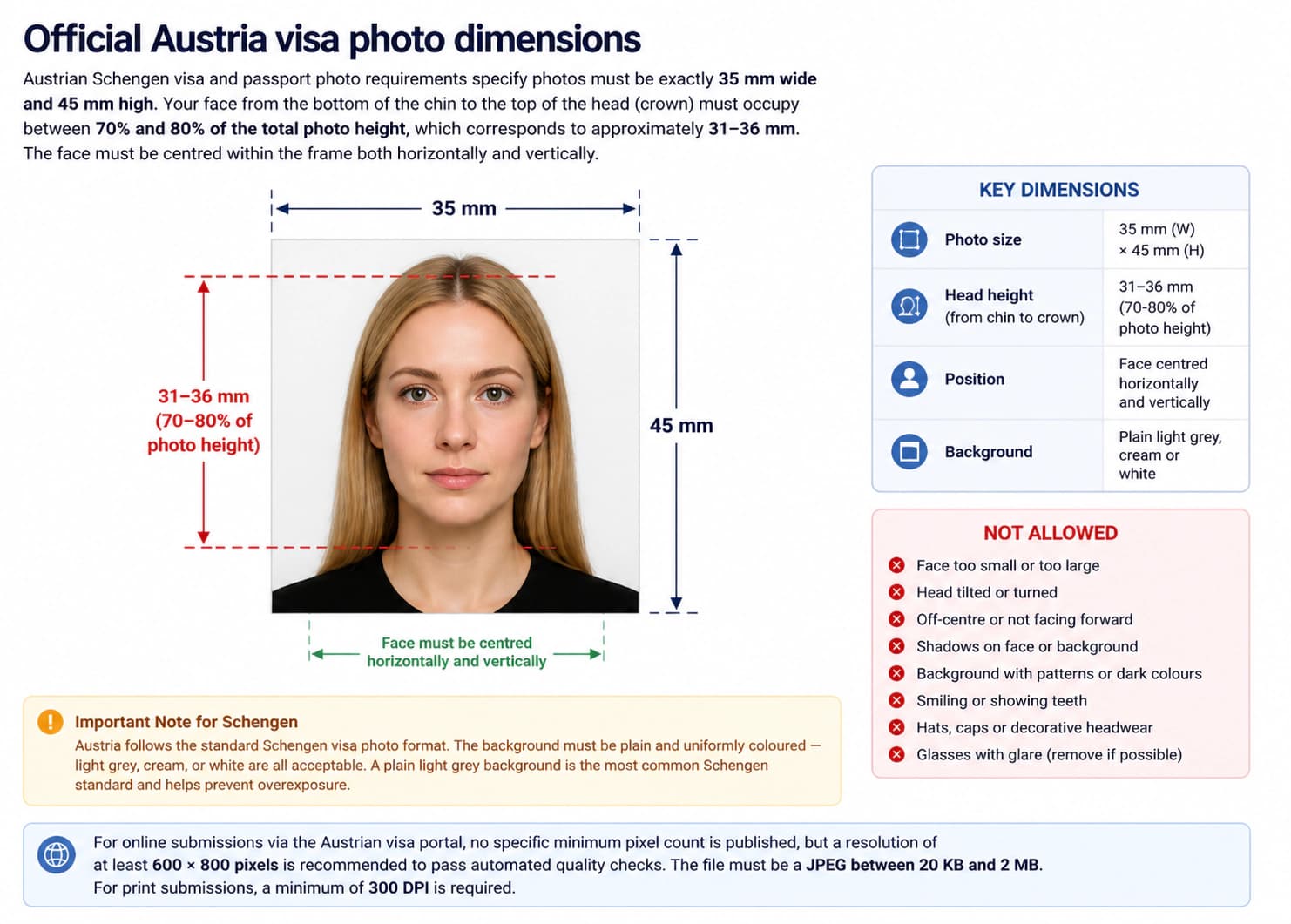
Photo size: 35 × 45 mm
Head size: 31 – 36 mm
FACE POSITION & SIZE
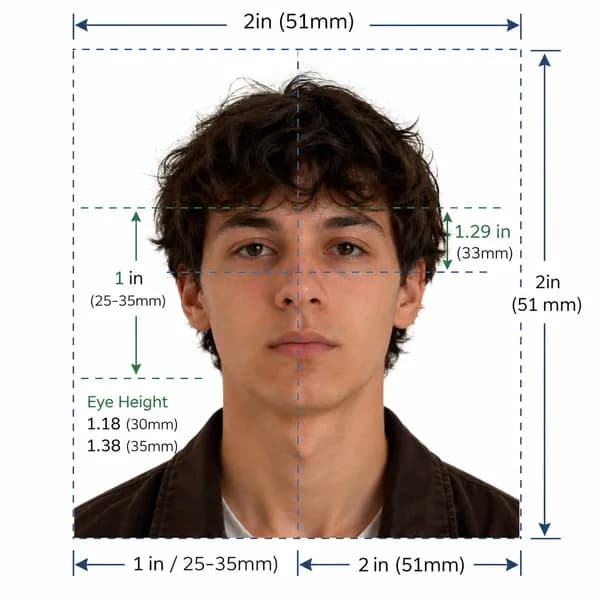
Center your face directly forward with a calm, neutral facial expression.
BACKGROUND
Important Note
The Federal Authority for Identity, Citizenship, Customs and Port Security (ICP) enforces an automated 40 KB file size limit. Uploading larger files causes immediate rejection.
Official ICP & GDRFA Compliance Guarantee
Our automated photo tool validates your Emirates ID photo and UAE visa picture against official ICP and ICAO 9303 standards. 100% compliant or we help you fix it instantly.
United Arab Emirates Official Photo Specifications
Federal Decree-Law No. 29 of 2021 (Entry and Residence of Foreigners) & ICP Smart Services Specifications
Official government rule for application approvalFederal Authority for Identity, Citizenship, Customs and Port Security (ICP UAE)
Application context: United Arab Emirates Visa Applications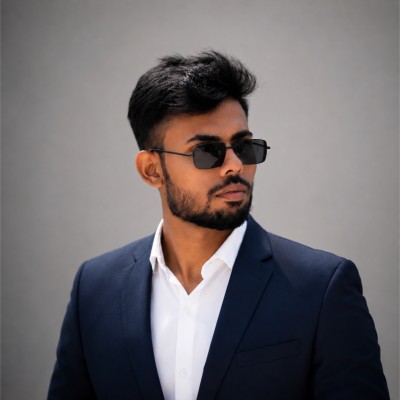
Quick reference: United Arab Emirates visa photo specifications
Review all official photo specifications required by United Arab Emirates embassies, consulates, and visa application centres worldwide.
| Specification | Requirement |
|---|---|
| Photo size (Paper) | 35 × 45 mm (1.38 × 1.77 in) |
| Digital resolution | 413 × 531 px @ 300 DPI |
| Face height | 31 – 36 mm (70–80% of total height) |
| File format & size | JPEG, 10 KB – 500 KB |
| Background colour | White |
| Expression | Neutral expression, mouth closed, eyes open |
| Glasses policy | Not permitted (Medical exception only) |
| Recency | Taken within the last 6 months |
Official Emirates ID Photo Size and Dimensions
The official Emirates ID photo size is 43 mm wide by 55 mm high (43 × 55 mm). Many visa categories also accept 35 mm × 45 mm. Your face must occupy 70% to 80% of the total frame height from the bottom of your chin to the crown of your head. Keep your head centered with equal margins on the left and right.
Online applications enforce a strict 40 KB file size limit. Raw smartphone images are usually 3 MB to 5 MB and fail upload validation. Using our online photo tool lets you crop to exact dimensions and compress under 40 KB without losing facial sharpness.
Emirates ID and UAE Visa Photo Size in mm, cm, inches, and pixels
| Unit | Width | Height | Face height |
|---|---|---|---|
| Millimetres (mm) | 35 mm | 45 mm | 31 – 36 mm |
| Centimetres (cm) | 3.5 cm | 4.5 cm | 3.1–3.6 cm |
| Inches (in) | 1.38 in | 1.77 in | 1.24–1.42 in |
| Pixels (px @ 300 DPI) | 413 px | 531 px | 372–425 px |
Too complicated? Let our AI handle it.
Upload a selfie and our AI will automatically crop, size, and replace the background to validate against official government requirements.
Need a United Arab Emirates Passport Photo instead?
View official biometric specs, size rules, and digital upload requirements for United Arab Emirates passport applications.
Print vs. Digital: What Changes for Your ID Photos?
When applying online through the ICP or GDRFA portal, you must upload a single JPEG file under 40 KB. When applying through a typing center or UAE embassy with paper forms, submit two identical printed photos on photo paper. In comparison to an official UAE passport photo, which strictly follows 35 × 45 mm, Emirates ID and visa authorities accept both 43 × 55 mm and 35 × 45 mm formats.
| Aspect | Print (Paper form) | Digital (Online) |
|---|---|---|
| Dimensions | 35 × 45 mm | 413 × 531 px |
| Format | Colour print on photo paper | JPEG (10 KB – 500 KB) |
| Background | White | White |
| Resolution | Min 300 DPI | 413 × 531 px (300 DPI) |
| Expression | Neutral expression, mouth closed, eyes open | Neutral expression, mouth closed, eyes open |
Emirates ID Photo Background Specifications
The background must be plain, pure white. Off-white, cream, light grey, or patterned backdrops are strictly rejected. The background must be uniform and completely free of shadows behind your head and shoulders.
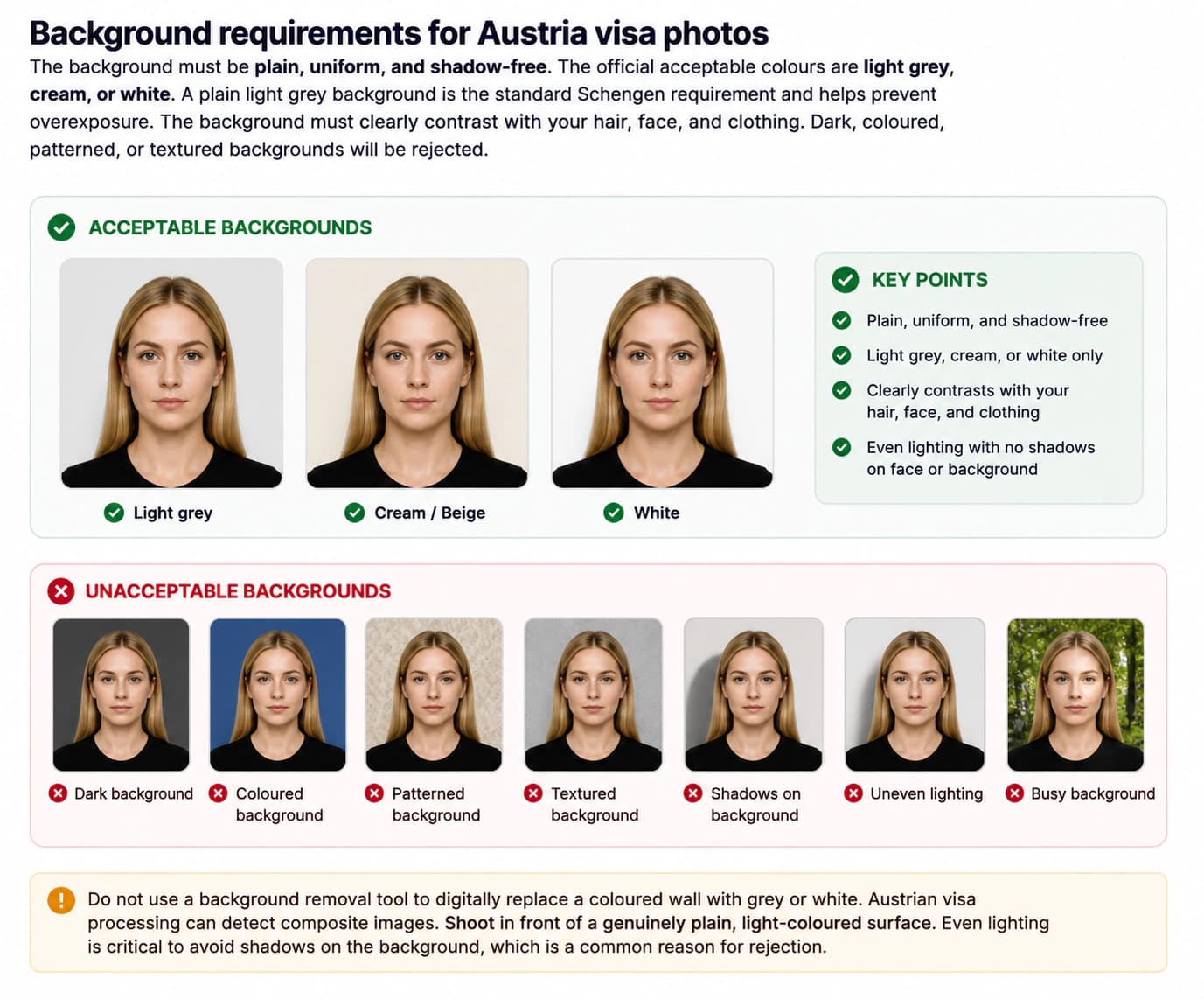
Wear dark or colorful clothing that contrasts clearly with the white background. Avoid white or pastel tops that blend into the backdrop. If your wall is uneven, our automated photo tool can convert your background to official pure white in seconds.
Facial Expression, Head Position, and Lighting
Maintain a natural, neutral facial expression with your mouth closed. Do not smile, frown, squint, or raise your eyebrows. Look straight into the camera lens with both eyes open. Keep your head level and upright without tilting or turning.
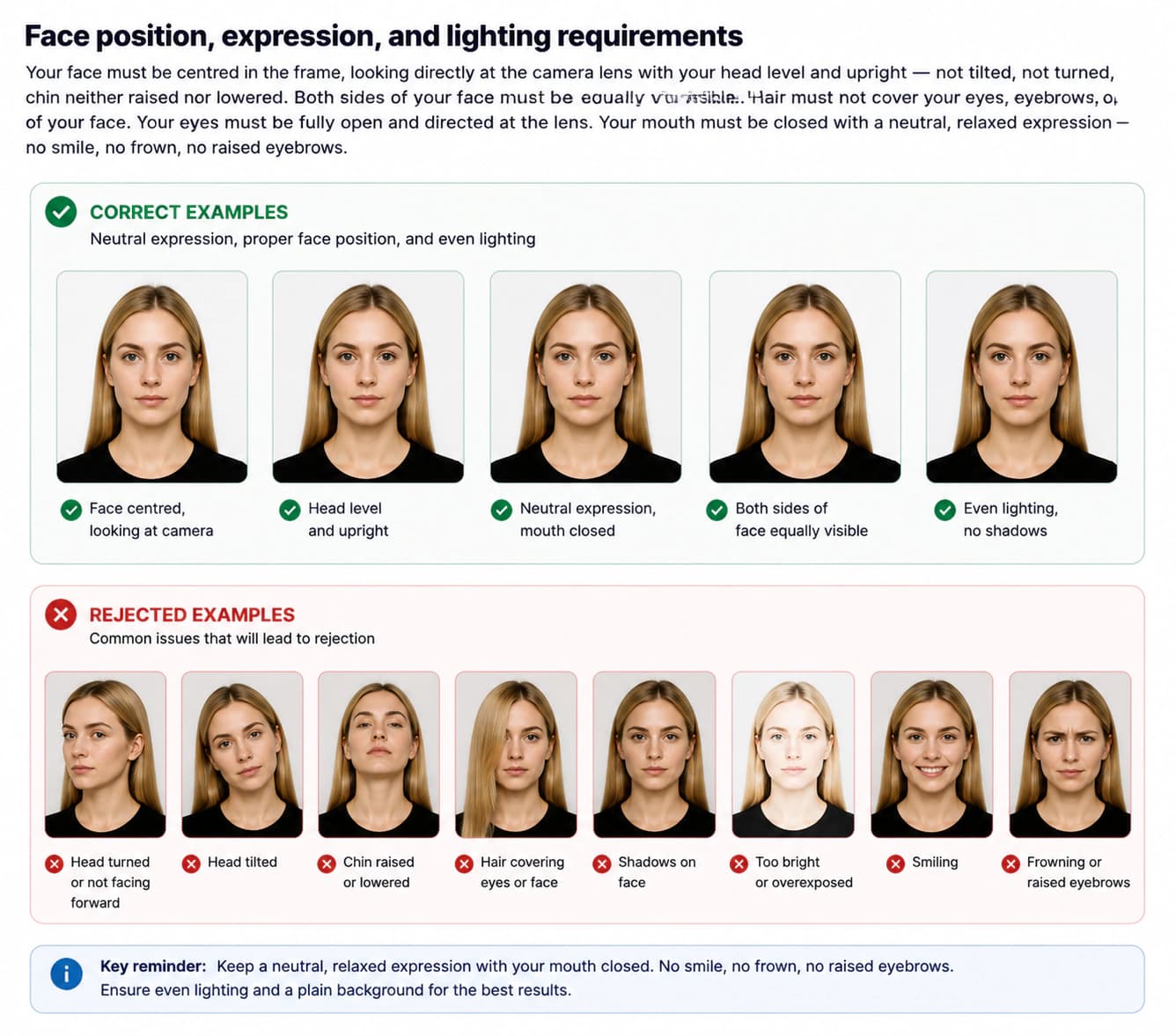
Lighting must be balanced and diffused across your face. Avoid direct flash, which casts harsh shadows or creates red eyes. Soft daylight or two front lights produce clean, shadow-free ID photos.
Glasses and Eyewear Rules
Glasses are not allowed in an Emirates ID photo or UAE visa picture. Remove all eyeglasses before taking the photo. Even thin frames or anti-reflective lenses can cause automated rejection.
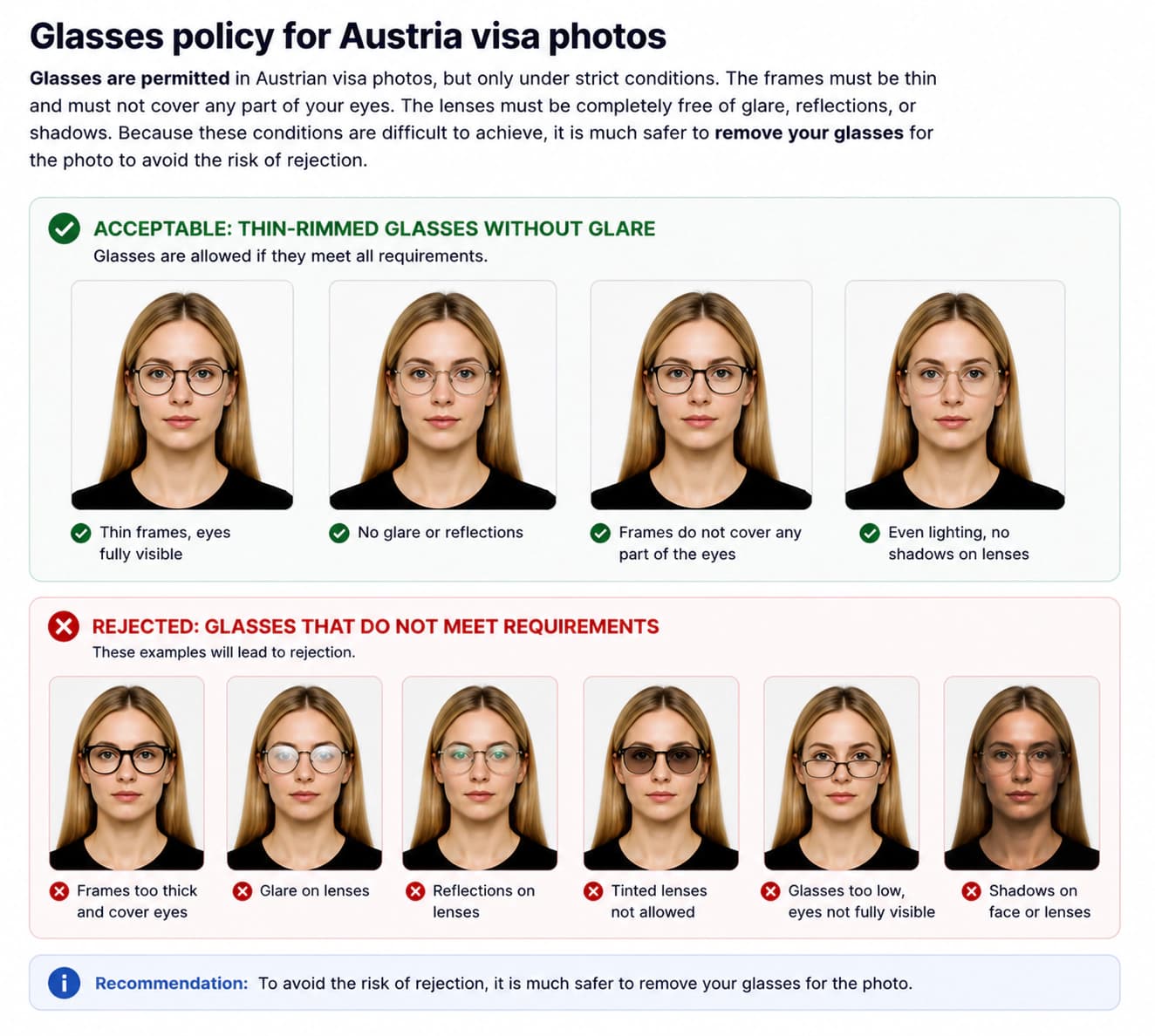
Clear medical contact lenses are permitted. Tinted or cosmetic colored contact lenses that alter your natural iris color are not allowed.
Emirates ID & Visa Photo Checklist: Do's and Don'ts
Follow this practical checklist to ensure your ID photos pass ICP and GDRFA screening on the first attempt.
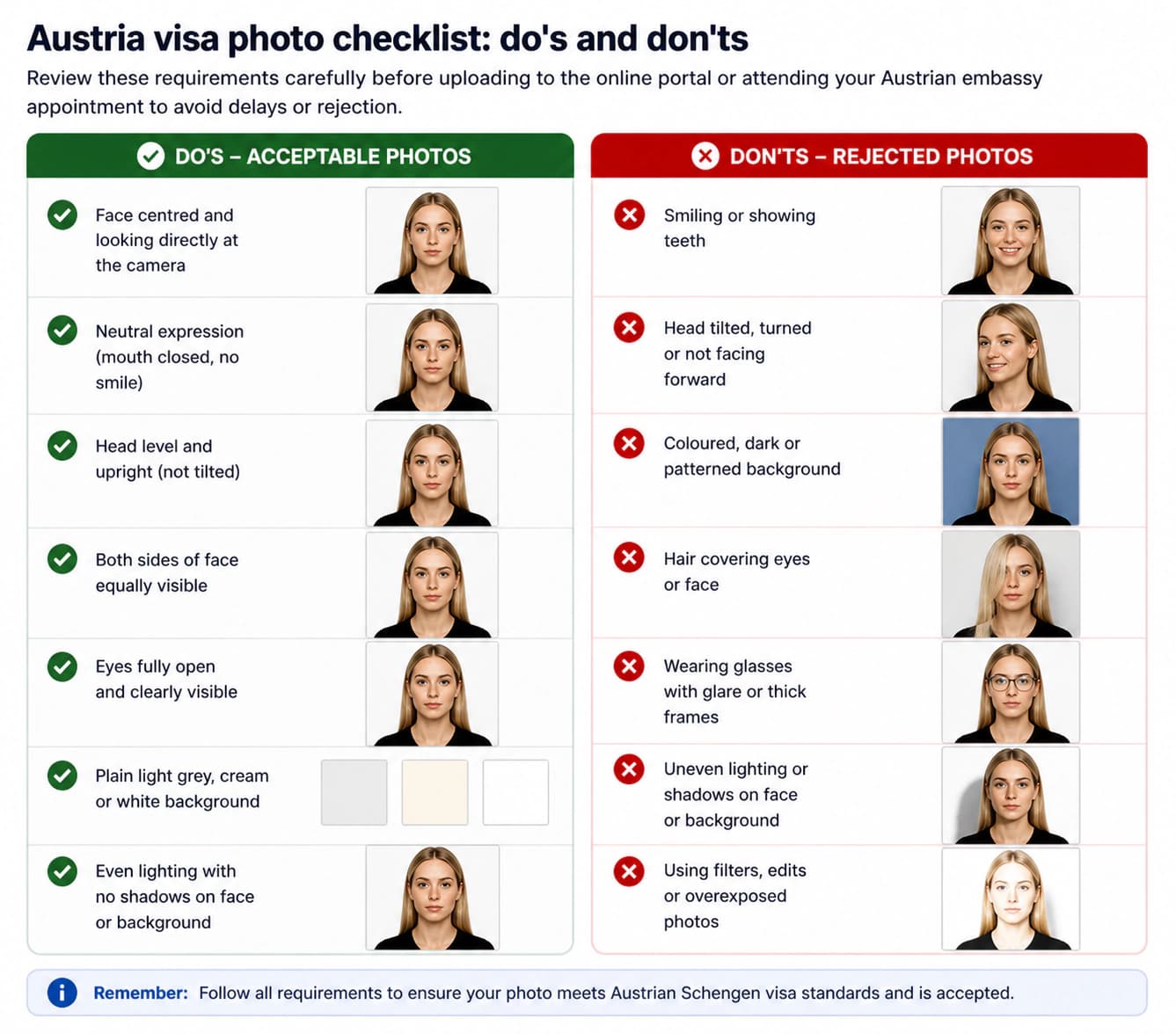
DO
- Use a plain, pure white background with even, shadow-free lighting
- Keep a neutral facial expression with your mouth closed and eyes open
- Look straight into the camera lens with your head level and centered
- Ensure your face covers 70% to 80% of the frame from chin to crown
- Remove all eyeglasses, tinted lenses, and fashion accessories
- Compress your digital JPEG file to strictly under 40 KB for ICP upload
- Wear dark or colorful clothing that contrasts sharply with the white backdrop
- Keep your hair off your forehead, eyebrows, and ears
- Use a recent photo taken within the last 6 months
- Check that both shoulders and the neck base appear clearly in the frame
DON'T
- Do not smile, show teeth, frown, or tilt your head
- Do not wear glasses — take them off to prevent glare and frame shadows
- Do not use off-white, beige, cream, or patterned backgrounds
- Do not upload JPEG files larger than 40 KB to the ICP portal
- Do not use beauty filters, skin smoothing, or retouching tools
- Do not wear white tops that blend into the white background
- Do not wear fashion hats, caps, or decorative headbands
- Do not allow shadows under your nose, chin, or on the backdrop
- Do not submit a scan or phone screenshot of an old printed photo
- Do not use a photo older than 6 months
How to Take a Compliant Emirates ID Photo at Home (Step-by-Step)
Follow these 6 simple steps to create government-compliant ID photos with your smartphone.
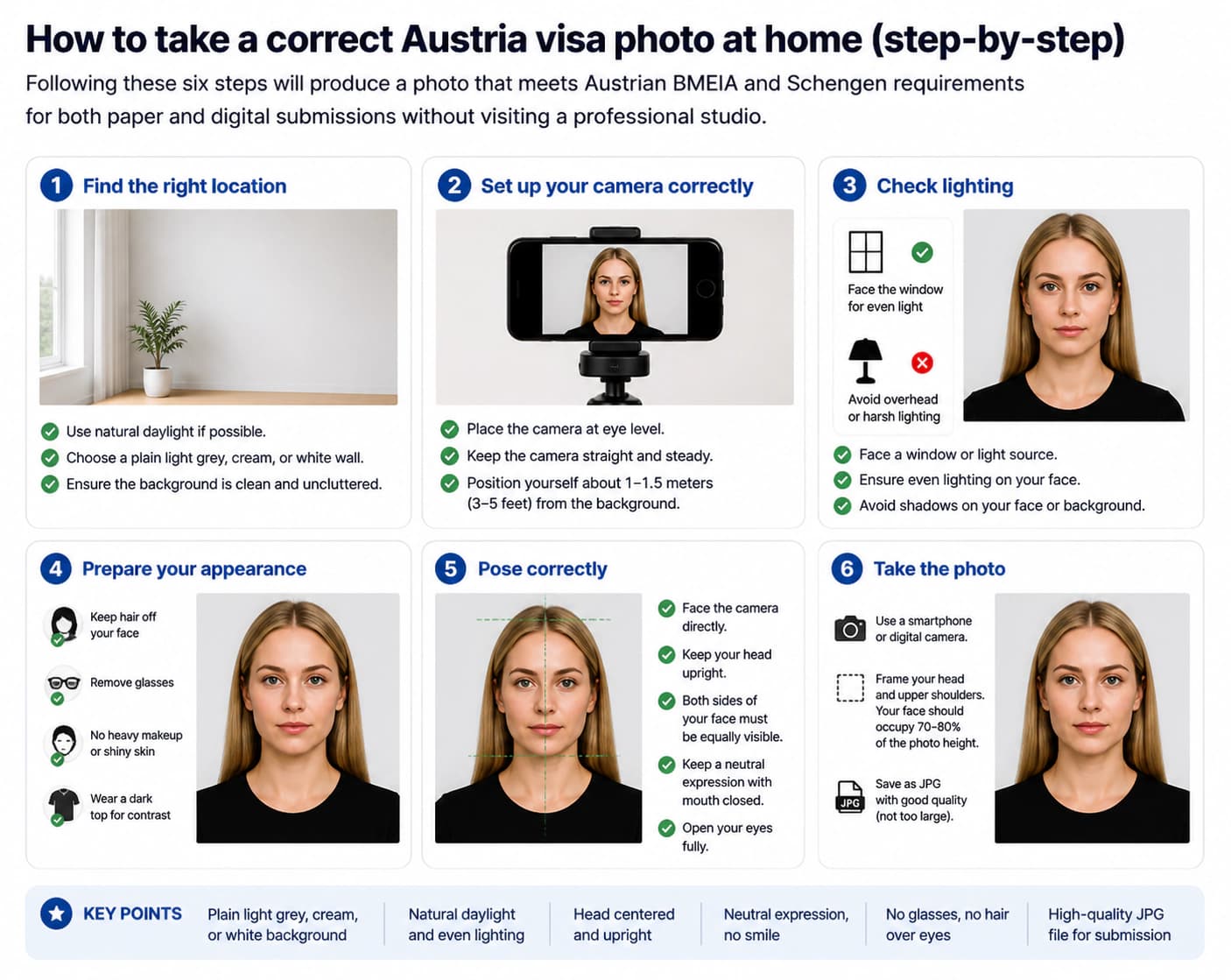
Set up a pure white background
Stand 1 to 2 feet in front of a flat, pure white wall. Make sure the surface has no patterns, textures, or shadows. If needed, hang a smooth white bedsheet.
Position your lighting evenly
Face a bright window or place two lamps at equal height on both sides of your face. Avoid flash, which creates harsh shadows on the white backdrop.
Pose with a neutral facial expression
Look straight at the camera at eye level. Keep your head upright, mouth closed, and maintain a calm, neutral facial expression with eyes fully open.
Take the photo with a smartphone
Ask a friend to hold the phone 4 to 6 feet away, or use a tripod. Keep your shoulders relaxed and centered. Take several shots to pick the sharpest one.
Crop to 43×55 mm with a photo tool
Use our online photo tool to crop your portrait to official 43 × 55 mm dimensions. The tool aligns your eyes and ensures your face covers 70–80% of the frame.
Compress under 40 KB and download
Save your final JPEG file under the strict 40 KB limit. Your photo is now fully compliant and ready to upload to the ICP or GDRFA portal.
Common Reasons Emirates ID and Visa Photos Get Rejected
The ICP portal uses automated biometric checks to screen every submission. Avoid these top rejection causes in 2026.
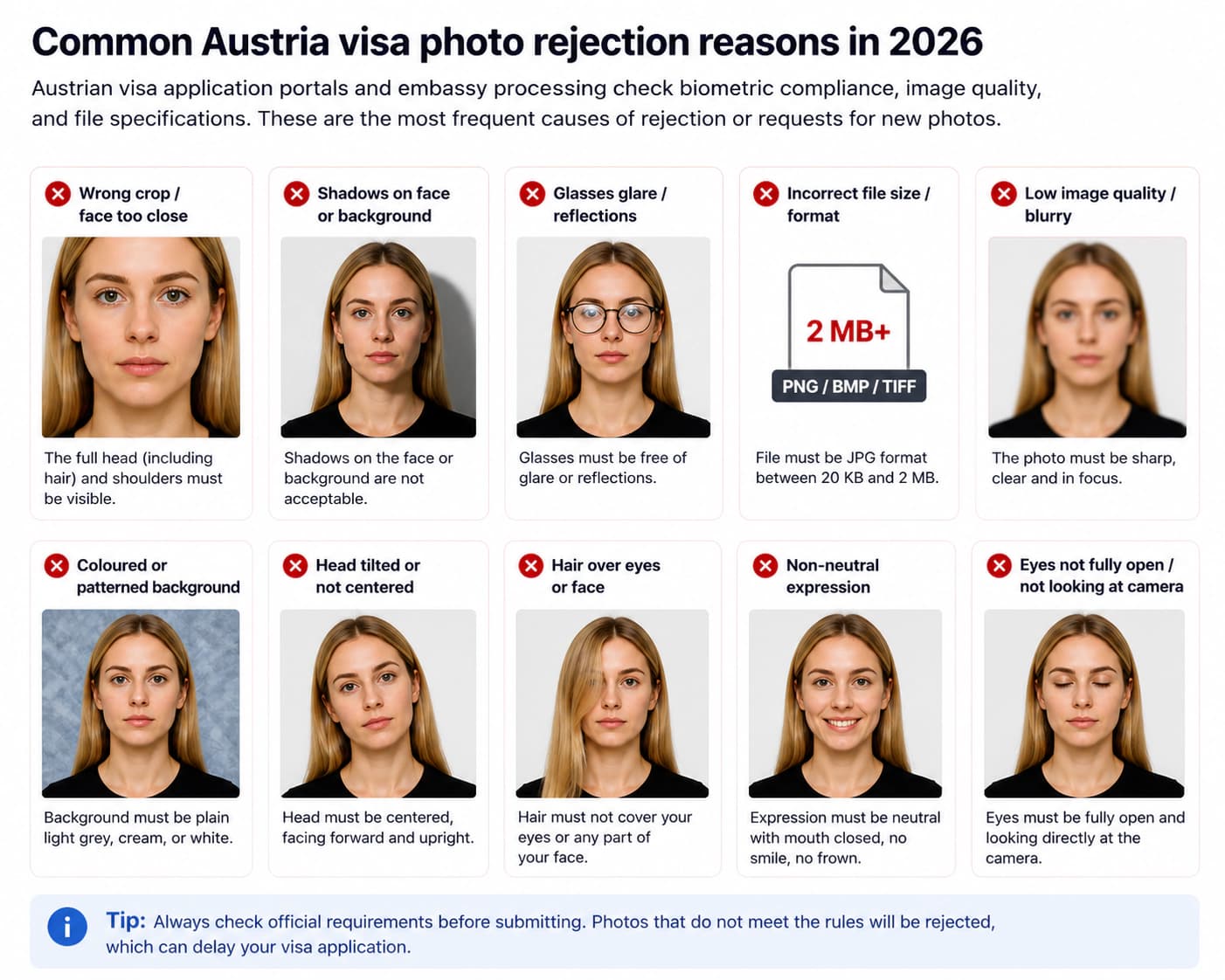
File size exceeds 40 KB
The ICP and GDRFA upload portals strictly reject any JPEG over 40 KB. Most raw phone images are 2 MB to 5 MB and require careful compression.
Wrong photo dimensions
Emirates ID photos require 43 × 55 mm (or 35 × 45 mm for certain visas). Uploading standard 2×2 inch or square images causes immediate rejection.
Off-white or shadowy background
The background must be pure white. Shadows behind your ears or an off-white tint will fail automated biometric screening.
Wearing glasses
Glasses are not permitted for UAE visa or Emirates ID photos. Frames and reflections block biometric eye recognition.
Smiling or non-neutral facial expression
Smiling, showing teeth, or squinting causes automatic rejection. Biometric scanners require a calm, neutral facial expression.
Face size out of proportion
Your head must occupy between 70% and 80% of the total photo height. Faces that are zoomed in too close or too far away get rejected.
Head tilt or angle
Your head must face directly forward. Tilting your chin up, down, or to the side distorts facial measurements.
Photo older than 6 months
Your photo must reflect your current appearance. Photos older than 6 months or previously used on an old ID card will be rejected.
Photo Rules for Babies, Toddlers, and Children
Every child must have an individual photo for their Emirates ID card and visa application. For babies who cannot sit up, lay them on a plain white sheet and photograph from directly above. No parents, hands, or toys may appear in the picture.
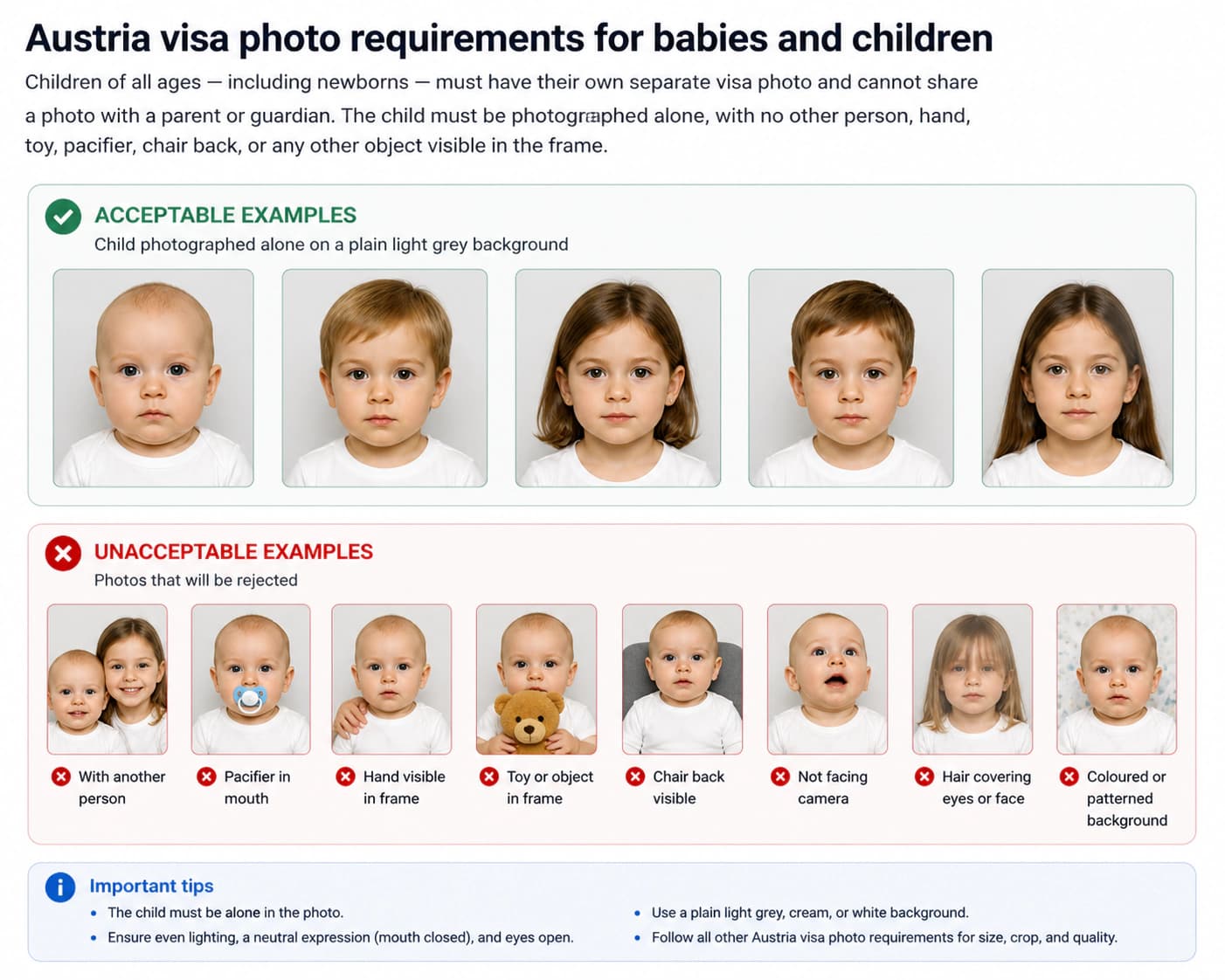
Children aged 3 and older must follow standard adult rules: neutral facial expression, mouth closed, eyes open, and a pure white background.
Religious Head Coverings and Dress Code
Religious head coverings such as hijabs are permitted. The covering must be plain, must not cast shadows, and must keep your full face visible from the tip of your chin to the top of your forehead.
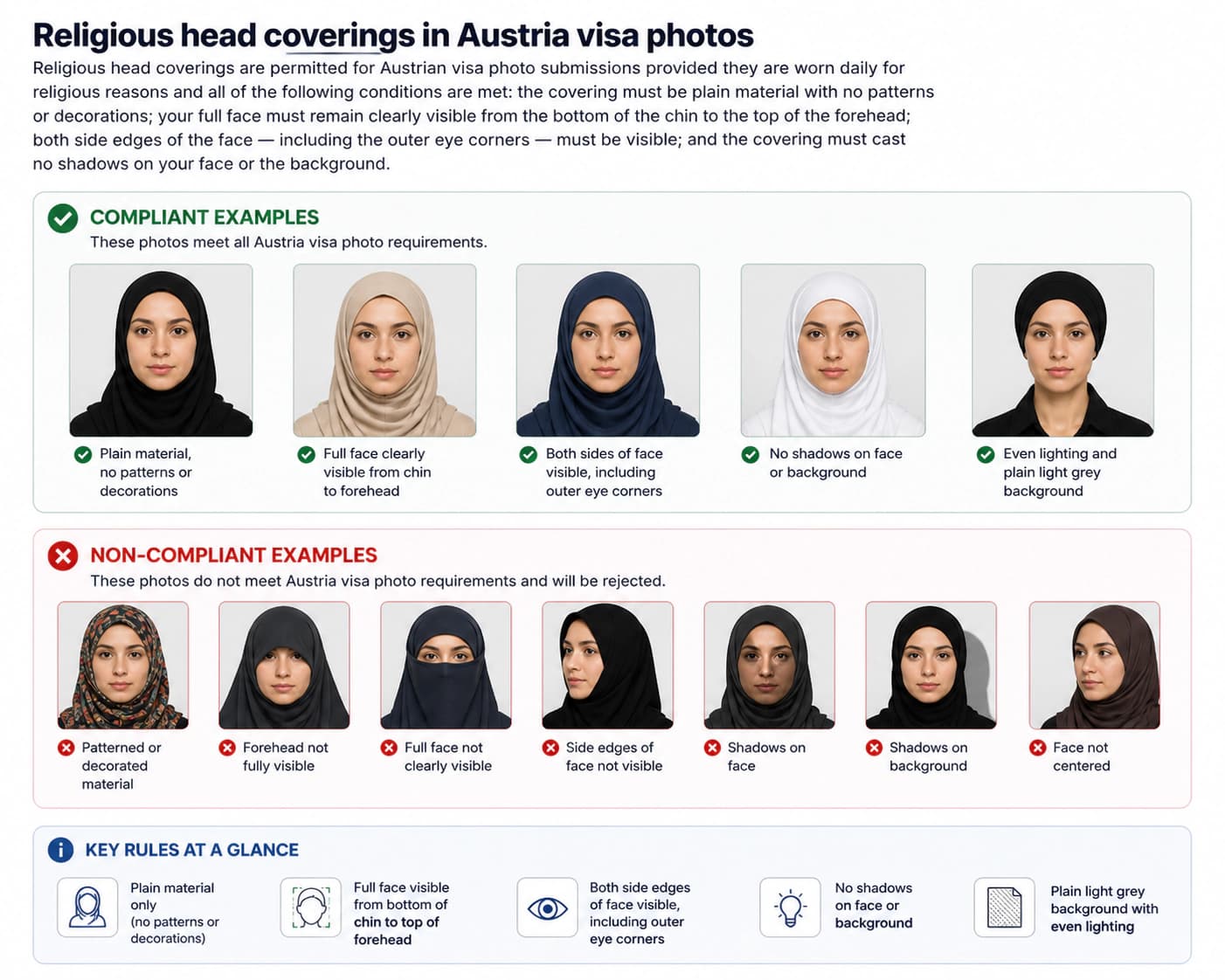
Fashion caps, hats, and decorative headwear are strictly prohibited in all official ID photos.
Official Sources and Reference Portals
These official UAE government authorities govern visa and Emirates ID photo requirements.
Frequently Asked Questions: Emirates ID & UAE Visa Photo (2026)
What is the official Emirates ID photo size and background specification in 2026?
The official Emirates ID photo size is 43 × 55 mm (4.3 × 5.5 cm), though 35 × 45 mm is accepted for certain visa applications. The background must be pure white and shadow-free. Your face must take up 70% to 80% of the photo height.
What is the difference between an Emirates ID photo and a UAE passport photo?
A UAE passport photo follows standard 35 × 45 mm dimensions. An Emirates ID photo is officially 43 × 55 mm, though 35 × 45 mm is also accepted. Both require a pure white backdrop, neutral facial expression, no glasses, and strict ICAO biometric standards.
Does an Emirates ID card require the same photo as a UAE residence visa?
Yes. The Federal Authority for Identity, Citizenship, Customs and Port Security (ICP) uses the same biometric photo standards for the Emirates ID card and residence visa applications.
What facial expression is required for an Emirates ID photo?
You must maintain a neutral facial expression with your mouth closed, lips together, and eyes open and looking straight into the lens. Smiling, frowning, or showing teeth is not permitted.
Why does the ICP portal require files under 40 KB?
The ICP and GDRFA online portals enforce a strict 40 KB file size limit to optimize document storage and biometric processing. Use an online photo tool to compress your JPEG under 40 KB without blurring facial details.
Can I use an online photo tool to prepare my Emirates ID photo?
Yes. A specialized photo tool automatically crops your image to 43 × 55 mm, removes background shadows to produce a pure white backdrop, verifies facial margins, and compresses the file under 40 KB.
Can I take compliant ID photos using my mobile phone?
Yes. You can capture high-quality ID photos at home using your smartphone camera. Stand in front of a well-lit white wall, look straight ahead with a neutral facial expression, have someone take the shot at eye level, and resize the image with our photo tool.
Can I wear glasses in an Emirates ID photo?
No. Eyeglasses are not permitted in Emirates ID or UAE visa photos. You must remove your glasses to prevent lens glare, frame shadows, and eye distortion.
What color clothing should I wear for an Emirates ID photo?
Wear dark, solid-colored clothing that contrasts strongly with the white background. Avoid white, cream, or pastel shirts, as they blend into the backdrop.
What is the Emirates ID photo size in pixels?
At standard 300 DPI print resolution, a 43 × 55 mm photo is approximately 508 × 650 pixels. For online ICP uploads, images around 400 × 514 pixels easily meet the under-40 KB file size requirement while maintaining sharp facial definition.
Are religious head coverings allowed for an Emirates ID photo?
Yes. Religious head coverings like hijabs are permitted. The covering must be plain, must not cast shadows, and must leave your entire face visible from chin to forehead.
Can I smile in an Emirates ID photo?
No. Smiling is strictly prohibited by ICP biometric standards. Keep your facial expression completely neutral with relaxed lips and closed mouth.
Can I edit or retouch my Emirates ID photo?
No. Digital retouching, skin filtering, red-eye removal, and beauty filters are strictly forbidden. The image must show your natural skin tone and facial features.
How recent must an Emirates ID photo be?
The photo must be taken within the last 6 months to reflect your current appearance. ICP systems reject photos that match older ID records.
What are the Emirates ID photo rules for babies and young children?
Children of all ages, including newborns, need an individual photo. Infants can be photographed lying on a plain white sheet from above. No hands, parents, or toys may be visible.
What file format is required for ICP and GDRFA photo uploads?
Upload your image in standard JPEG (.jpg or .jpeg) format. The file must be under 40 KB in size and have balanced brightness with no pixelation.
Ready to Prepare Your Emirates ID Photo?
Upload your portrait to our online photo tool. We crop to official 43 × 55 mm dimensions, generate a pure white background, verify facial expression, and compress under 40 KB for guaranteed ICP acceptance.
Prepare My Photo Now