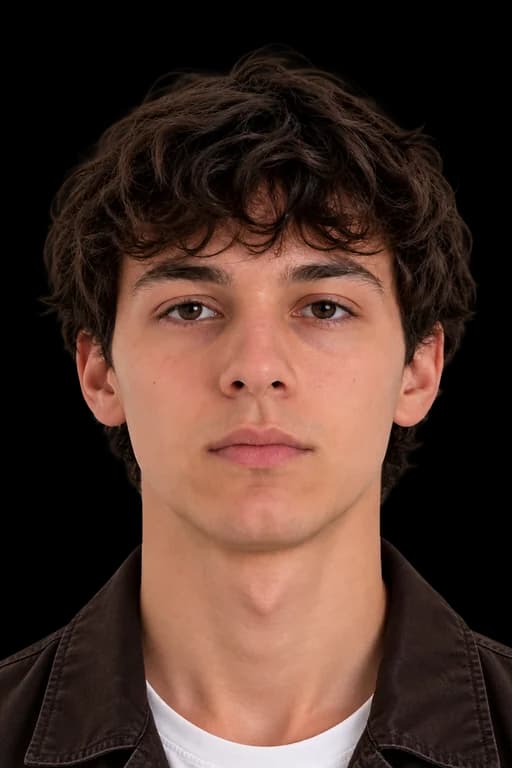
UAE PASSPORT PHOTO REQUIREMENTS AT A GLANCE
Follow these key rules so your passport photos pass ICP and Ministry of Foreign Affairs checks.
DIMENSIONS
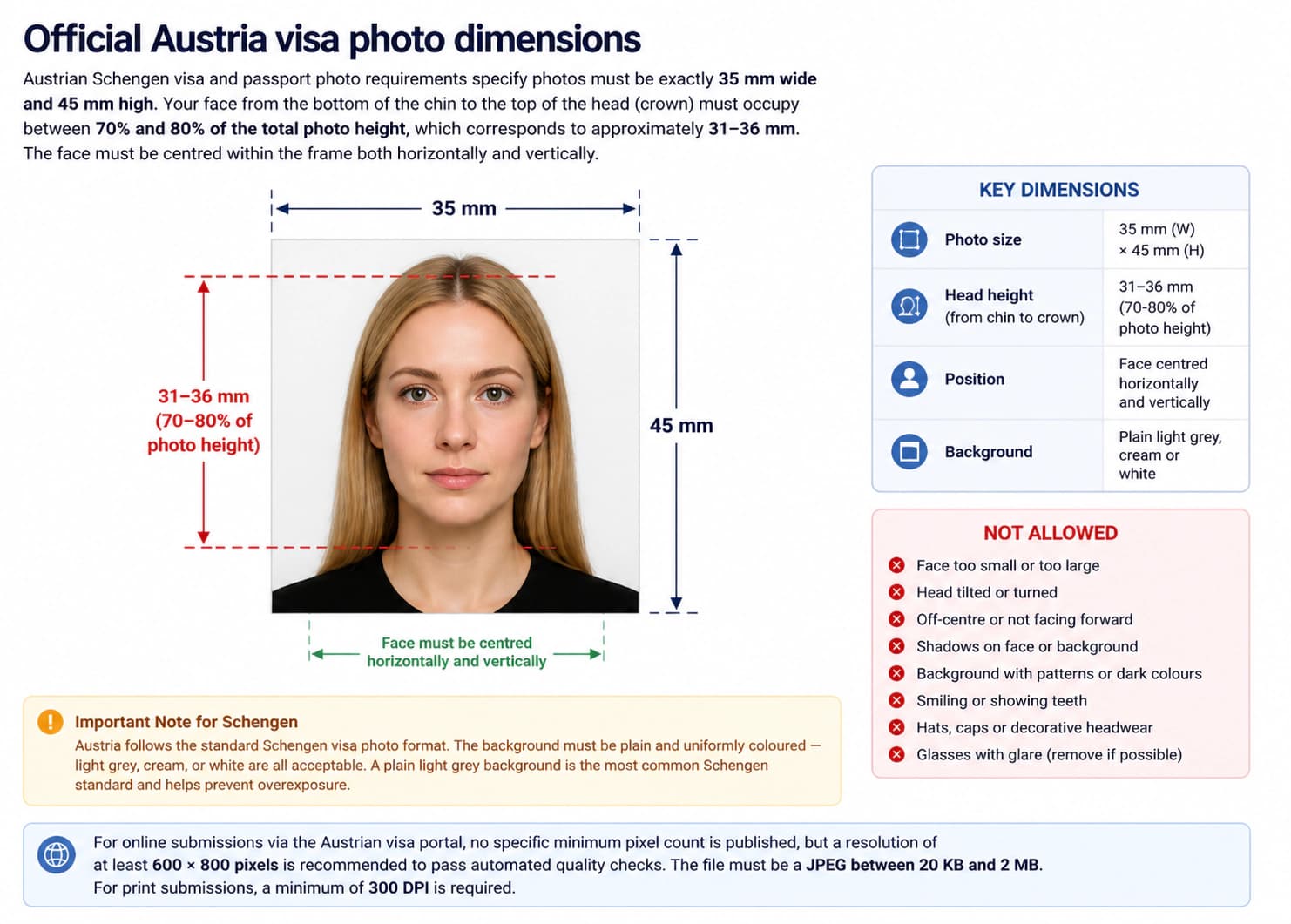
Photo size: 35 × 45 mm
Head size: 31 – 36 mm
FACE POSITION & SIZE
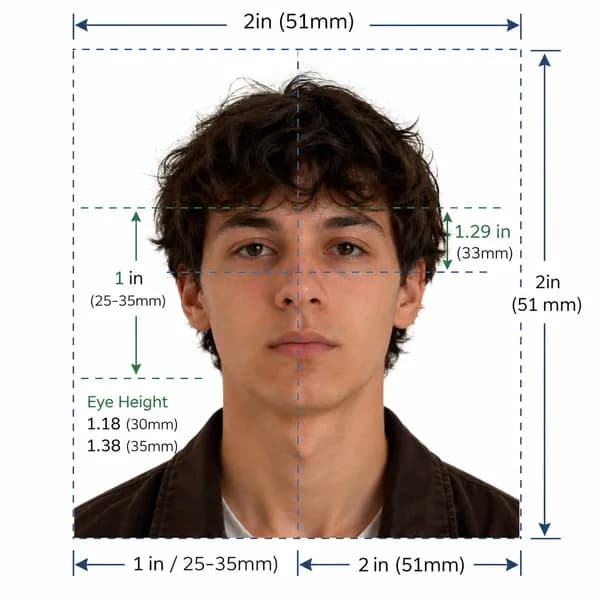
Center your face directly forward with a calm, neutral facial expression.
BACKGROUND
Important Note
The Federal Authority for Identity, Citizenship, Customs and Port Security (ICP) requires 35×45 mm prints or compliant digital files with 70–80% face coverage.
Official ICP UAE Passport Compliance Guarantee
Our automated photo tool validates your UAE passport photo against official ICP and ICAO 9303 standards. 100% compliant or we help you fix it instantly.
United Arab Emirates Official Photo Specifications
Federal Decree-Law No. 14 of 2021 & ICP ICAO Doc 9303 Biometric Photo Standards
Official government rule for application approvalFederal Authority for Identity, Citizenship, Customs and Port Security (ICP UAE)
Application context: United Arab Emirates Passport Applications
Quick reference: United Arab Emirates passport photo specifications
Review all official photo specifications required by United Arab Emirates embassies, consulates, and visa application centres worldwide.
| Specification | Requirement |
|---|---|
| Photo size (Paper) | 35 × 45 mm (1.38 × 1.77 in) |
| Digital resolution | 413 × 531 px @ 300 DPI |
| Face height | 31 – 36 mm (70–80% of total height) |
| File format & size | JPEG, 10 KB – 500 KB |
| Background colour | White |
| Expression | Neutral expression, mouth closed, eyes open |
| Glasses policy | Not permitted (Medical exception only) |
| Recency | Taken within the last 6 months |
Official UAE Passport Photo Size and Dimensions
The official UAE passport photo size is 35 mm wide by 45 mm high (35 × 45 mm). Your face must occupy 70% to 80% of the total frame height from the bottom of your chin to the crown of your head (31 mm to 36 mm). Keep your head centered with equal margins on the left and right.
For digital applications and online renewals, upload high-resolution JPEG files (300 DPI) meeting all ICP biometric parameters.
UAE Passport Photo Size in mm, cm, inches, and pixels
| Unit | Width | Height | Face height |
|---|---|---|---|
| Millimetres (mm) | 35 mm | 45 mm | 31 – 36 mm |
| Centimetres (cm) | 3.5 cm | 4.5 cm | 3.1–3.6 cm |
| Inches (in) | 1.38 in | 1.77 in | 1.24–1.42 in |
| Pixels (px @ 300 DPI) | 413 px | 531 px | 372–425 px |
Too complicated? Let our AI handle it.
Upload a selfie and our AI will automatically crop, size, and replace the background to validate against official government requirements.
Need a United Arab Emirates Visa Photo instead?
View official biometric specs, size rules, and digital upload requirements for United Arab Emirates visa applications.
Print vs. Digital: UAE Passport Requirements
When applying online through the ICP portal or UAE smart services app, upload a single high-resolution JPEG file. When applying in person at an ICP customer happiness center, submit two identical printed photos on premium photo paper.
| Aspect | Print (Paper form) | Digital (Online) |
|---|---|---|
| Dimensions | 35 × 45 mm | 413 × 531 px |
| Format | Colour print on photo paper | JPEG (10 KB – 500 KB) |
| Background | White | White |
| Resolution | Min 300 DPI | 413 × 531 px (300 DPI) |
| Expression | Neutral expression, mouth closed, eyes open | Neutral expression, mouth closed, eyes open |
UAE Passport Photo Background Specifications
The background must be plain, pure white. Off-white, cream, light grey, or patterned backdrops are strictly rejected. The background must be uniform and completely free of shadows behind your head and shoulders.
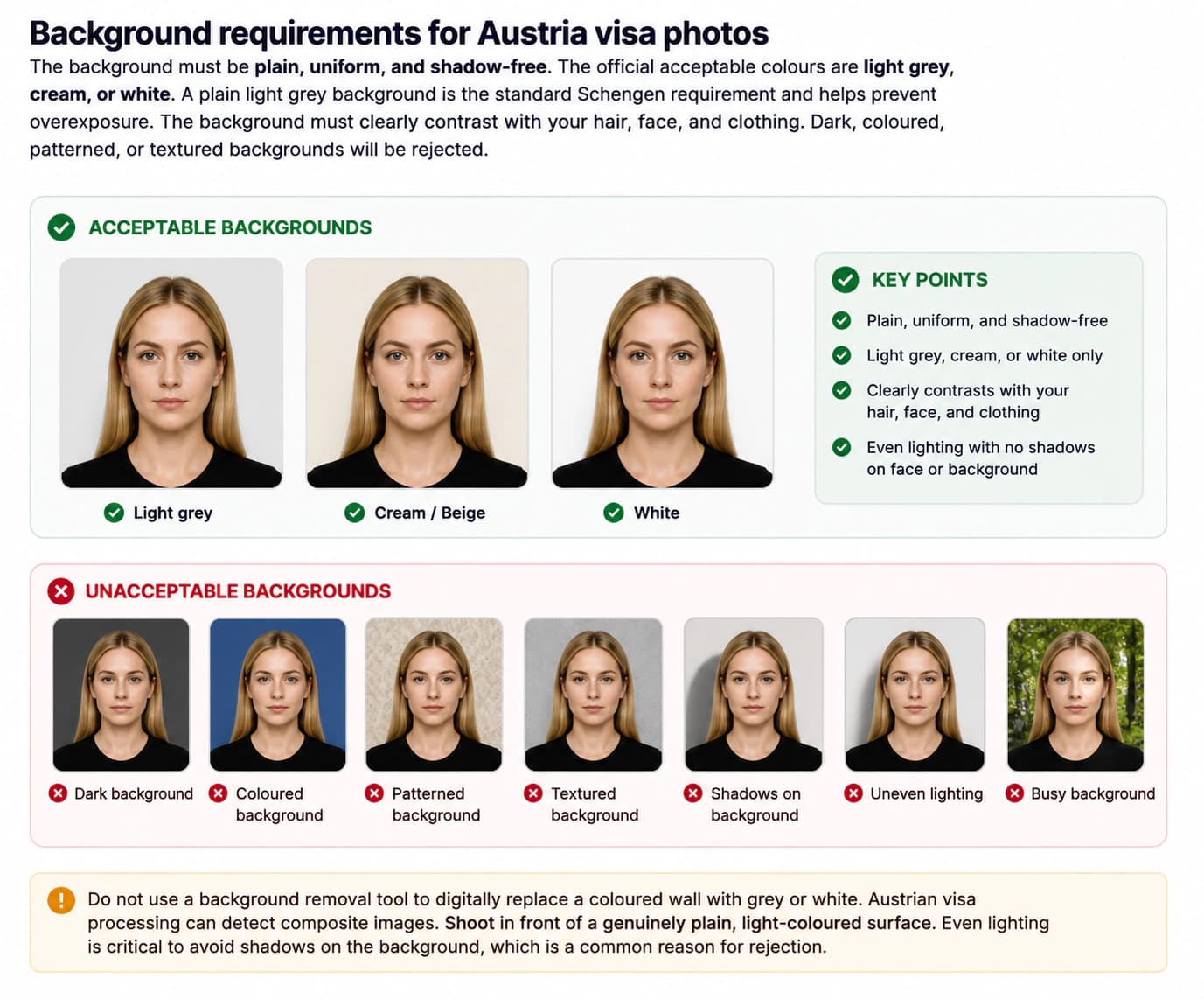
Wear dark or colorful clothing that contrasts clearly with the white background. Avoid white or pastel tops that blend into the backdrop. If your wall is uneven, our automated photo tool can convert your background to official pure white in seconds.
Facial Expression, Head Position, and Lighting
Maintain a natural, neutral facial expression with your mouth closed. Do not smile, frown, squint, or raise your eyebrows. Look straight into the camera lens with both eyes open. Keep your head level and upright without tilting or turning.
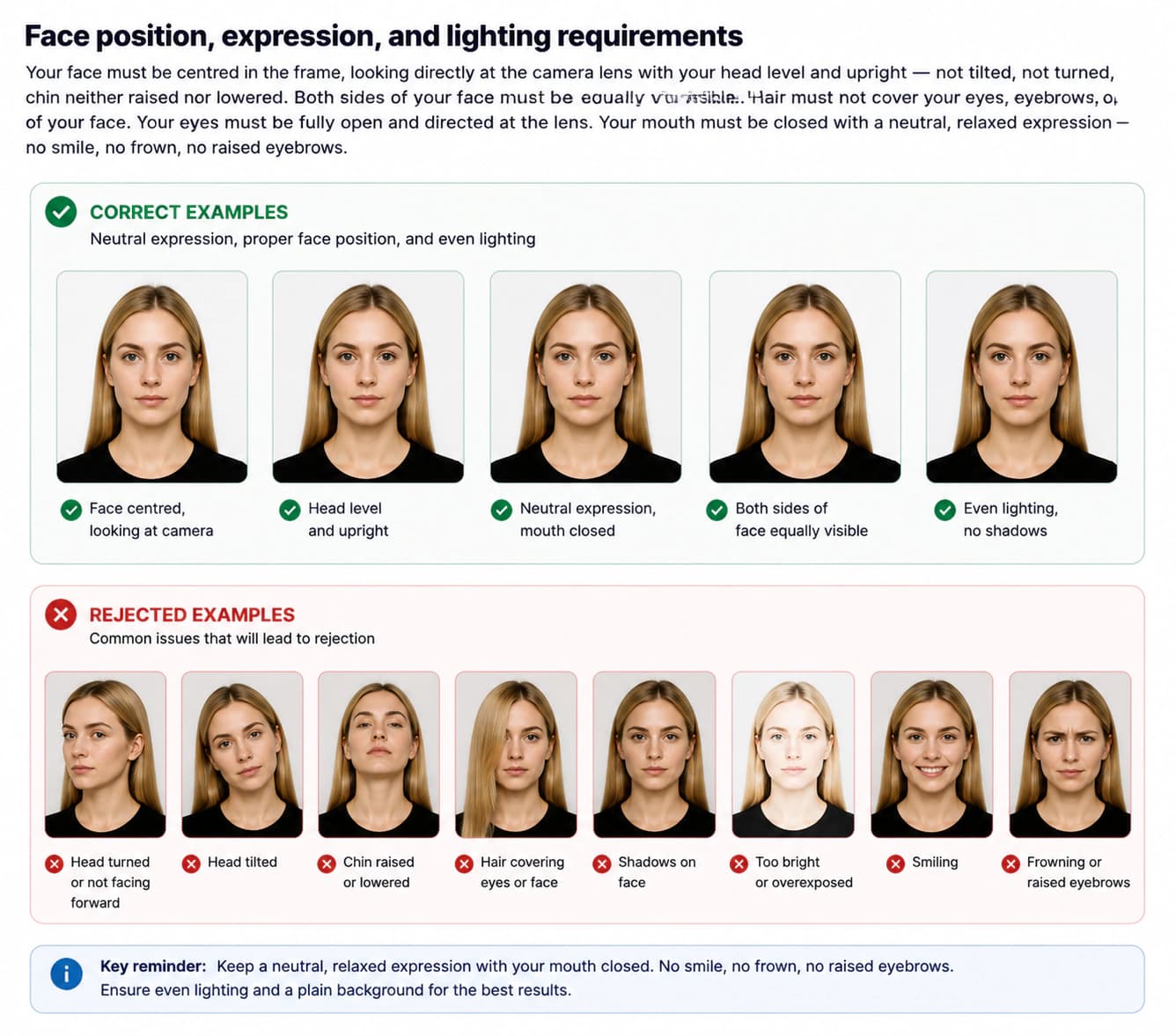
Lighting must be balanced and diffused across your face. Avoid direct flash, which casts harsh shadows or creates red eyes. Soft daylight or two front lights produce clean, shadow-free ID photos.
Glasses and Eyewear Rules
Glasses are strictly prohibited in UAE passport photos. Remove all eyeglasses before taking the photo to eliminate reflections and shadows.
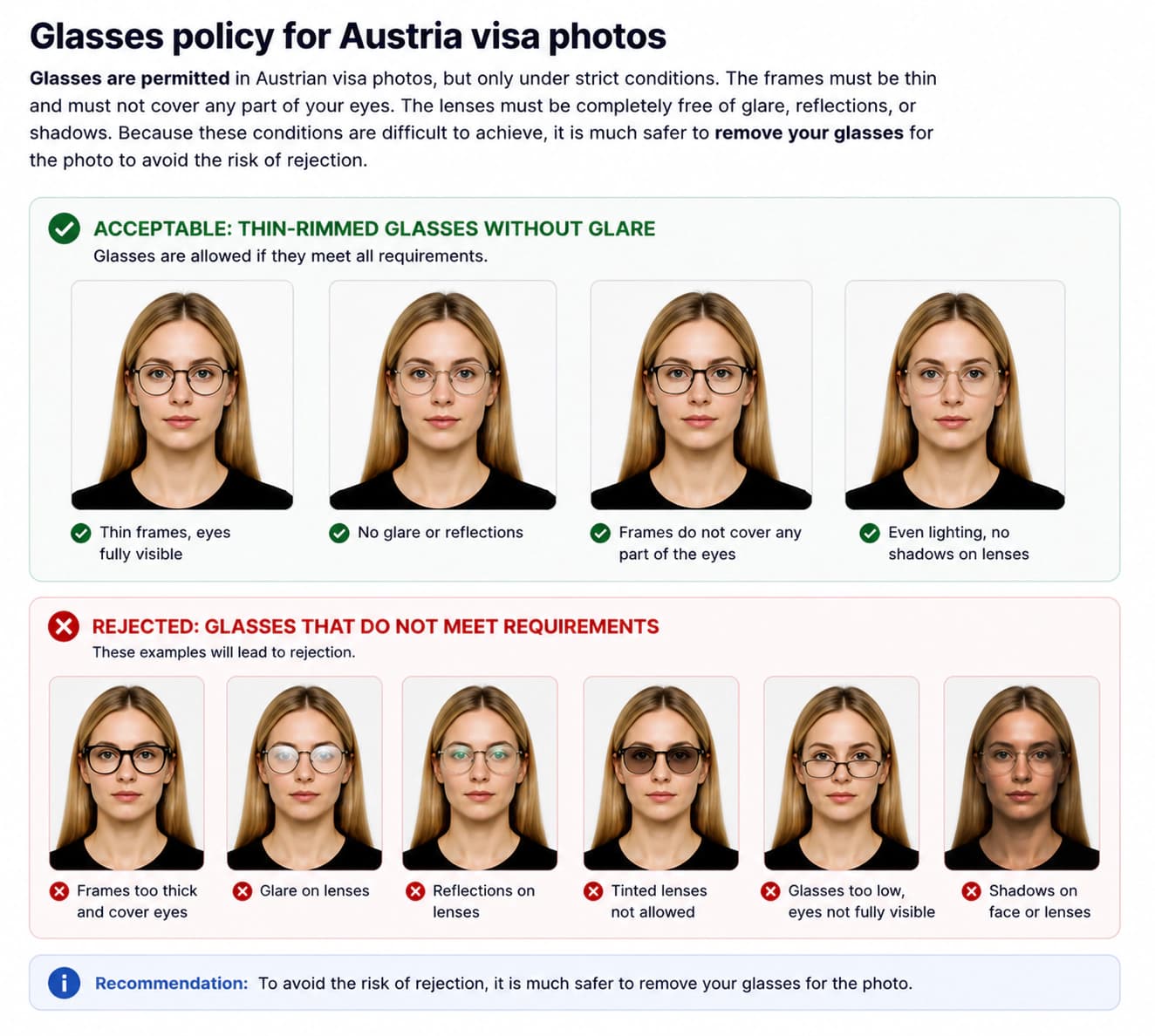
Clear medical contact lenses are permitted. Tinted or cosmetic colored contact lenses that alter your natural iris color are not allowed.
UAE Passport Photo Checklist: Do's and Don'ts
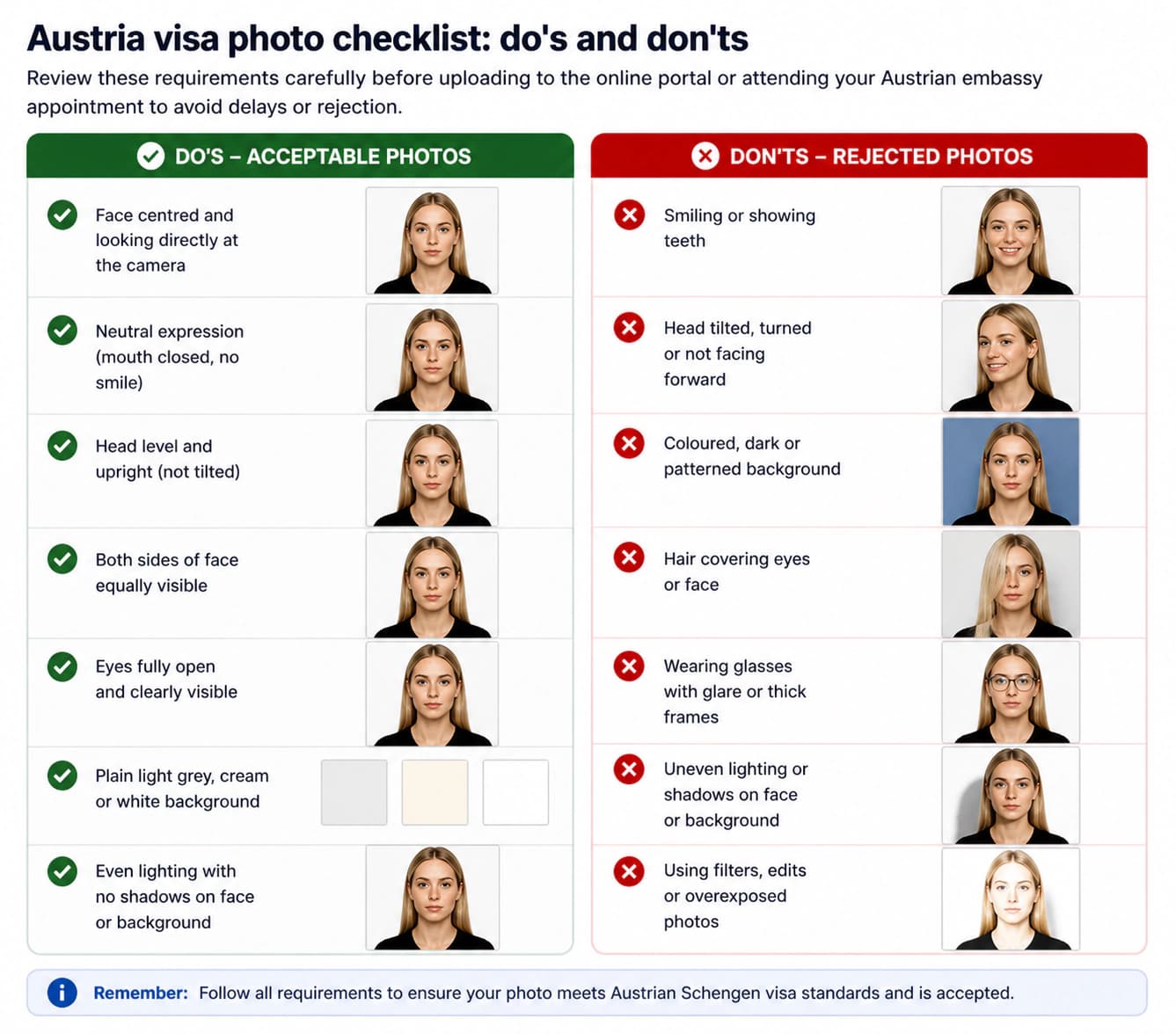
Follow this practical checklist to ensure your passport photos pass ICP screening on the first attempt.
DO
- Use a plain, pure white background with even, shadow-free lighting
- Keep a neutral facial expression with your mouth closed and eyes open
- Look straight into the camera lens with your head level and centered
- Ensure your face covers 70% to 80% of the frame from chin to crown
- Remove all eyeglasses, tinted lenses, and fashion accessories
- Wear dark clothing that contrasts sharply with the white backdrop
- Keep your hair off your forehead, eyebrows, and ears
- Use a recent photo taken within the last 6 months
- Check that both shoulders and the neck base appear clearly in the frame
DON'T
- Do not smile, show teeth, frown, or tilt your head
- Do not wear glasses — take them off to prevent glare and frame shadows
- Do not use off-white, beige, cream, or patterned backgrounds
- Do not use beauty filters, skin smoothing, or retouching tools
- Do not wear white tops that blend into the white background
- Do not wear fashion hats, caps, or decorative headbands
- Do not allow shadows under your nose, chin, or on the backdrop
- Do not submit a scan or phone screenshot of an old printed photo
- Do not use a photo older than 6 months
How to Take a Compliant UAE Passport Photo at Home (Step-by-Step)
Follow these 6 simple steps to create government-compliant passport photos with your smartphone.
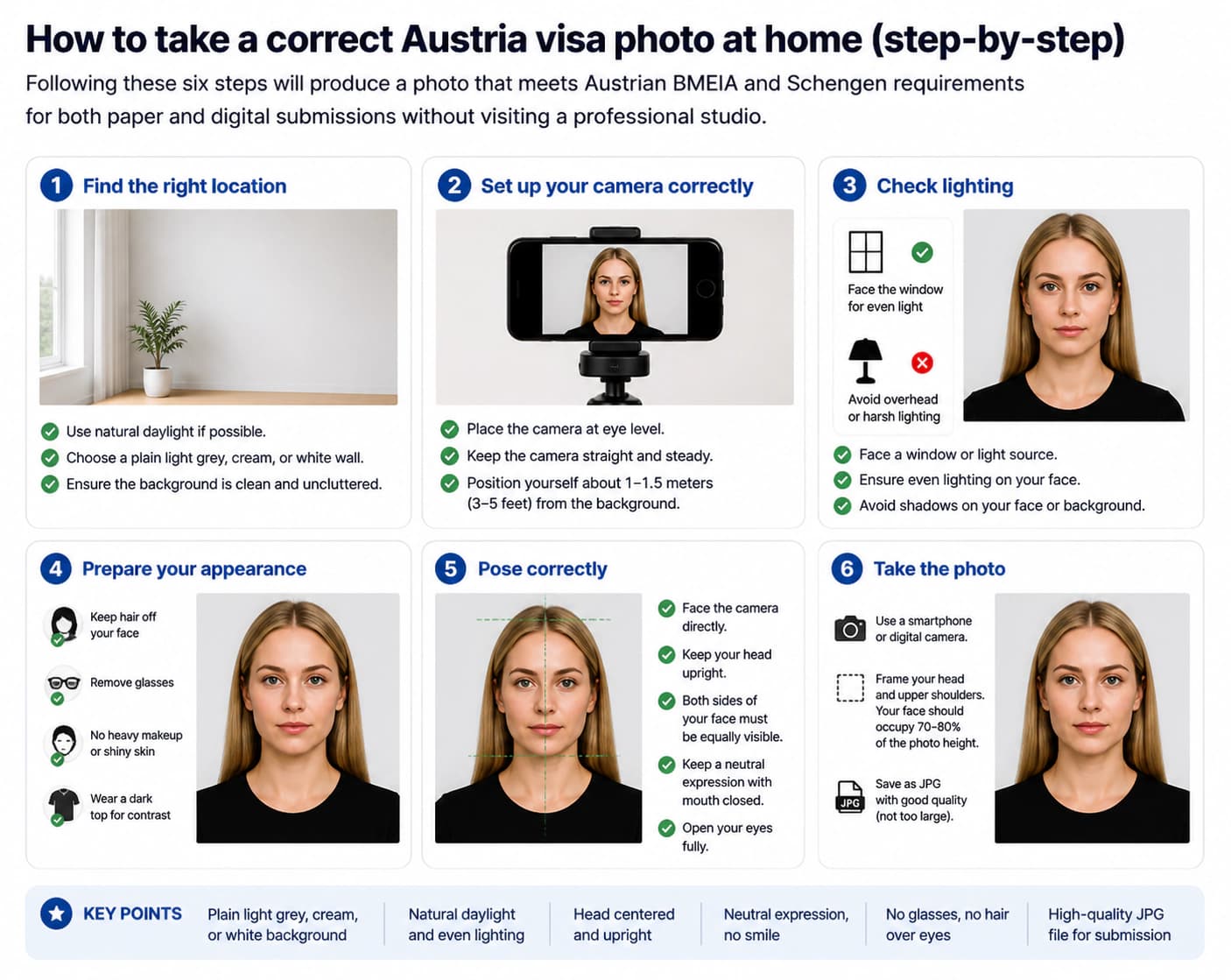
Set up a pure white background
Stand 1 to 2 feet in front of a flat, pure white wall. Make sure the surface has no patterns, textures, or shadows. If needed, hang a smooth white bedsheet.
Position your lighting evenly
Face a bright window or place two lamps at equal height on both sides of your face. Avoid flash, which creates harsh shadows on the white backdrop.
Pose with a neutral facial expression
Look straight at the camera at eye level. Keep your head upright, mouth closed, and maintain a calm, neutral facial expression with eyes fully open.
Take the photo with a smartphone
Ask a friend to hold the phone 4 to 6 feet away, or use a tripod. Keep your shoulders relaxed and centered. Take several shots to pick the sharpest one.
Crop to 35×45 mm with a photo tool
Use our online photo tool to crop your portrait to official 35 × 45 mm dimensions. The tool aligns your eyes and ensures your face covers 70–80% of the frame.
Save high-resolution JPEG and download
Save your final JPEG file at 300 DPI. Your photo is now fully compliant and ready to submit for UAE passport renewal.
Common Reasons UAE Passport Photos Get Rejected
The ICP portal uses automated biometric checks to screen every submission. Avoid these top rejection causes in 2026.
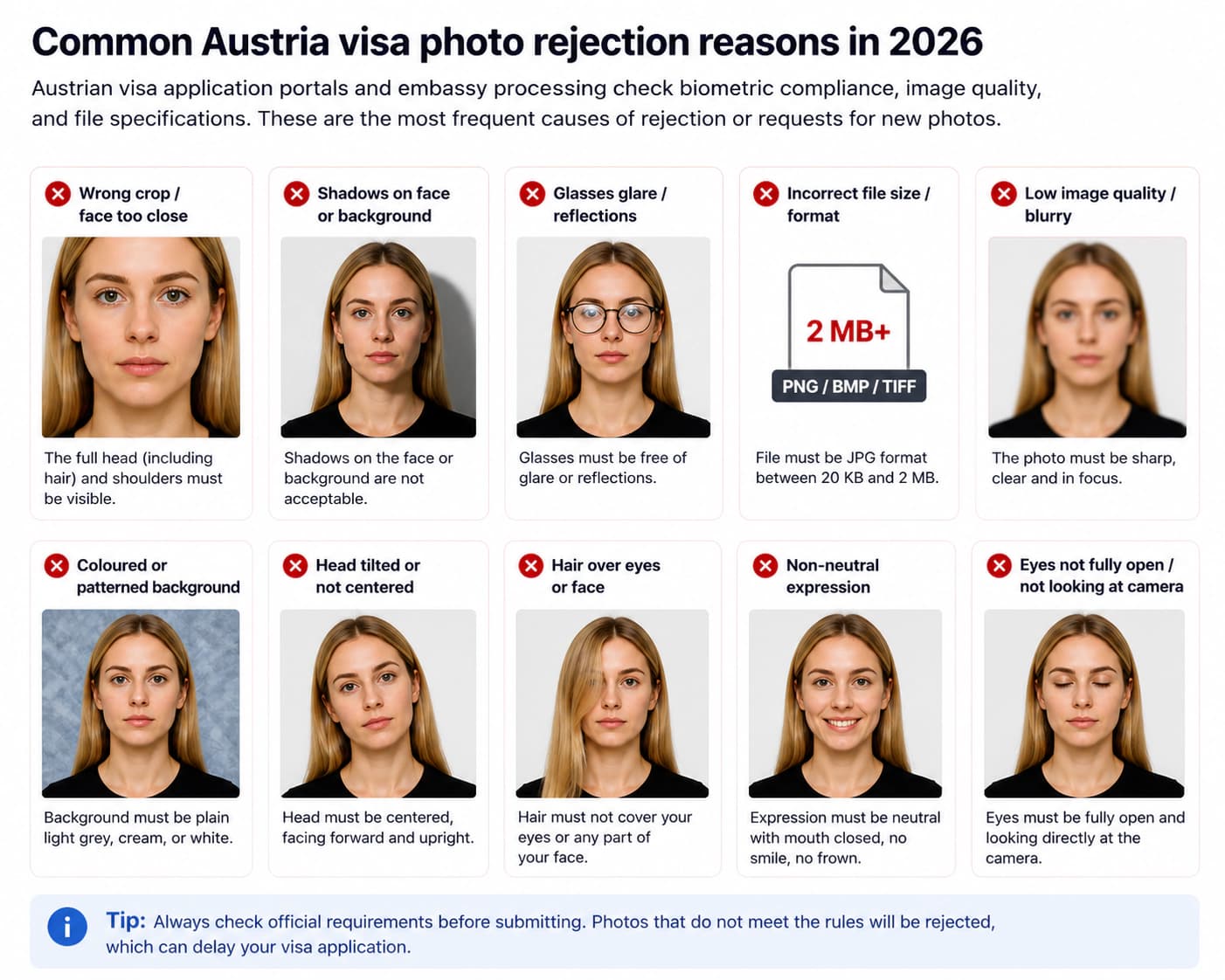
Wrong photo dimensions
UAE passport photos require exact 35 × 45 mm sizing. Submitting 2x2 inch or non-standard dimensions causes rejection.
Off-white or shadowy background
The background must be pure white. Shadows behind your ears or an off-white tint will fail automated biometric screening.
Wearing glasses
Glasses are not permitted for UAE passport photos. Frames and reflections block biometric eye recognition.
Smiling or non-neutral facial expression
Smiling, showing teeth, or squinting causes automatic rejection. Biometric scanners require a calm, neutral facial expression.
Face size out of proportion
Your head must occupy between 70% and 80% of the total photo height. Faces that are zoomed in too close or too far away get rejected.
Head tilt or angle
Your head must face directly forward. Tilting your chin up, down, or to the side distorts facial measurements.
Photo older than 6 months
Your photo must reflect your current appearance. Photos older than 6 months will be rejected.
Photo Rules for Babies, Toddlers, and Children
Every child must have an individual photo for their UAE passport application. For babies who cannot sit up, lay them on a plain white sheet and photograph from directly above. No parents, hands, or toys may appear in the picture.
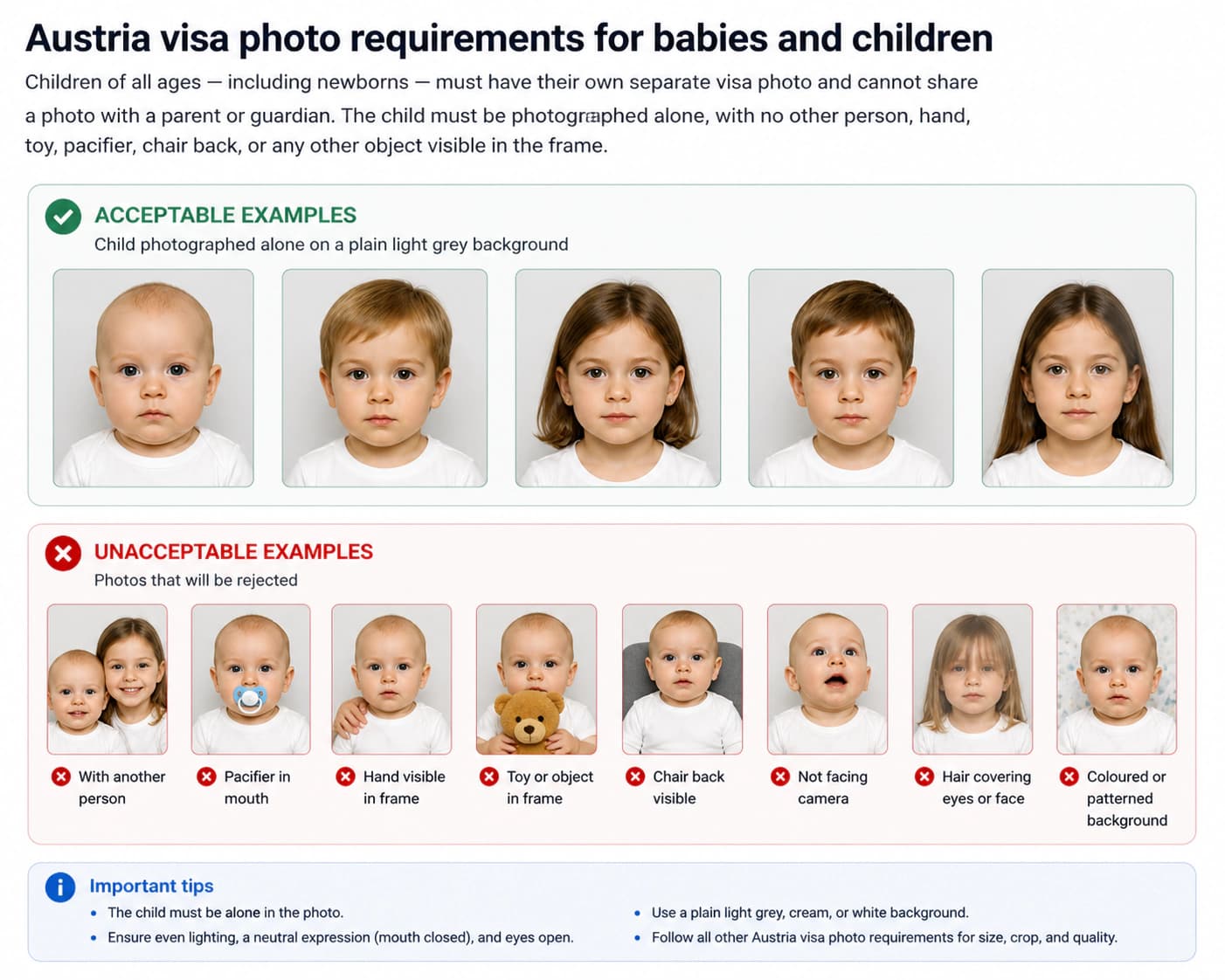
Children aged 3 and older must follow standard adult rules: neutral facial expression, mouth closed, eyes open, and a pure white background.
Religious & National Head Coverings and Dress Code
Traditional Emirati national dress (Ghutra/Shemagh) and religious head coverings (Hijab) are permitted. The covering must be plain, must not cast shadows, and must keep your full face visible from the tip of your chin to the top of your forehead.
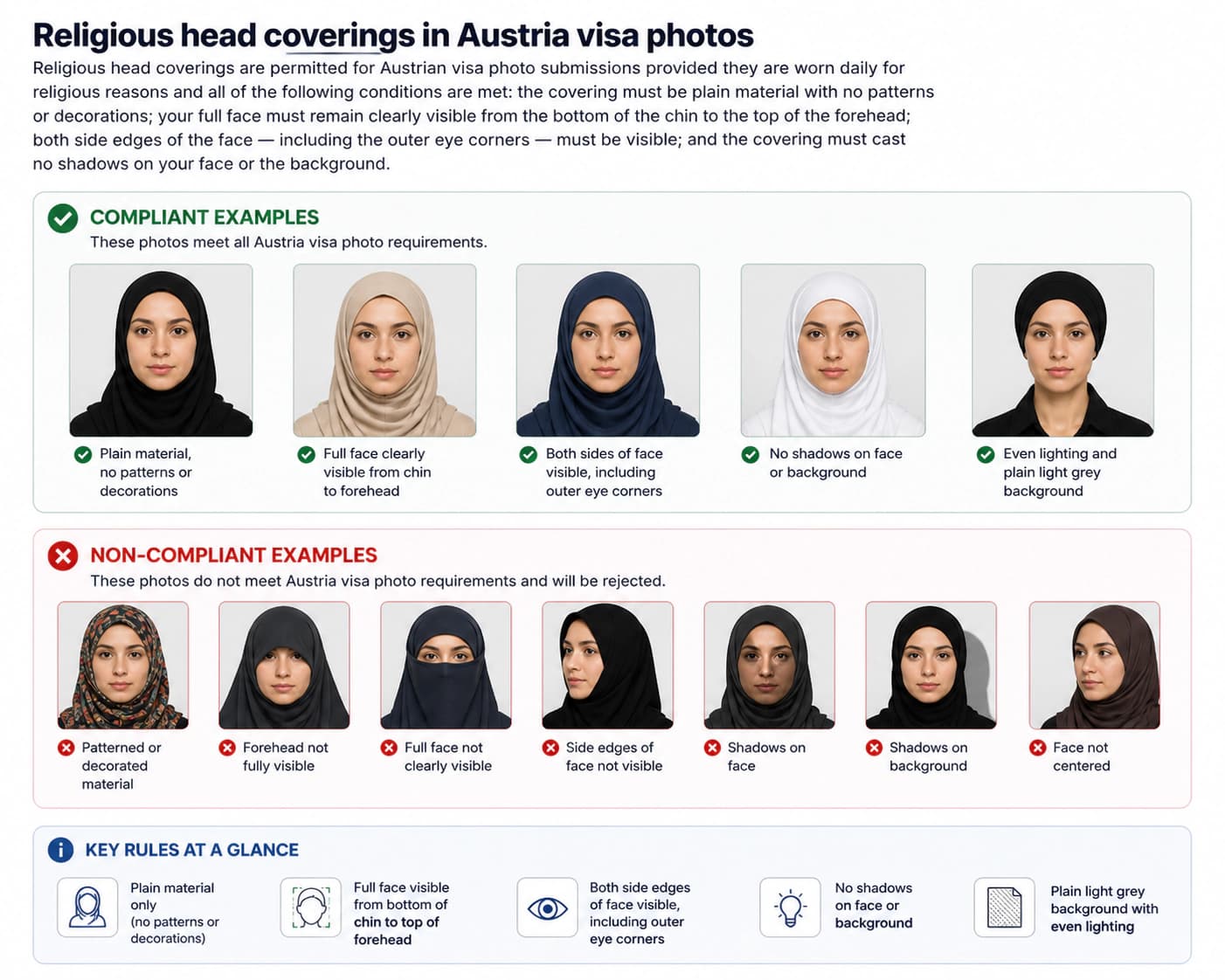
Fashion caps, hats, and decorative headwear are strictly prohibited.
Official Sources and Reference Portals
These official UAE government authorities govern passport issuance and photo requirements.
Frequently Asked Questions: UAE Passport Photo (2026)
What is the official UAE passport photo size?
The official UAE passport photo size is 35 × 45 mm (3.5 × 4.5 cm). Your face from the bottom of your chin to the top of your head must cover 70% to 80% (31–36 mm) of the image height.
What background color is required for UAE passport photos?
The background must be completely plain and pure white with zero shadows, reflections, or background patterns.
Are eyeglasses permitted in UAE passport photos?
No, eyeglasses are not permitted in UAE passport photos under ICP regulations to avoid glare and biometric scanner errors.
Are religious or traditional head coverings allowed for UAE passport photos?
Yes, traditional Emirati national dress (Ghutra and Agal) as well as religious head coverings (Hijab) are permitted as long as the full oval of the face from forehead to chin is clearly visible.
Ready to Prepare Your UAE Passport Photo?
Upload your portrait to our online photo tool. We crop to official 35 × 45 mm dimensions, generate a pure white background, verify facial expression, and ensure 100% ICP compliance.
Prepare My Passport Photo Now