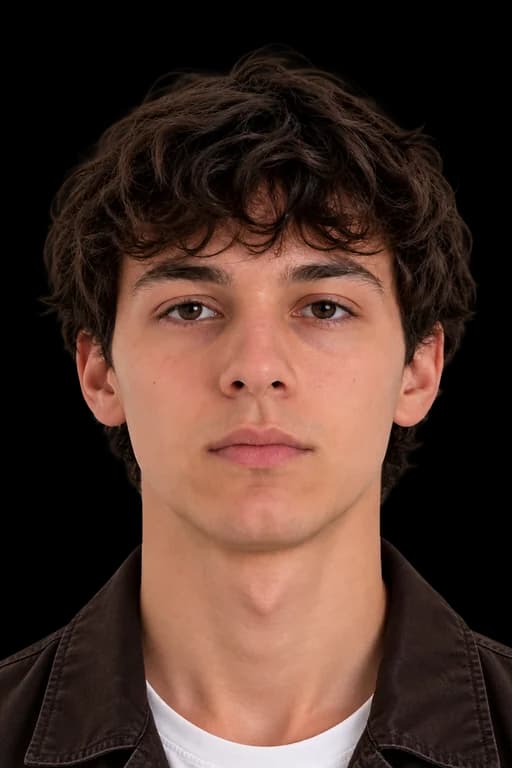
UNITED KINGDOM PASSPORT PHOTO REQUIREMENTS AT A GLANCE
Follow these key biometric guidelines to ensure your United Kingdom passport application is approved without delay.
DIMENSIONS
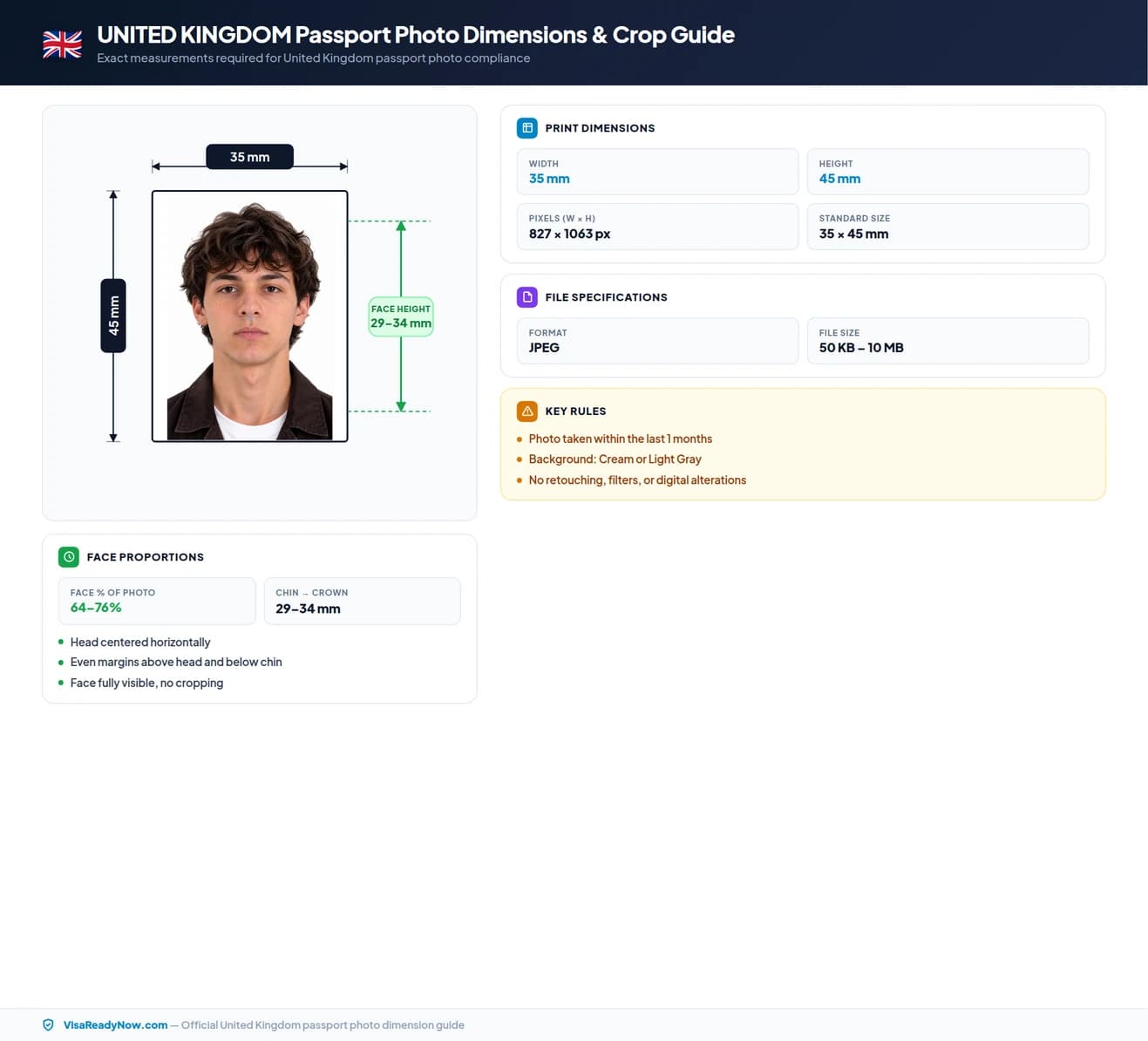
Photo size: 35 × 45 mm
Head size: 29 – 34 mm
FACE POSITION & SIZE
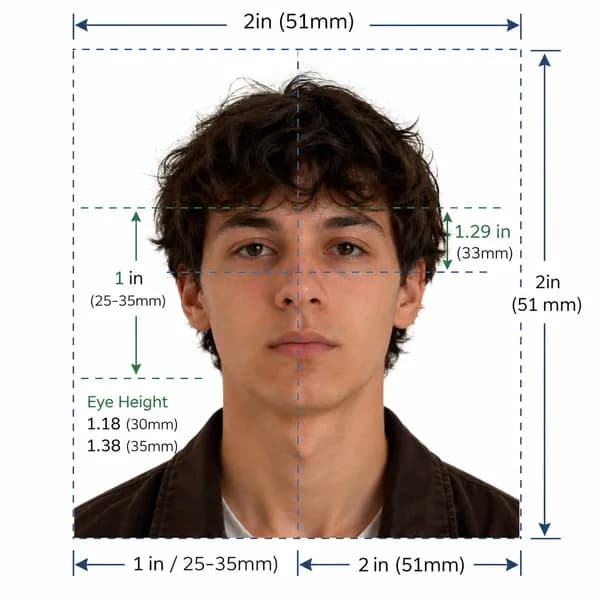
Look straight at the camera with your head upright and centered. Keep eyes fully open and mouth closed in a neutral expression.
BACKGROUND
Important Note
United Kingdom passport photos must be taken within the last 1 months to reflect your current appearance. A plain cream or light gray background, zero glasses, and exact 35 × 45 mm dimensions are strictly enforced by HM Passport Office (HMPO).
Official Biometric Compliance Guarantee
Our AI system automatically resizes, aligns, crops, and checks your image against official HM Passport Office (HMPO) photo specifications so you can submit with total confidence.
United Kingdom Official Photo Specifications
HM Passport Office Photo Guidance & Section 14 Immigration Act Standards (Gov.uk)
Official government rule for application approvalHM Passport Office & UK Visas and Immigration (UKVI)
Application context: United Kingdom Passport Applications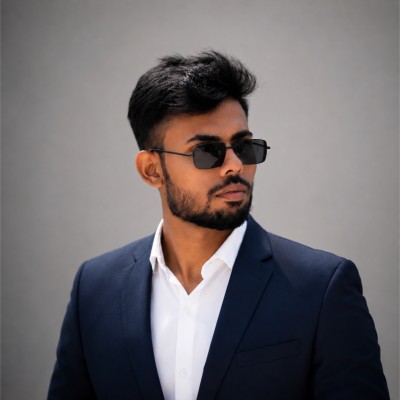
Quick reference: United Kingdom passport photo specifications
Review all official photo specifications required by United Kingdom embassies, consulates, and visa application centres worldwide.
| Specification | Requirement |
|---|---|
| Photo size (Paper) | 35 × 45 mm (1.38 × 1.77 in) |
| Digital resolution | 600 × 750 px @ 300 DPI |
| Face height | 29 – 34 mm (64–76% of total height) |
| File format & size | JPEG, 50 KB – 10 MB |
| Background colour | Cream or Light Gray |
| Expression | Neutral expression, mouth closed, eyes open |
| Glasses policy | Not permitted (Medical exception only) |
| Recency | Taken within the last 1 months |
Official United Kingdom passport photo dimensions & sizing
Official guidelines issued by HM Passport Office (HMPO) specify that United Kingdom passport photos must measure exactly 35 × 45 mm (1.38 × 1.77 in). Your face from the bottom of the chin to the top of the crown must measure 29 – 34 mm, occupying 64–76% of the total frame height. Your head must be centered horizontally and vertically with balanced margin above the hair.
Submitting incorrect dimensions or an improper face crop is one of the most common causes of application rejection. Ensure you do not use square 2×2 inch photos if a rectangular format is required, or vice versa. Always crop to the exact biometric standard before uploading or printing.
United Kingdom passport photo size in mm, cm, inches, and pixels
| Unit | Width | Height | Face height |
|---|---|---|---|
| Millimetres (mm) | 35 mm | 45 mm | 29 – 34 mm |
| Centimetres (cm) | 3.5 cm | 4.5 cm | 2.9–3.4 cm |
| Inches (in) | 1.38 in | 1.77 in | 1.13–1.35 in |
| Pixels (px @ 300 DPI) | 600 px | 750 px | 480–570 px |
Too complicated? Let our AI handle it.
Upload a selfie and our AI will automatically crop, size, and replace the background to validate against official government requirements.
Need a United Kingdom Visa Photo instead?
View official biometric specs, size rules, and digital upload requirements for United Kingdom visa applications.
Print vs. digital: what changes between online portals and paper applications?
If applying online through the official United Kingdom portal, submit a single digital JPEG file meeting the 600 × 750 px resolution and file size limits (50 KB – 10 MB). If applying via a physical embassy appointment or paper form, submit identical printed photographs on quality photo paper. Biometric alignment, neutral expression, and background rules remain identical for both.
| Aspect | Print (Paper form) | Digital (Online) |
|---|---|---|
| Dimensions | 35 × 45 mm | 600 × 750 px |
| Format | Colour print on photo paper | JPEG (50 KB – 10 MB) |
| Background | Cream or Light Gray | Cream or Light Gray |
| Resolution | Min 300 DPI | 600 × 750 px (300 DPI) |
| Expression | Neutral expression, mouth closed, eyes open | Neutral expression, mouth closed, eyes open |
Background color and lighting standards for United Kingdom
The background must be plain cream or light gray — completely uniform with no shadows, patterns, or gradients. It must provide clear contrast with your face, hair, and clothing.
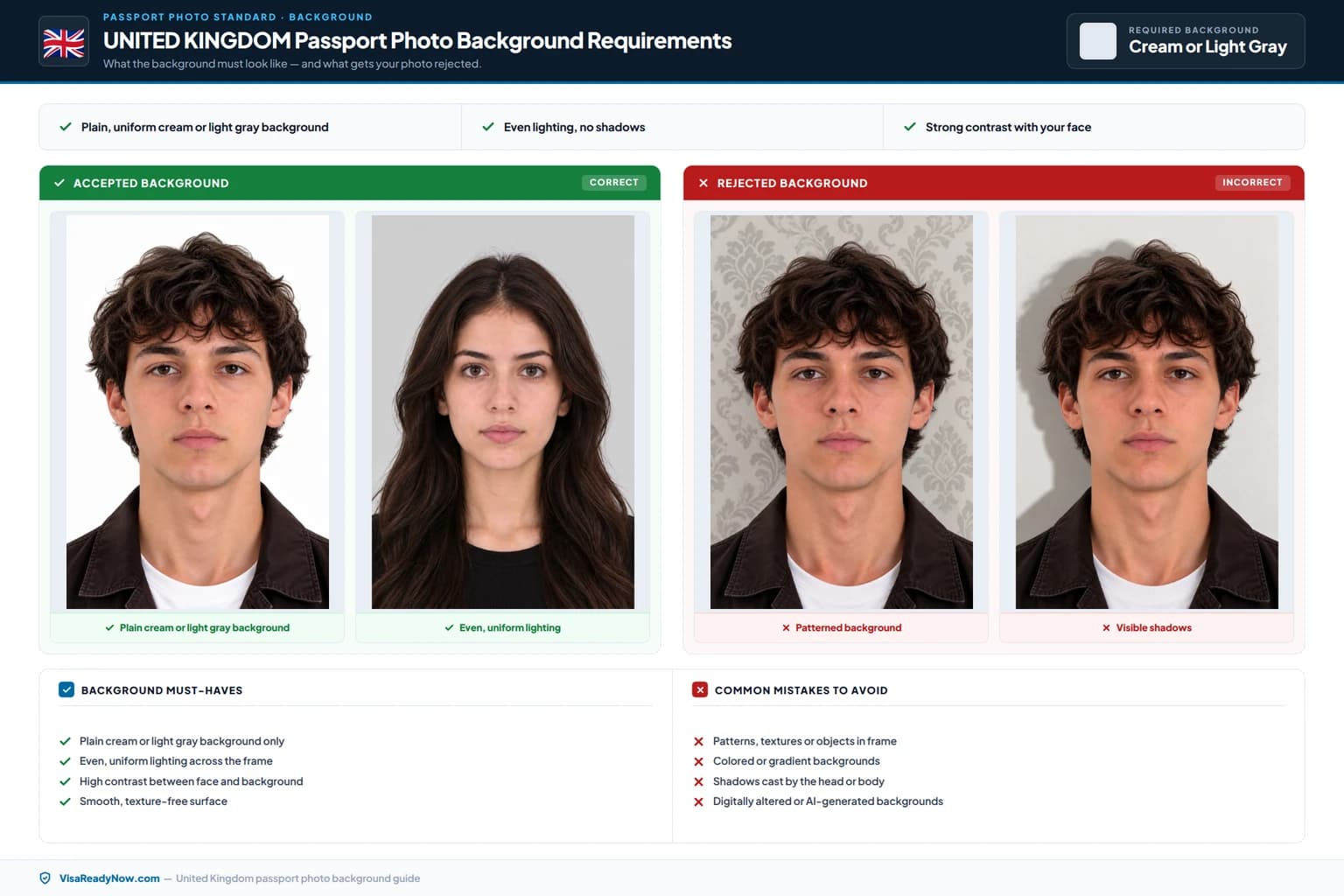
Lighting must be uniform and balanced across your entire face and the background. Avoid direct harsh flash that creates washed-out skin tones, red-eye, or sharp drop-shadows behind your head or under your chin. Diffused natural daylight or two soft studio lights at eye level produce optimal biometric results.
Face position, neutral expression, and hair visibility
Face the camera directly with your head level and upright (no tilt, rotation, or pitch). Your full facial oval from the bottom of your chin to the top of your forehead must remain unobstructed. Hair must be tucked back or arranged so it does not obscure your eyes, eyebrows, or the side contours of your face.
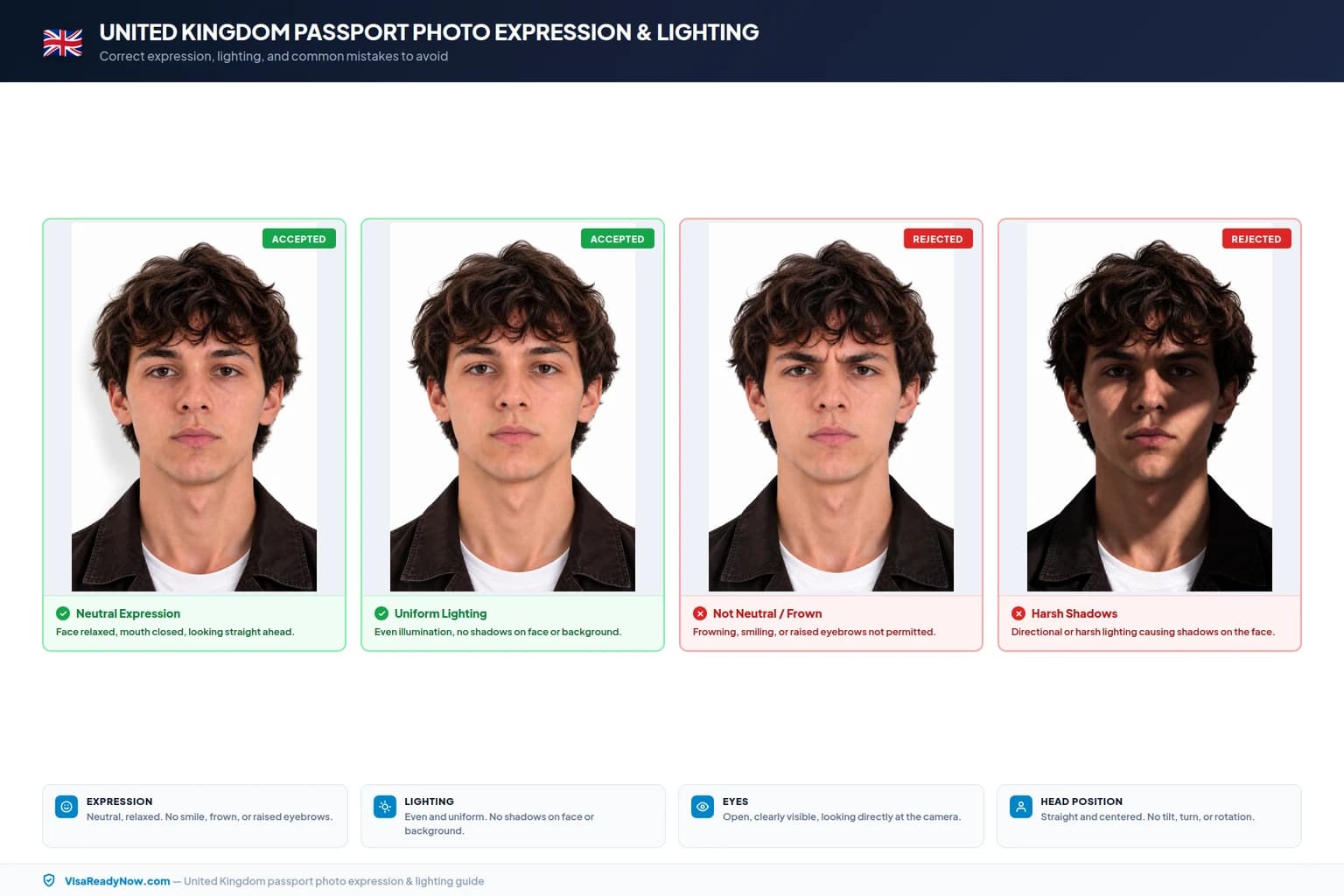
Maintain a relaxed, neutral facial expression with your mouth completely closed and teeth not visible. Smiling, frowning, smirking, squinting, or raising your eyebrows will trigger automated biometric scanning failures.
Eyewear and glasses policy for United Kingdom passport photos
Glasses are strictly not permitted in United Kingdom passport photos. All eyewear (including clear prescription frames, reading glasses, and sunglasses) must be removed prior to taking the photo to ensure clear biometric scanning.
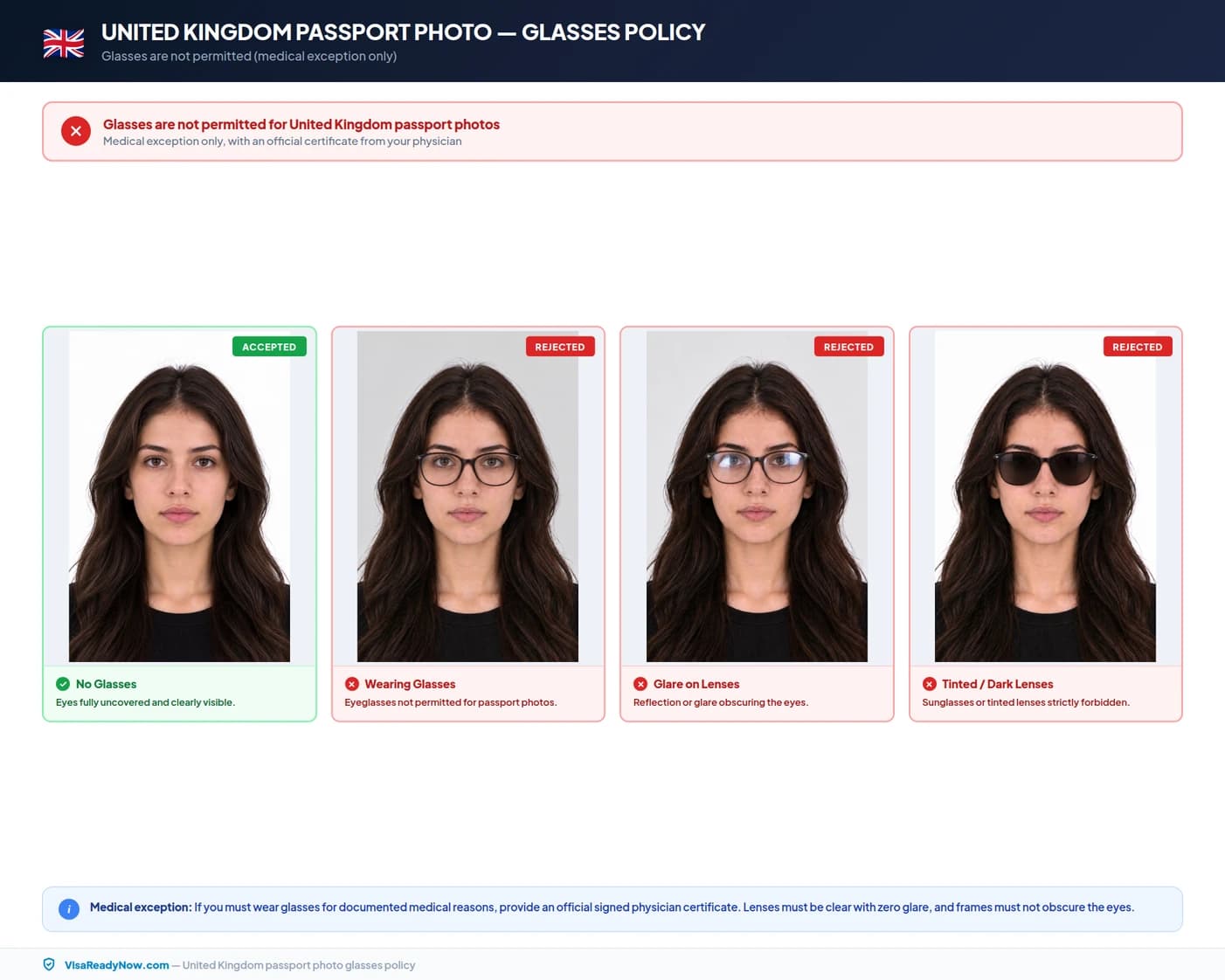
Tinted lenses, sunglasses, heavy dark frames, and colored cosmetic contact lenses are never permitted under any circumstances. If your glasses create reflections or obscure your eyes in any way, take the photo without them.
United Kingdom passport photo checklist: do's and don'ts
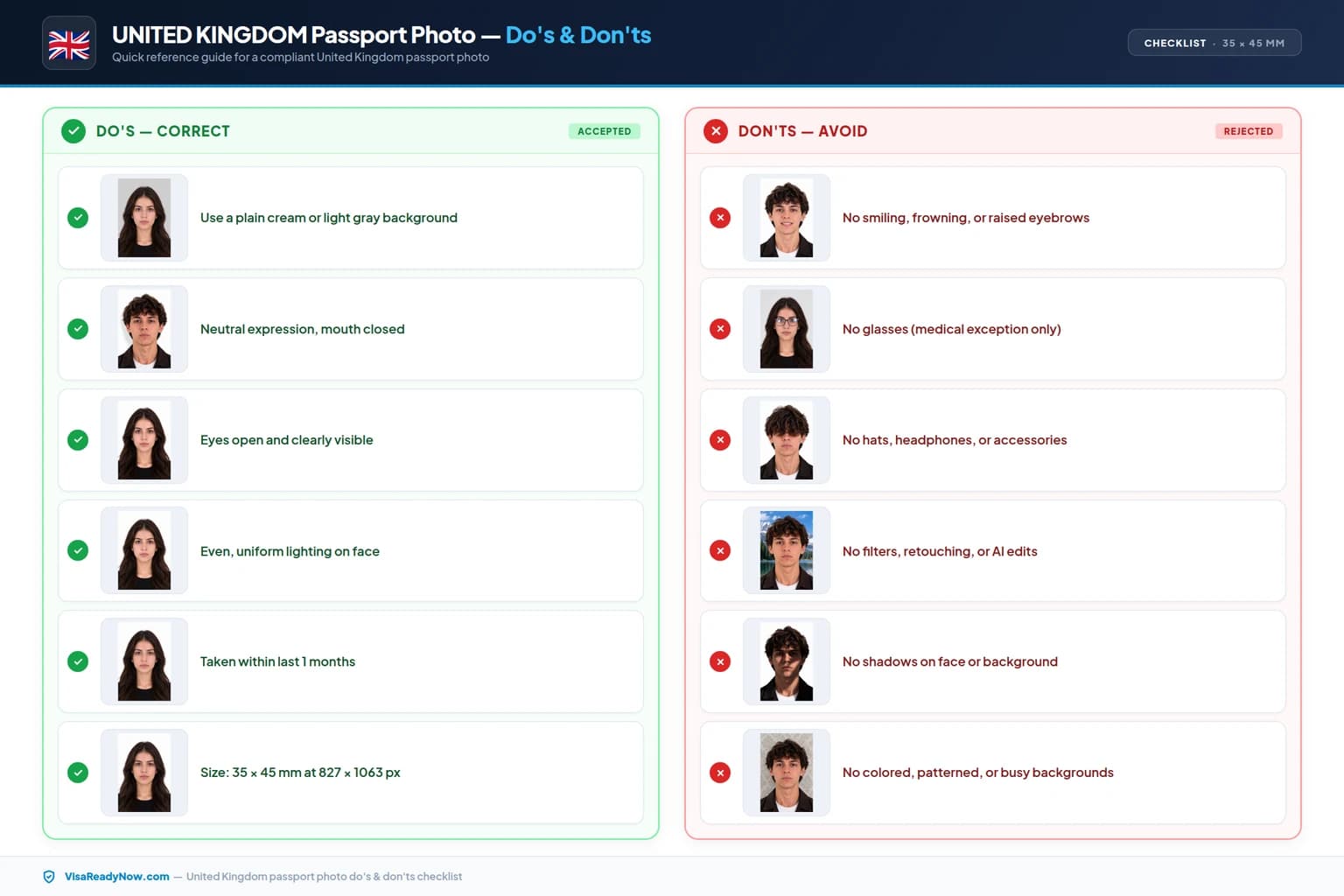
Review these essential rules before submitting your photo to HM Passport Office (HMPO) to avoid costly delays and re-submissions.
DO
- Use a plain, uniform cream or light gray background with no patterns or shadows
- Ensure your face is centered, front-facing, and occupies 64–76% (29 – 34 mm) from chin to crown
- Keep your eyes open, level, and looking directly into the camera lens
- Maintain a neutral expression with your mouth closed and teeth covered
- Use balanced, diffused lighting with no shadows under the chin or behind the head
- Include the tops of both shoulders and upper chest in the frame
- Ensure hair does not cover your eyes, eyebrows, or facial edges
- Upload a high-quality JPEG file (600 × 750 px minimum, 50 KB – 10 MB)
- Use a photo taken within the past 1 months to reflect current likeness
- Wear everyday clothing that contrasts clearly against the cream or light gray backdrop
DON'T
- Wear glasses — remove all eyewear before taking the photo
- Smile, laugh, frown, raise eyebrows, or tilt your head
- Use a colored, patterned, textured, or unevenly lit background
- Apply beauty filters, retouching, skin smoothing, or artificial background cutouts
- Submit a scan of a physical paper photo or a photo of a computer screen
- Allow hair, shadows, or accessories to cover any part of your eyes or face
- Wear uniforms, camouflage attire, hats, or fashion headwear
- Upload low-resolution, blurry, over-compressed, or pixelated images
- Use a photo older than 6 months or one that does not reflect your current appearance
- Include other people, hands, toys, or background objects in the shot
How to take a compliant United Kingdom passport photo at home (step-by-step)
Follow these six simple steps to capture a photo that satisfies every official requirement using your smartphone or digital camera.
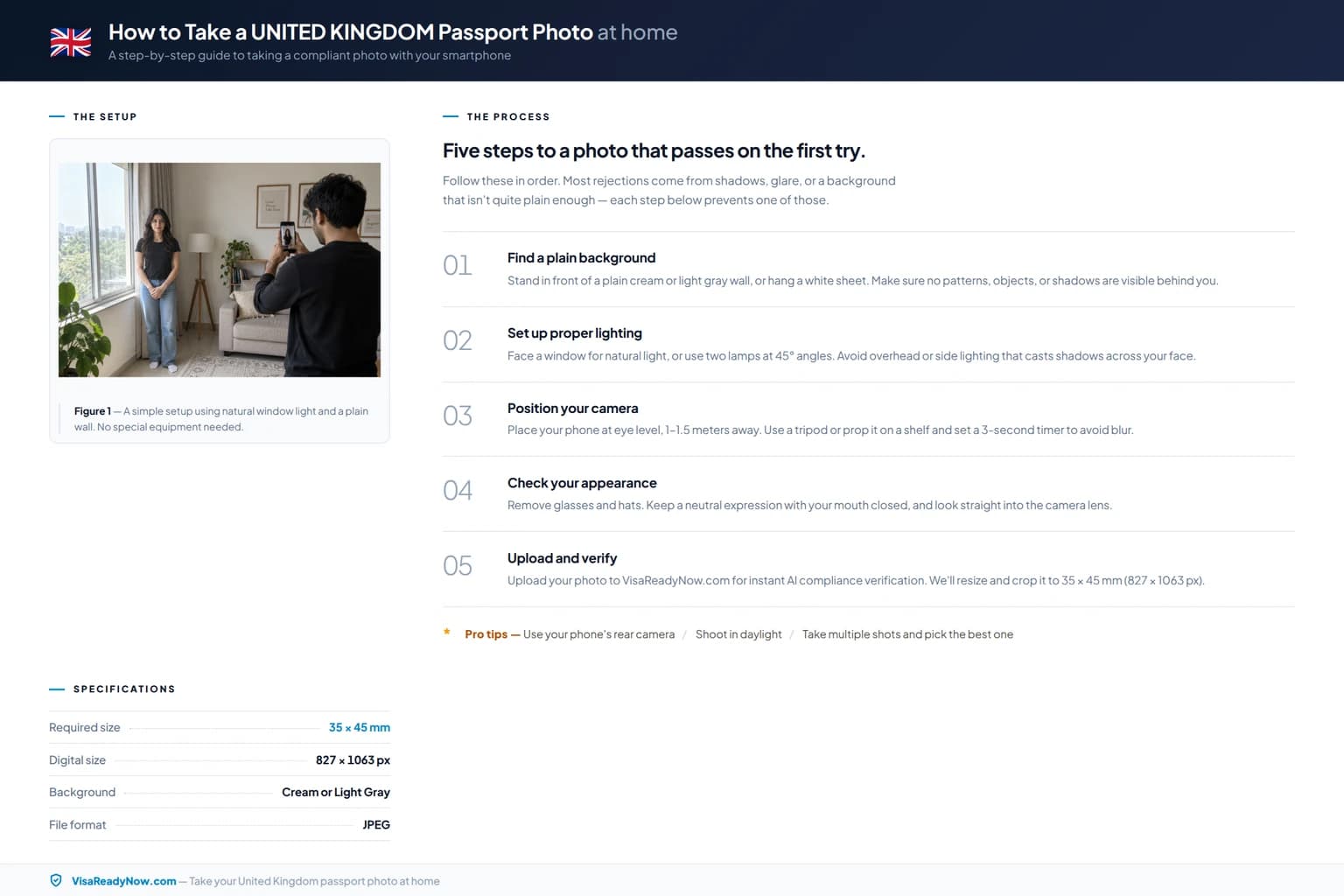
Set up a plain cream or light gray background
Stand or sit 1–1.5 meters in front of a flat, evenly painted cream or light gray wall or hang a smooth, crease-free white sheet. Ensure no shadows fall on the wall behind you.
Position balanced, shadow-free lighting
Face a large window for diffused natural daylight, or place two lamps at eye level on either side of your camera. Avoid overhead lighting or direct camera flash that casts harsh shadows.
Set camera at eye level
Position your camera or smartphone 1.5 to 2 meters away directly at eye level. Use a tripod or have a friend take the shot — do not use front-facing selfie mode as it distorts proportions.
Adopt the correct posture and expression
Stand tall with relaxed shoulders, face the lens squarely, keep your mouth closed in a neutral expression, and look straight into the camera. Remove all glasses.
Crop and calibrate to 35 × 45 mm
Crop the photo to 35 × 45 mm (600 × 750 px @ 300 DPI), ensuring the face from chin to crown occupies 64–76% (29 – 34 mm) of the image height.
Verify against official requirements
Check background uniformity, face height, file format (JPEG), and file size (50 KB – 10 MB) before submitting to HM Passport Office (HMPO).
Top causes of United Kingdom passport photo rejection in 2026
Consular and biometric scanning systems routinely flag and reject submissions that fail automated checks. Here are the most frequent pitfalls and how to prevent them:
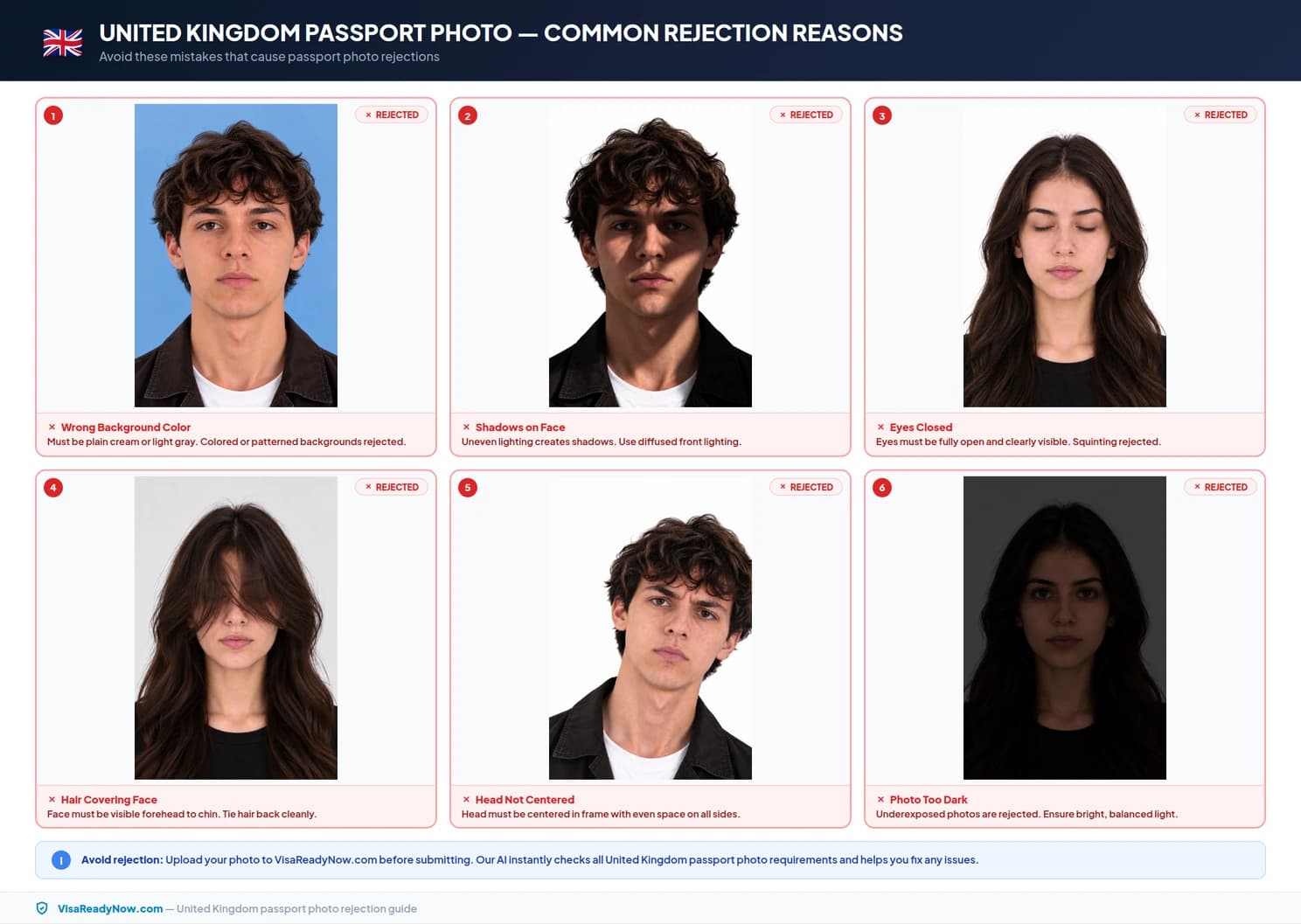
Incorrect background color or shadows
The background must be a solid, uniform cream or light gray. Shadows cast on the backdrop, textures, or off-color tones cause automatic biometric rejection.
Wearing glasses in the photo
Glasses are not permitted for United Kingdom passport applications and must be removed.
Wrong face proportion or improper crop
The face from chin to crown must measure 29 – 34 mm (64–76%). Crops that are too close or too distant fail automated biometric validation.
Non-neutral facial expression
Smiling, showing teeth, squinting, or frowning alters biometric facial landmark coordinates and will trigger a photo return.
Hair covering eyes, eyebrows, or face edges
Both eyes and the full facial contour must be unobscured. Long fringes or hair falling across the cheeks must be pinned or tucked back.
Poor lighting, blurriness, or low resolution
Images below 600 × 750 px or compressed excessively will appear soft and pixelated, leading to immediate rejection.
Digital filters or AI retouching
Any digital alteration, skin smoothing, background pasting, or contrast filtering is detected by biometric security scans and rejected.
Photo older than 6 months
Applications require a recent likeness taken within the past 1 months. Old photos matching previous passport stamps or visas are flagged.
United Kingdom passport photo guidelines for babies and young children
Minors and infants of all ages — including newborns — require their own separate passport photo. The child must be photographed alone in the frame with no parents, hands, supporting cushions, toys, or pacifiers visible.
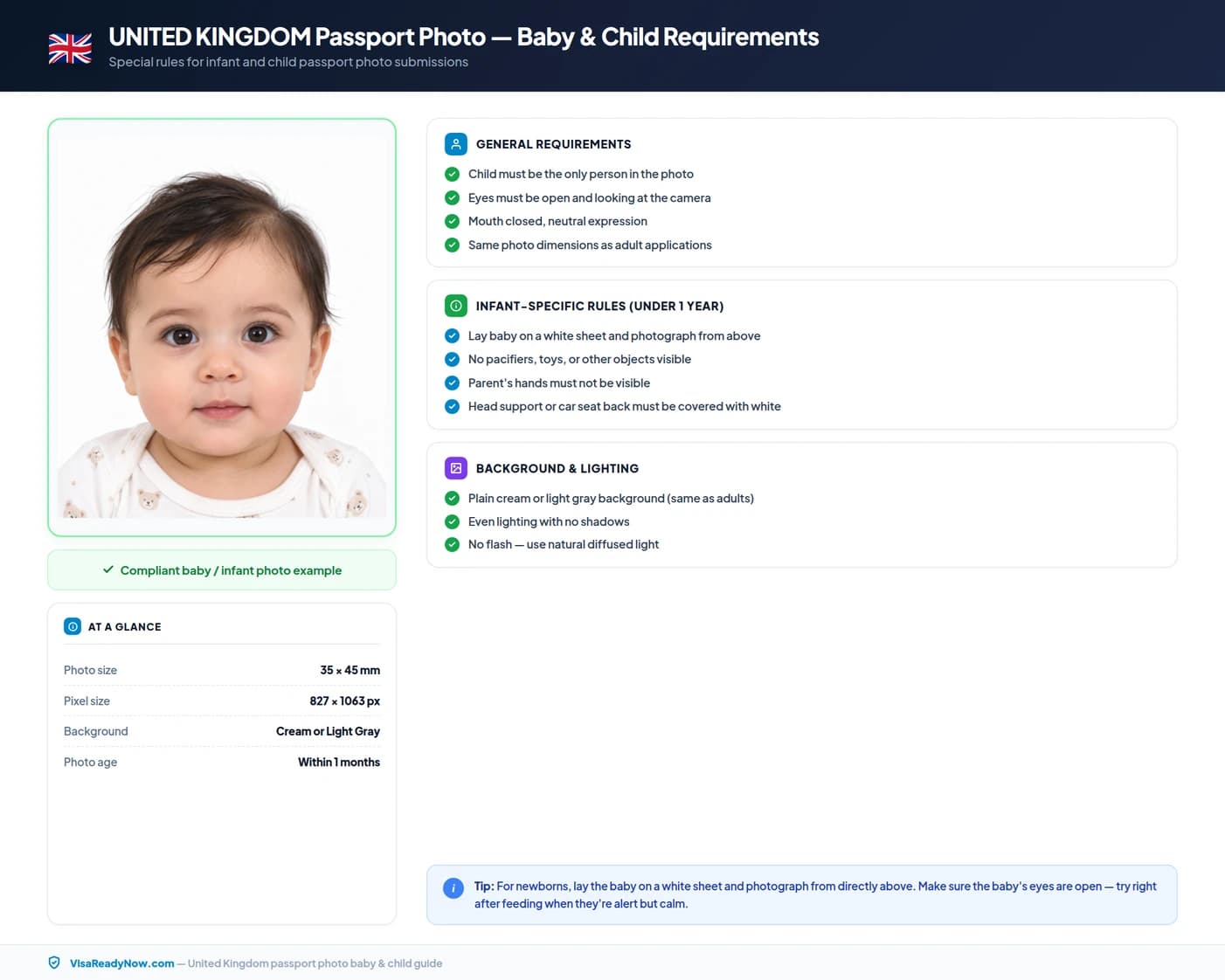
For infants who cannot sit unsupported, lay them on a smooth, wrinkle-free cream or light gray sheet and photograph directly from above. For children under 3 years old, minor variations in eye gaze or slightly parted lips are generally tolerated, but the background and lighting standards remain strict.
Religious head coverings and medical headwear rules
Head coverings worn daily for sincere religious or cultural reasons are permitted, provided your full face from the tip of the chin to the top of the forehead and both side edges of your cheeks remain clearly visible with zero shadows cast upon the face.
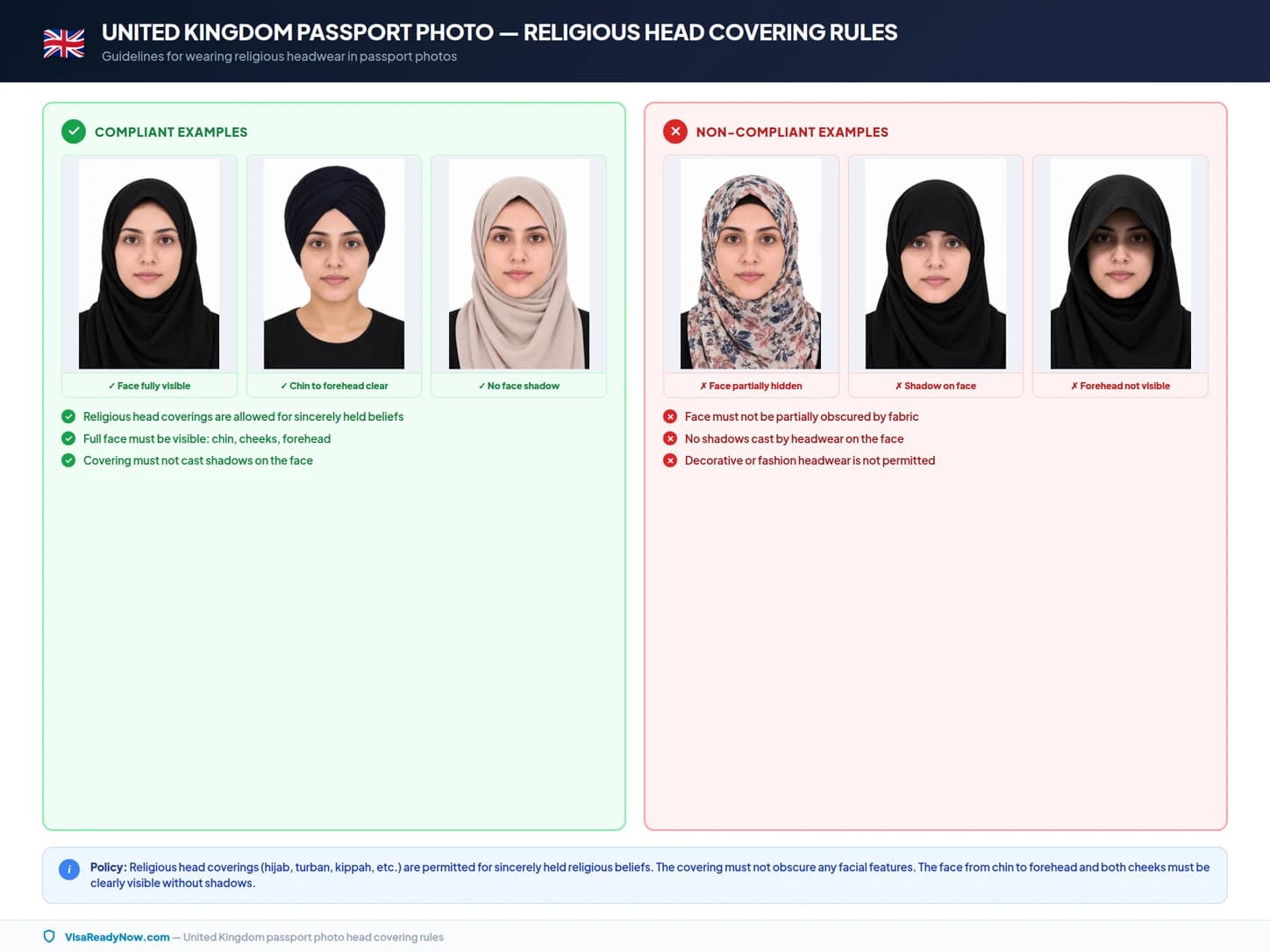
Fashion hats, baseball caps, beanies, headbands, and decorative hair accessories are strictly prohibited in all official photos.
Official sources & authority guidelines
All specifications listed in this guide are verified against official government documentation and biometric standards.
Frequently asked questions: United Kingdom passport photo requirements 2026
What is the official United Kingdom passport photo size in mm and pixels?
The official United Kingdom passport photo size is 35 × 45 mm (1.38 × 1.77 in) for physical prints, and at least 600 × 750 px (at 300 DPI) for digital online portal submissions. The face height from chin to crown must measure 29 – 34 mm (64–76% of the total frame height).
What background color is required for a United Kingdom passport photo?
The background must be plain, uniform cream or light gray with zero shadows, patterns, gradients, or visible objects. It must clearly contrast with your face and clothing.
Can I wear glasses in a United Kingdom passport photo?
Glasses are strictly not permitted in United Kingdom passport photos. All eyewear (including clear prescription frames, reading glasses, and sunglasses) must be removed prior to taking the photo to ensure clear biometric scanning.
Can I smile in my United Kingdom passport photo?
No. You must maintain a neutral facial expression with your mouth completely closed, eyes open looking directly at the camera, and relaxed facial muscles. Smiling or showing teeth is not permitted.
Can I take my United Kingdom passport photo with a smartphone at home?
Yes! You can take a compliant photo at home using a smartphone or digital camera provided you set up a plain cream or light gray background, even lighting, position the camera at eye level 1.5–2 meters away, and use our AI tool to calibrate the exact 35 × 45 mm sizing.
How recent must my United Kingdom passport photo be?
The photo must have been taken within the last 1 months to reflect your current physical appearance. If your appearance has changed significantly (e.g. major hair, beard, or facial change), take a new photo.
What should I wear for a United Kingdom passport photo?
Wear neat everyday clothing in dark or vibrant colors that contrast clearly with the cream or light gray background. Avoid wearing white or light tops that blend into the backdrop, uniforms, camouflage patterns, or excessive jewelry.
Are religious head coverings allowed in United Kingdom passport photos?
Yes, head coverings worn for recognized religious or medical reasons are permitted, provided your full face from the bottom of the chin to the top of the forehead and both cheek contours are fully visible with no shadows on the face.
What are the photo rules for babies and children?
Children of all ages, including newborns, must have their own individual photo. No other person, hands, pacifiers, or toys may appear in the frame. For infants, photograph them lying on a plain cream or light gray sheet from directly above.
Can I edit or retouch my United Kingdom passport photo?
No. Retouching, blemish removal, skin softening, beauty filters, or artificial background manipulation are strictly prohibited. The photo must be an authentic, unedited representation of your natural appearance.
What file format and size is required for digital online uploads?
Digital files should be saved in JPEG format (.jpg / .jpeg) with a file size between 50 KB – 10 MB and a resolution of at least 600 × 750 px at 300 DPI.
What is the difference between United Kingdom passport and visa photo sizes?
United Kingdom passport photos require strict adherence to HM Passport Office (HMPO) specifications (35 × 45 mm). While some visas accept general international sizes, always verify the specific visa checklist for foreign destinations.
Ready to prepare your United Kingdom passport photo?
Upload your portrait and our AI compliance tool will automatically adjust the cream or light gray background, calibrate to 35 × 45 mm, ensure 29 – 34 mm face proportion, and export a print-ready or upload-ready file.
Create United Kingdom Passport Photo