
ICELAND VISA PHOTO REQUIREMENTS AT A GLANCE
Follow these key rules to make sure your photo is accepted.
DIMENSIONS
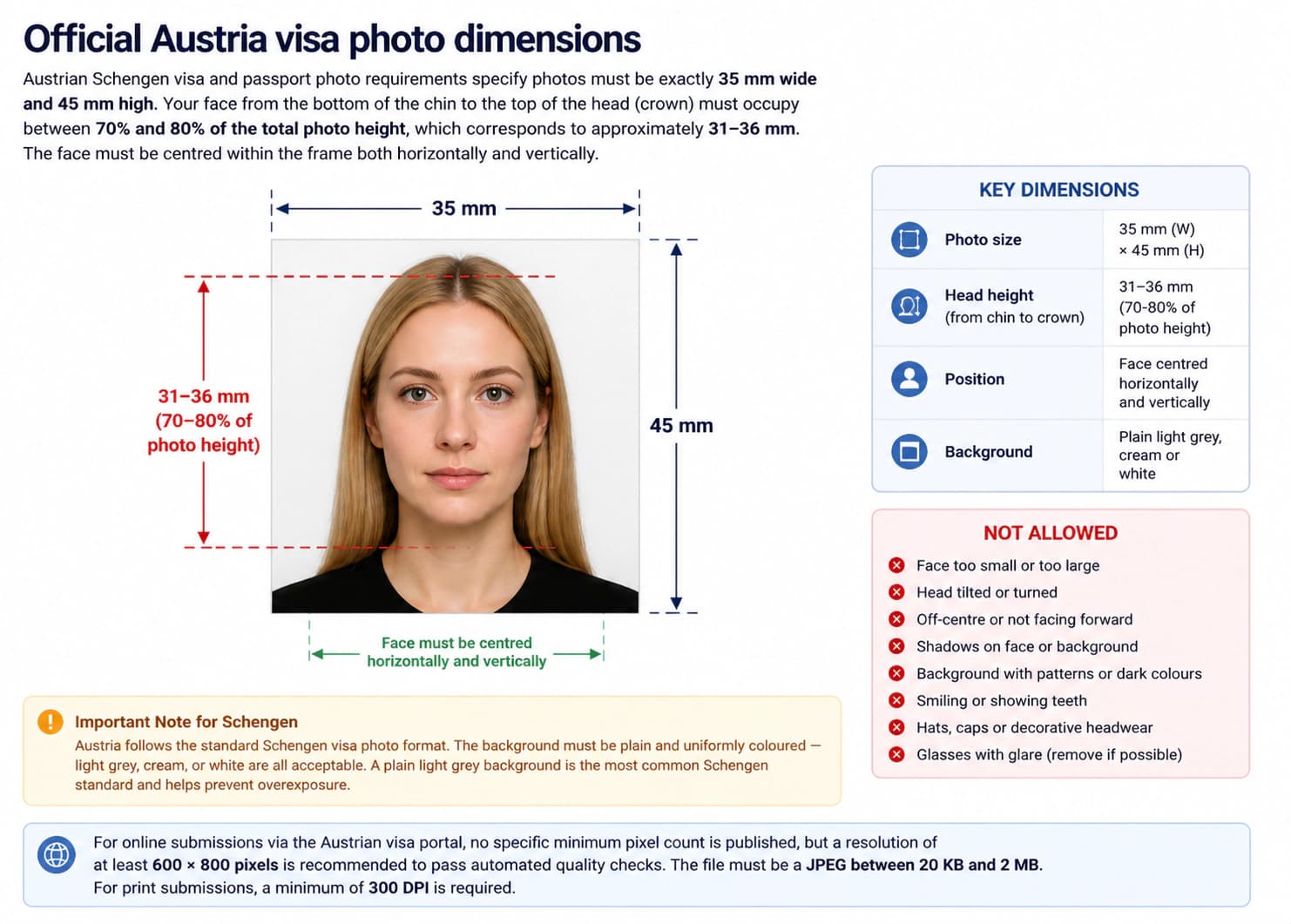
Photo size: 35 × 45 mm
Head size: 31 – 36 mm
FACE POSITION & SIZE
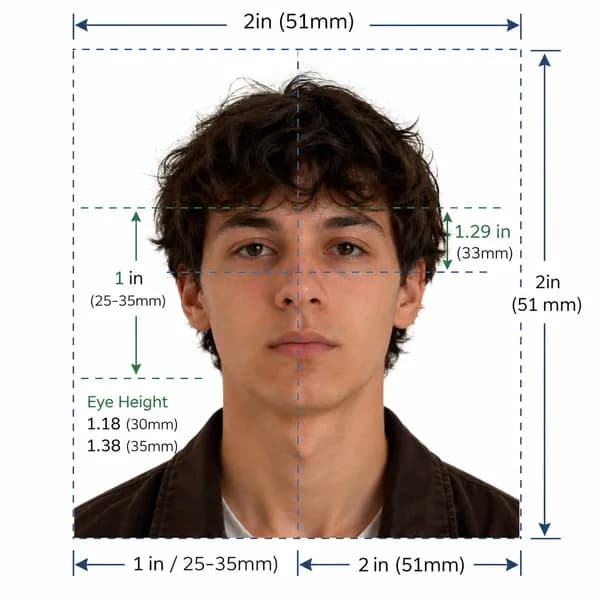
Keep your head centered with even space around.
BACKGROUND
Important Note
Iceland visa photos must be taken within the last 6 months. Ensure a plain white background, glasses not permitted, and exact 35 × 45 mm sizing.
Official Compliance Guarantee
Our AI system validates your photo against official Icelandic UTL and Schengen standards. Get 100% compliant photos or we'll help you fix it.
Iceland Official Photo Specifications
Regulation (EC) No 810/2009 (Visa Code), Lög um útlendinga nr. 80/2016 (Foreign Nationals Act) & ICAO Doc 9303
Official government rule for application approvalDirectorate of Immigration (Útlendingastofnun), Ministry for Foreign Affairs & European Commission
Application context: Iceland Visa Applications
Quick reference: Iceland visa photo specifications
Review all official photo specifications required by Iceland embassies, consulates, and visa application centres worldwide.
| Specification | Requirement |
|---|---|
| Photo size (Paper) | 35 × 45 mm (1.38 × 1.77 in) |
| Digital resolution | 413 × 531 px @ 300 DPI |
| Face height | 31 – 36 mm (70–80% of total height) |
| File format & size | JPEG, 20 KB – 2 MB |
| Background colour | White |
| Expression | Neutral expression, mouth closed, eyes open |
| Glasses policy | Not permitted (Medical exception only) |
| Recency | Taken within the last 6 months |
Official Iceland visa photo dimensions
Icelandic Schengen visa photo requirements specify photos must be exactly 35 mm wide and 45 mm high. Your face from the bottom of the chin to the top of the head (crown) must occupy between 70% and 80% of the total photo height (30–36 mm).
Important Note for Schengen (Iceland)
Iceland visa photo size in mm, cm, and inches
| Unit | Width | Height | Face height |
|---|---|---|---|
| Millimetres (mm) | 35 mm | 45 mm | 31 – 36 mm |
| Centimetres (cm) | 3.5 cm | 4.5 cm | 3.1–3.6 cm |
| Inches (in) | 1.38 in | 1.77 in | 1.24–1.42 in |
| Pixels (px @ 300 DPI) | 413 px | 531 px | 372–425 px |
Too complicated? Let our AI handle it.
Upload a selfie and our AI will automatically crop, size, and replace the background to validate against official government requirements.
Need a Iceland Passport Photo instead?
View official biometric specs, size rules, and digital upload requirements for Iceland passport applications.
Print vs. digital application requirements
| Aspect | Print (Paper form) | Digital (Online) |
|---|---|---|
| Dimensions | 35 × 45 mm | 413 × 531 px |
| Format | Colour print on photo paper | JPEG (20 KB – 2 MB) |
| Background | White | White |
| Resolution | Min 300 DPI | 413 × 531 px (300 DPI) |
| Expression | Neutral expression, mouth closed, eyes open | Neutral expression, mouth closed, eyes open |
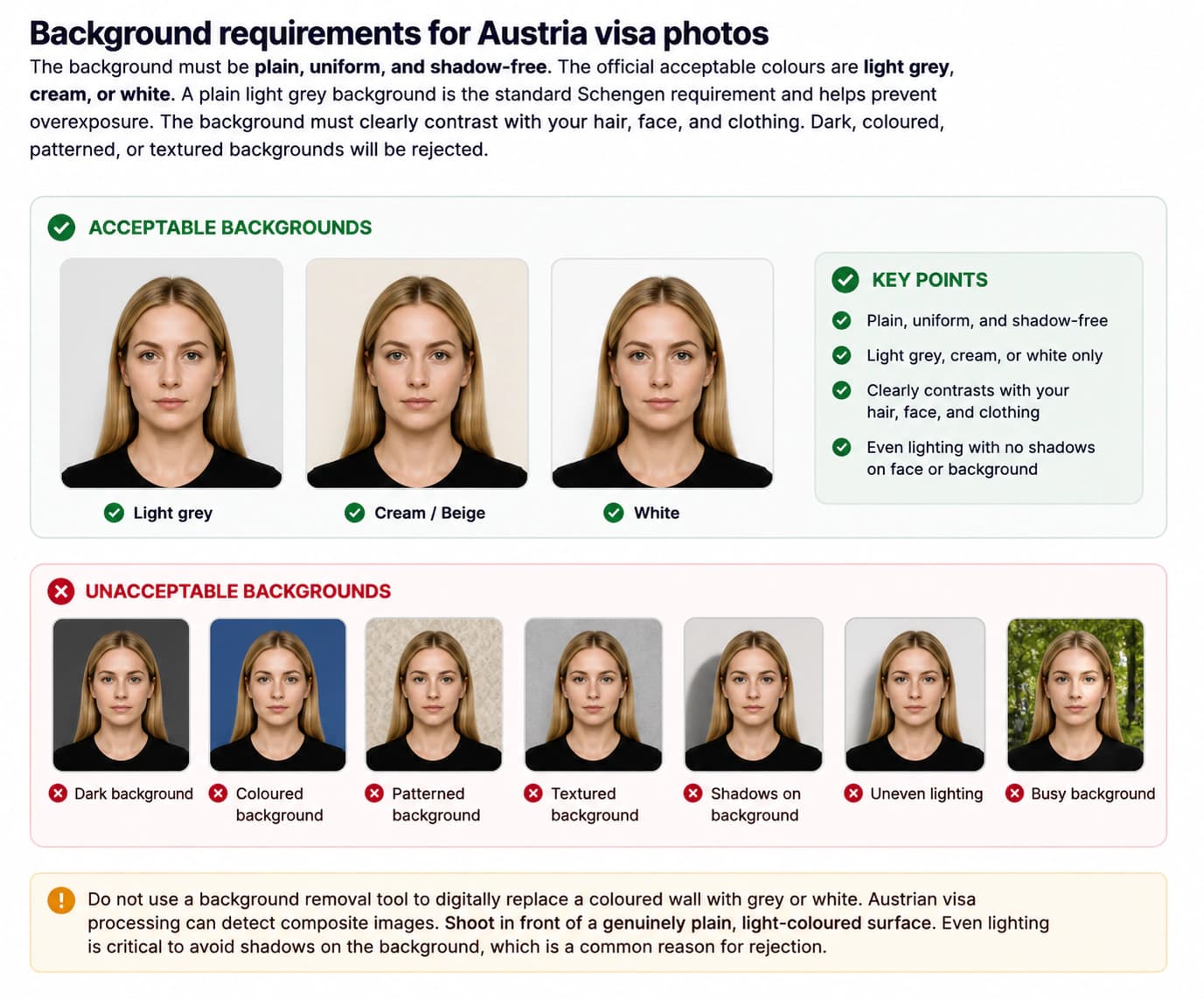
Background requirements for Iceland visa photos
The background must be plain light grey, cream, or white and completely shadow-free.
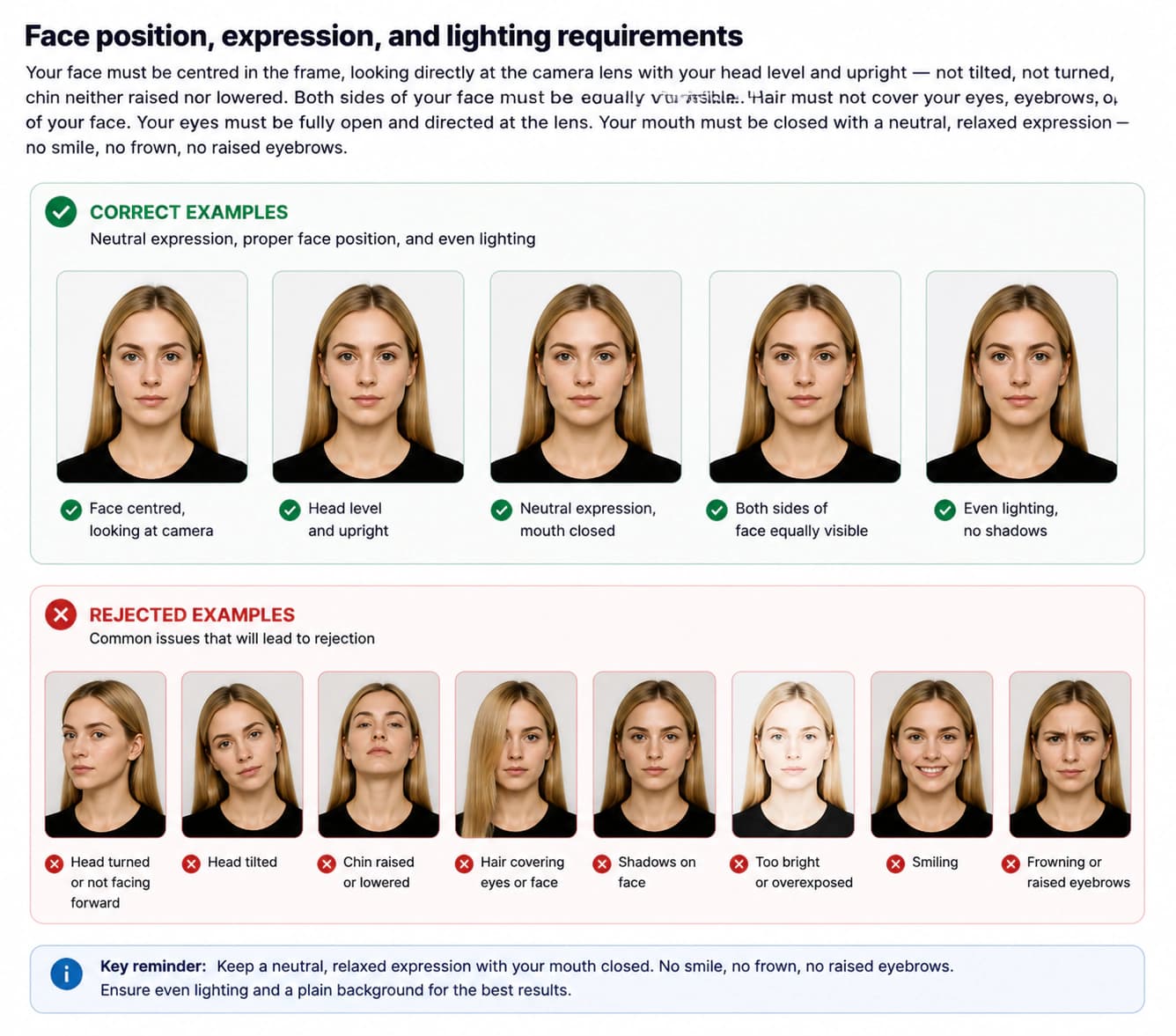
Face position and expression rules
Your face must be centred, looking directly at the lens with a strictly neutral expression and mouth closed. No smiling.
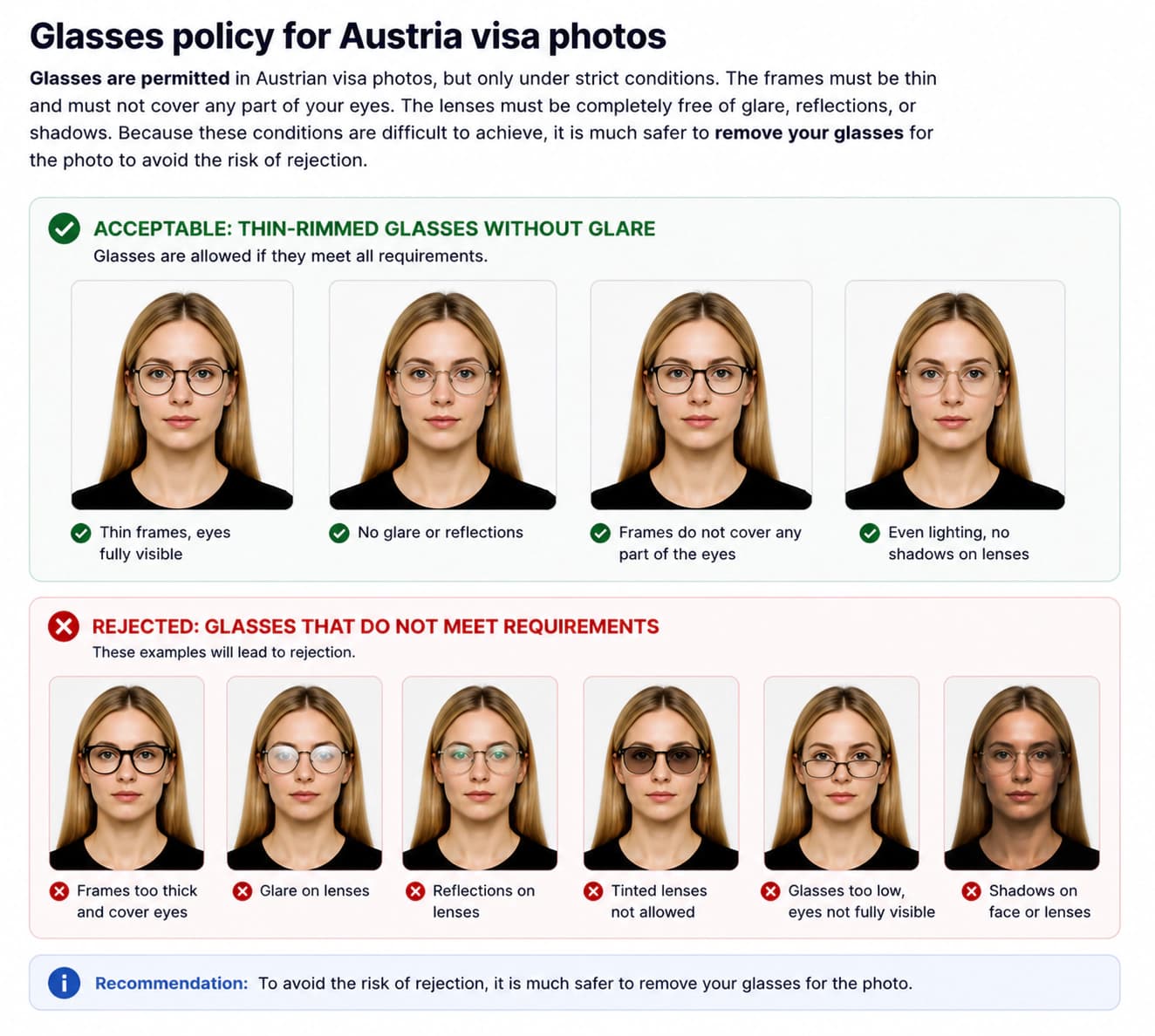
Glasses policy for Iceland visa photos
Glasses are permitted for Iceland visa photos provided frames are thin and lenses have zero glare. Removing glasses is strongly recommended.
Iceland visa photo checklist: do's and don'ts
Double check these common pitfalls to ensure your photo isn't delayed or rejected.
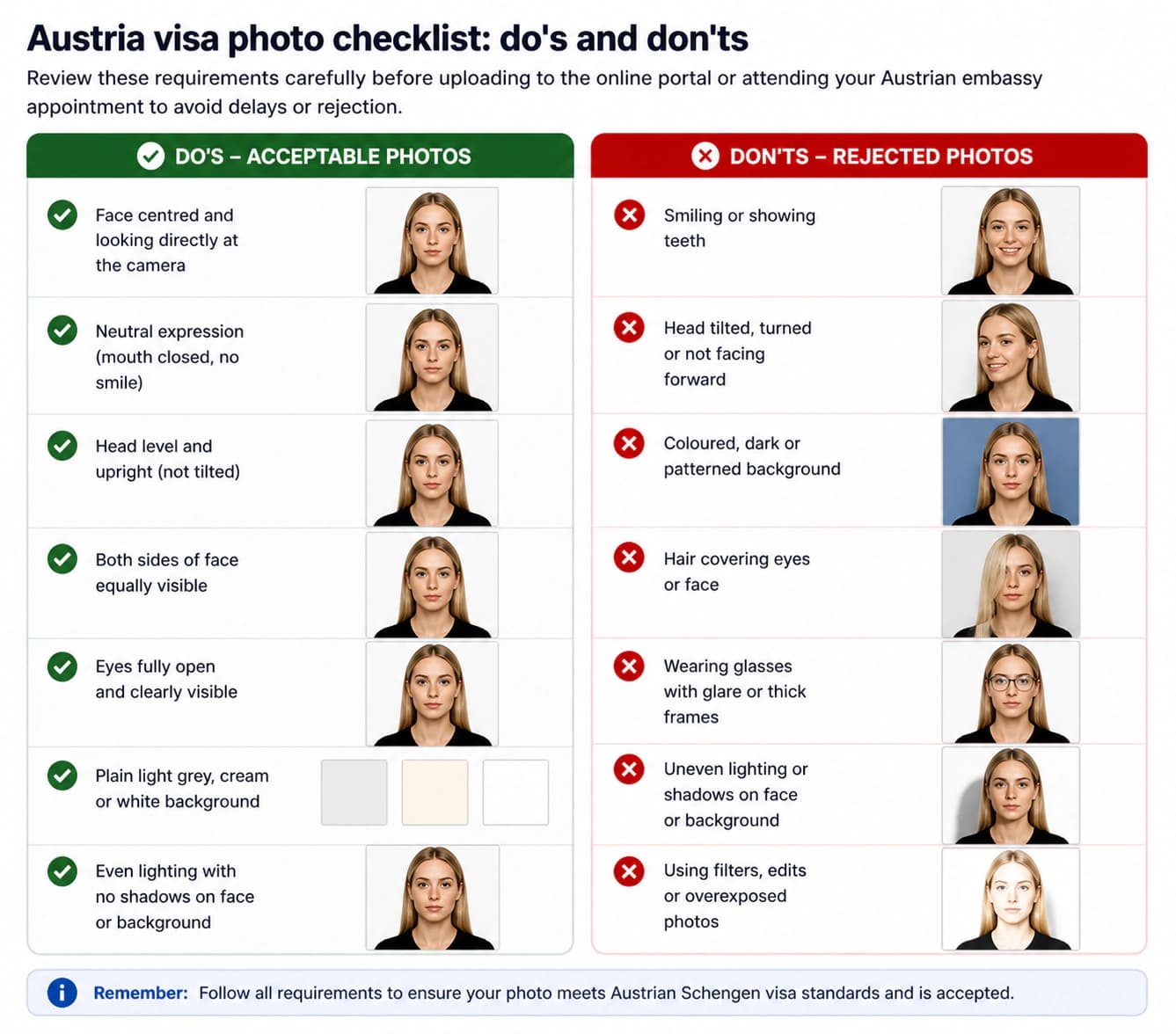
DO
- Use a plain, uniform background — light grey, cream, or white are acceptable
- Ensure your face is centred, forward-facing, and fully visible from chin to crown
- Keep your eyes fully open and looking directly at the camera lens
- Maintain a neutral, relaxed expression with your mouth closed
- Use even, diffused lighting with no harsh shadows on your face or background
- Include the tops of both shoulders and the base of the neck in the frame
- Ensure hair does not obscure your eyes, eyebrows, or the edges of your face
- Submit a JPEG file with minimum 10 KB file size for online submissions
- Have the photo taken within the last 6 months to reflect your current appearance
- Wear everyday clothing that contrasts well with the light background
DON'T
- Smile, frown, tilt or turn your head, or allow your eyes to be partially closed
- Use a dark, coloured, patterned, textured, or overly bright white background
- Retouch, filter, adjust brightness/contrast, or digitally alter the photo in any way
- Submit a scanned photo or a picture of a printed photo
- Upload a JPEG file that is too small or overly compressed (stay above 10 KB)
- Wear hats, caps, or fashion headwear (religious/medical head coverings permitted under conditions)
- Allow hair, large jewellery, or accessories to cover your eyes or face
- Use a photo older than 6 months
- Use a black-and-white, sepia, or heavily compressed image
- Wear glasses with thick frames or that cause glare/reflections on the lenses
How to take an Iceland visa photo at home
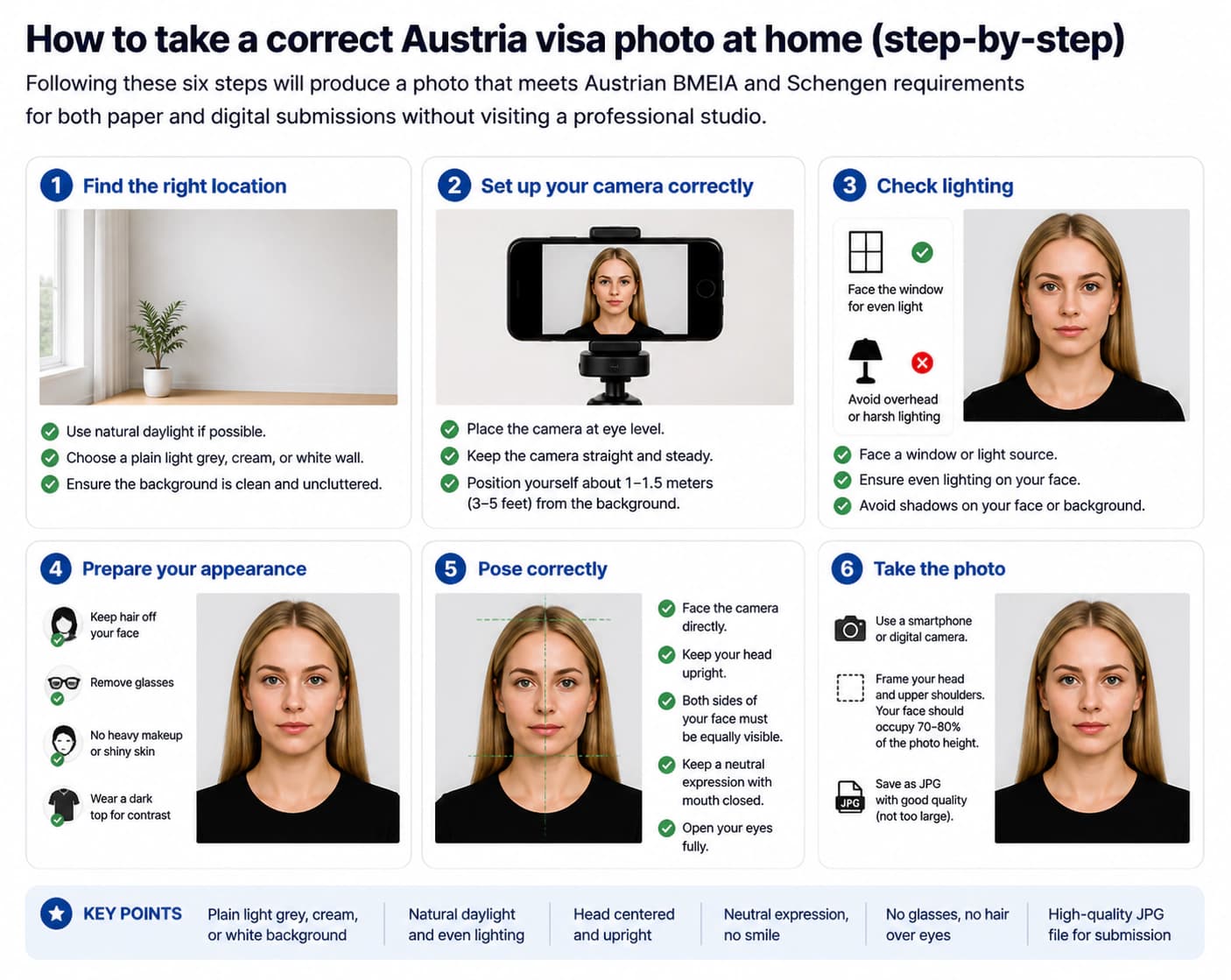
Set up a light grey, cream, or white background
Stand or sit in front of a plain, uniformly coloured wall or surface that is light grey, cream, or white. The background must be shadow-free with no patterns, textures, folds, or objects. A light grey background is the standard Schengen recommendation and helps prevent overexposure.
Set up balanced, diffused lighting
Use natural daylight from a large window, or two balanced artificial lights at equal height and distance on either side of your face. Avoid direct flash, which creates harsh highlights, red-eye, and shadows. Soft, even lighting is crucial for a uniform background and a well-lit face without shadows.
Position your head and body correctly
Face the camera directly with your head level and upright — not tilted, not turned. Your chin should be neither raised nor lowered. Both sides of your face should be equally visible. Your shoulders and the base of your neck should appear at the bottom of the frame. Position yourself approximately 45–60 cm from the camera.
Take the photo
Open your eyes fully and look directly into the lens. Keep a neutral expression with your mouth closed — no smiling, frowning, or raised eyebrows. If you wear glasses, consider removing them to avoid glare, or ensure they have thin frames and tilt them slightly to prevent reflections. Ask someone else to take the photo for better framing.
Crop and size the image
For paper submissions, crop to exactly 35 × 45 mm at 300 DPI minimum, ensuring the face occupies 70–80% of the height. For online submissions via the UTL portal, export as a JPEG file with a minimum size of 10 KB. Resize or compress the image if necessary while maintaining good quality.
Check before submitting
Verify the background is plain light grey, cream, or white and shadow-free, your expression is neutral, eyes are fully open, the face occupies 70–80% of the frame, hair does not obscure the face, there is no glare on glasses, and the JPEG file meets minimum size requirements (at least 10 KB) before submitting to the UTL portal.
Common Iceland visa photo rejection reasons
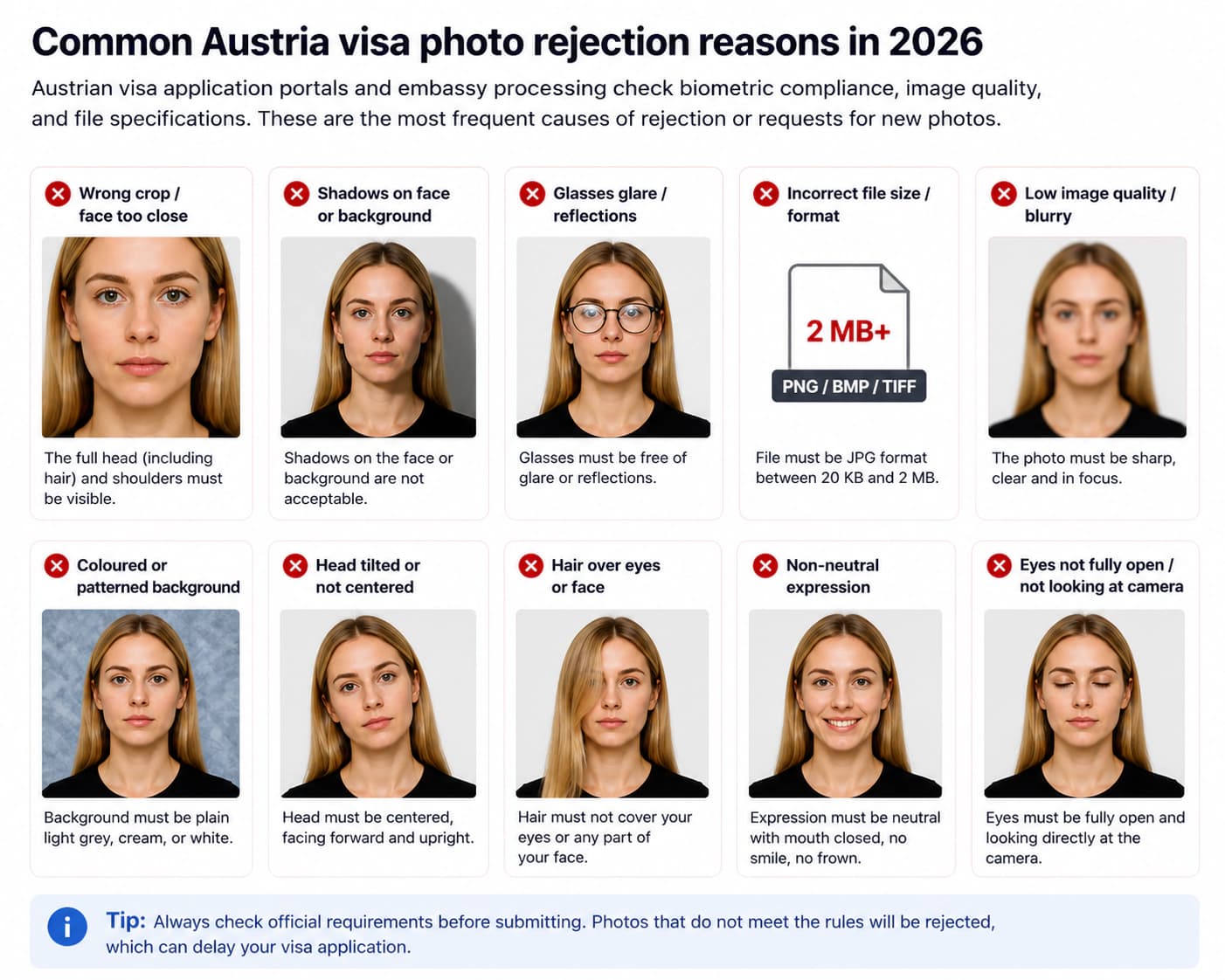
Incorrect background colour or shadows
Iceland requires a plain light grey, cream, or white background for Schengen visa photos. Dark, coloured, patterned backgrounds or the presence of any shadows on the background or face will lead to rejection. Ensure even, shadow-free lighting on a uniform surface.
Non-neutral expression or head position
Smiling, open mouth, tilted head, head turned to the side, raised eyebrows, or partially closed eyes are detected by biometric checks. Your head must be level and upright, facing the camera directly with a neutral expression and mouth closed.
Face proportion out of range
Your face from chin to crown must occupy 70–80% of the 45 mm photo height (approximately 30–36 mm). If your face is too small or too large, it will fail the automated proportion check.
Insufficient file size or quality
The Icelandic online portal (UTL) requires a minimum file size of 10 KB. Files under this size are likely over-compressed or too small and will be rejected for low quality. Always check your file size before uploading.
Glasses causing glare or with thick frames
While glasses are permitted, they frequently cause rejection if the frames are too thick or if there is glare, reflections, or shadows from the lenses on the face or eyes. It is often safer to remove glasses for the photo.
Scan of a printed photo
Uploading a scanned version of a printed photo, or a mobile phone photo taken of another photo, will fail quality checks. The digital file must be the original camera capture, not a reproduction.
Photo older than 6 months
The photo must be recent (taken within the last 6 months) and reflect your current appearance. Older photos will be rejected during processing.
Hair or accessories obscuring the face
Hair covering the forehead, eyebrows, or eyes, and large earrings or accessories casting shadows on the face, are common causes of rejection. Pull hair back fully so the entire face is clearly visible.
Iceland visa photo requirements for babies and children
Children of all ages must have their own photo. Lay infants on a plain light grey, cream, or white sheet and photograph from directly above.

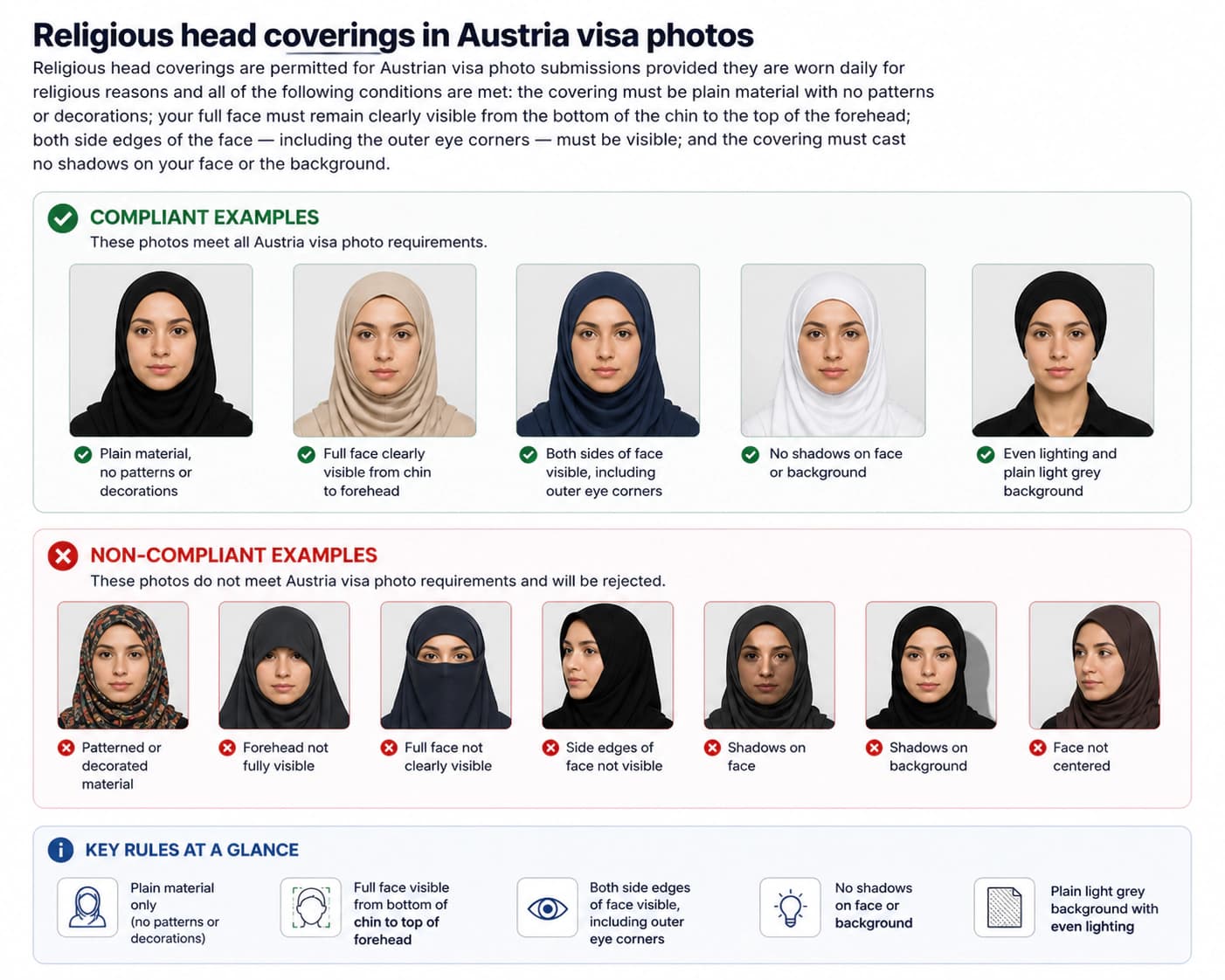
Religious head coverings in Iceland visa photos
Permitted for religious reasons provided the full face from chin to forehead is visible and casts no shadows.
Official sources
These pages are the authoritative references.
Frequently asked questions: Iceland visa photo 2026
What is the Iceland visa photo size requirement in 2026?
Iceland Schengen visa photos must be 35 mm wide by 45 mm high. Your face from chin to crown must occupy 70 to 80 percent of the photo height (approx. 30–36 mm). The background must be plain light grey, cream, or white. For online applications submitted through the UTL (Icelandic Directorate of Immigration) portal, upload a JPEG file with a minimum size of 10 KB.
What is the Iceland visa photo size in pixels?
The Icelandic UTL portal does not specify a fixed minimum pixel count, but a resolution of at least 600 × 800 pixels is recommended to ensure quality. Aim for 900 × 1200 pixels or higher for best results, ensuring the JPEG file is not over-compressed and stays above 10 KB.
What is the Iceland visa photo size in cm and inches?
The photo must be 3.5 cm wide by 4.5 cm high. In inches, that is approximately 1.38 inches wide by 1.77 inches high. This follows the standard European Schengen format.
What colour must the background be for an Iceland visa photo?
The background must be plain and uniform. Acceptable colours are light grey, cream, or white. It must be shadow-free with no patterns or textures. A plain light grey background is the standard Schengen requirement and is strongly recommended.
Can I wear glasses in an Iceland visa photo?
Yes, glasses are permitted for Iceland/Schengen visa photos, but with strict conditions. Frames must be thin and not cover any part of the eyes. Lenses must be completely glare-free with no reflections. Due to these strict rules, it is often recommended to remove glasses to avoid rejection.
Can I smile in an Iceland visa photo?
No. You must maintain a neutral expression with your mouth closed and eyes fully open. Smiling, frowning, raised eyebrows, head tilt, and any non-neutral expression will be detected by biometric processing and will cause your photo to be rejected.
How recent must an Iceland visa photo be?
The photo must have been taken within the last 6 months and must accurately reflect your current appearance. Photos that are older or that do not match your current look will be rejected.
What is the minimum file size for Iceland visa online photo upload?
The UTL (Icelandic Directorate of Immigration) online portal requires a minimum file size of 10 KB. Files under this size are too small and will be rejected for low quality. Aim for a file between 100 KB and 2 MB for best results.
Are Iceland tourist visa and student visa photo requirements different?
No. The same 35 × 45 mm Schengen specification and biometric requirements apply across all short-stay Schengen visa categories for Iceland, including tourist, business, and visitor visas. Always check the specific documentation checklist for your visa type on the official Icelandic Directorate of Immigration website.
Can I retouch or edit my Iceland visa photo?
No. Any form of digital retouching or editing is prohibited. This includes skin smoothing, blemish removal, background replacement, and brightness or contrast adjustments. The submitted file must be the original, unaltered digital capture.
What should I wear for an Iceland visa photo?
Wear everyday clothing that clearly contrasts with the light grey, cream, or white background. Avoid light-coloured tops that blend in. Do not wear uniforms, costumes, or anything that obscures the face or neck. Religious dress is permitted if the full face remains visible.
Are religious head coverings allowed in an Iceland visa photo?
Yes, provided the covering is worn daily for religious reasons and your full face from chin to crown remains clearly visible. The covering must not cast shadows on your face or background, and the side edges of your face (including the outer eye corners) must be visible.
What are the Iceland visa photo requirements for babies and children?
Children of all ages, including newborns, must have their own separate visa photo. For infants who cannot support their head, lay them on a plain light grey, cream, or white sheet and photograph from above. All standard requirements apply, with some flexibility on expression for very young infants.
Should an Iceland visa photo be matte or glossy?
For paper submissions, either matte or glossy photo paper is acceptable. For digital submissions via the UTL portal, paper finish is irrelevant. Ensure printed photos are on high-quality photo paper.
Can I use a photo taken on my phone for an Iceland visa?
Yes, provided the photo meets all requirements: plain light grey/cream/white background, neutral expression, face occupying 70–80% of the frame, JPEG format with adequate file size (minimum 10 KB). Have a second person take the photo rather than using a selfie. Ensure the file is not over-compressed.
Is Iceland part of the Schengen Area for visa purposes?
Yes, Iceland is a full member of the Schengen Area (though not an EU member state). Icelandic visa photo requirements follow the standard Schengen format (35×45 mm, face 70-80%, neutral expression, light grey/cream/white background). An Icelandic short-stay visa (Schengen visa) allows travel within the entire Schengen Area.
Ready to prepare your Iceland photo?
Upload your original image and our tool will automatically crop to 35×45 mm, verify the background (light grey/cream/white), check biometric face proportions, and ensure minimum 10 KB file size — ready to upload to the UTL portal or bring to your appointment.
Check My Photo Now